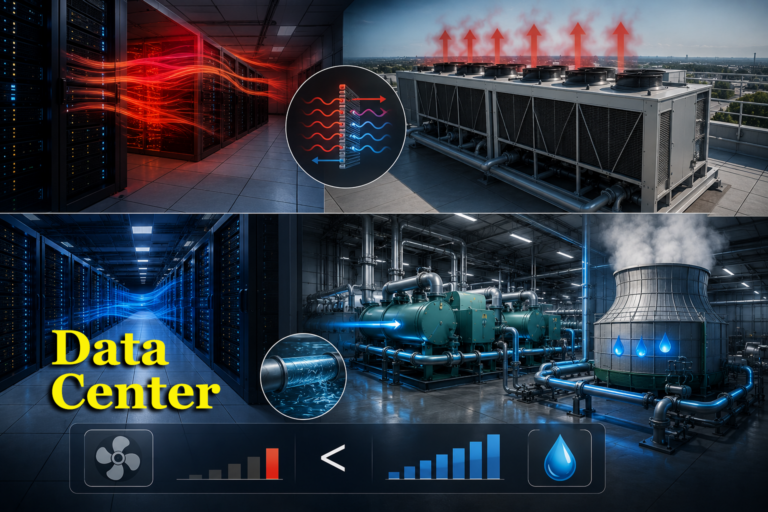
Modern data centers consume enormous amounts of power, and nearly all of that power eventually becomes heat. Whether the facility supports cloud computing, enterprise applications, artificial intelligence, or high-performance computing, one challenge remains constant: removing heat from the IT equipment.
Without effective cooling, servers can overheat, performance can be reduced, equipment life can be shortened, and critical operations can be interrupted.
Watch the Video
Watch the Video version of this article on Air-Cooled vs Water-Cooled Data Centers
One of the most important decisions in data center design is how that heat will be rejected from the facility. In most cases, the choice comes down to two primary approaches: air-cooled systems and water-cooled systems.
Both methods are widely used throughout the industry. Both can provide reliable cooling. However, they differ significantly in efficiency, water consumption, complexity, and operating costs.
Air-Cooled and Water-Cooled Systems for Data Centers
In this article, we’ll explain how air-cooled and water-cooled data centers work, the advantages and disadvantages of each approach, and why many modern facilities are carefully evaluating both energy and water usage when selecting a cooling strategy.
The Real Challenge: Removing Heat
Every server, processor, storage device, and network switch generates heat while operating.
The cooling system’s job is simple in theory:
Capture heat from the IT equipment
Move the heat away from the servers
Reject the heat outdoors
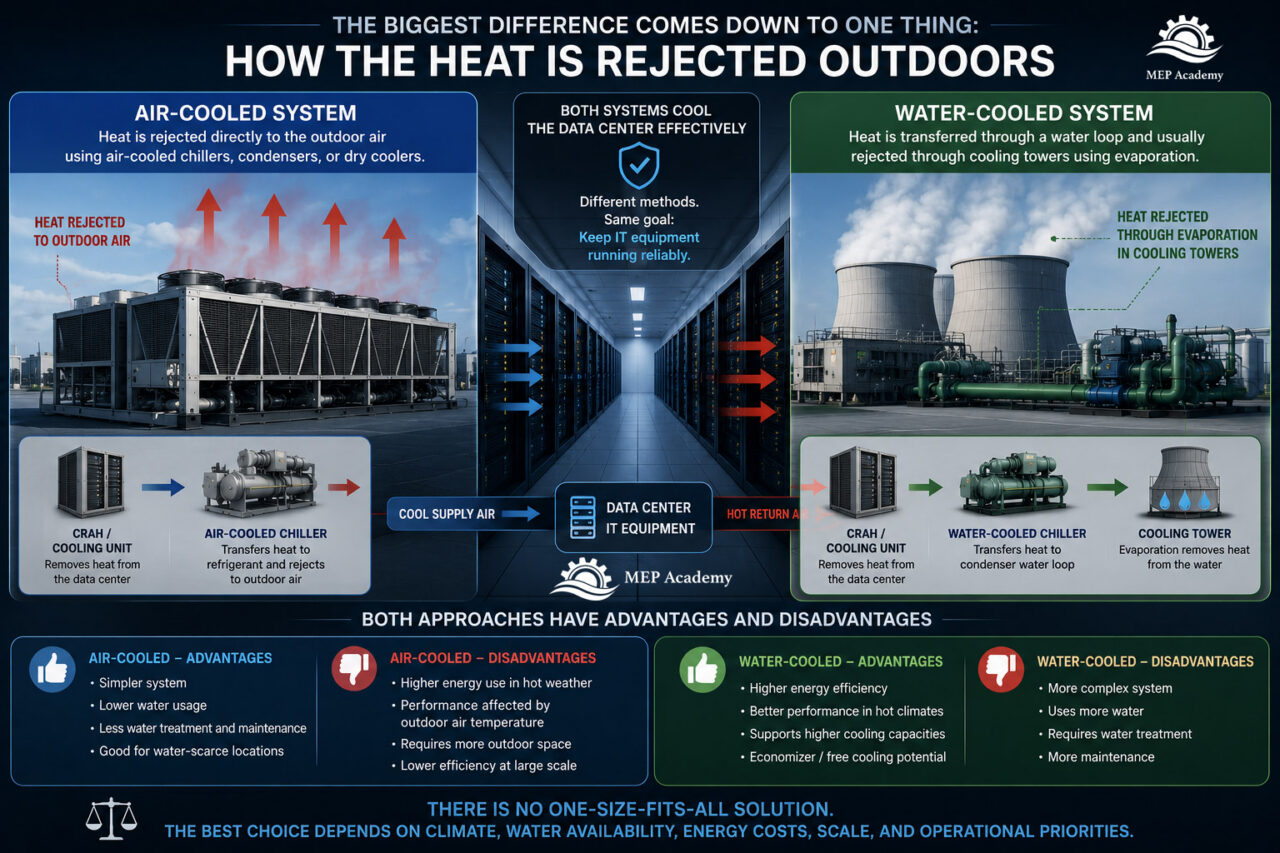
The primary difference between air-cooled and water-cooled systems is how that final step occurs.
Air-Cooled vs Water-Cooled Data Center Cooling
What Is an Air-Cooled Data Center?
An air-cooled data center rejects heat directly to the outdoor air using equipment such as:
Air-cooled chillers
Dry coolers
Refrigerant condensers
DX cooling systems
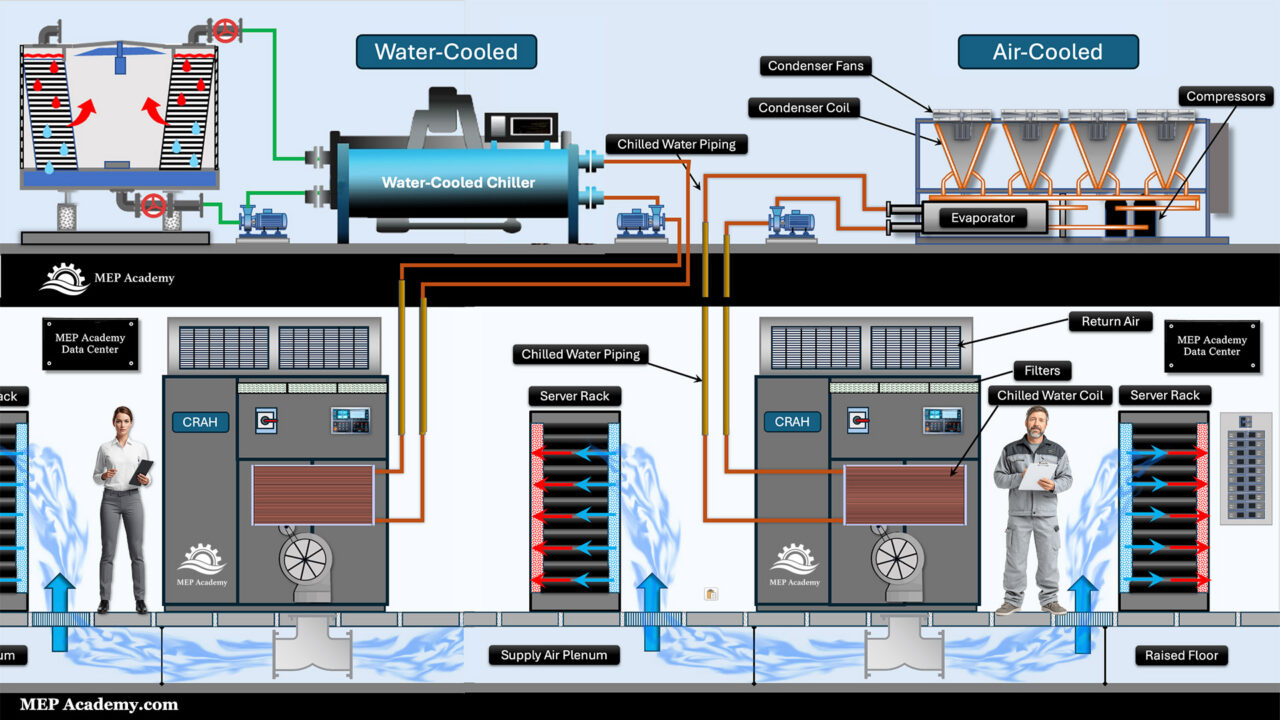
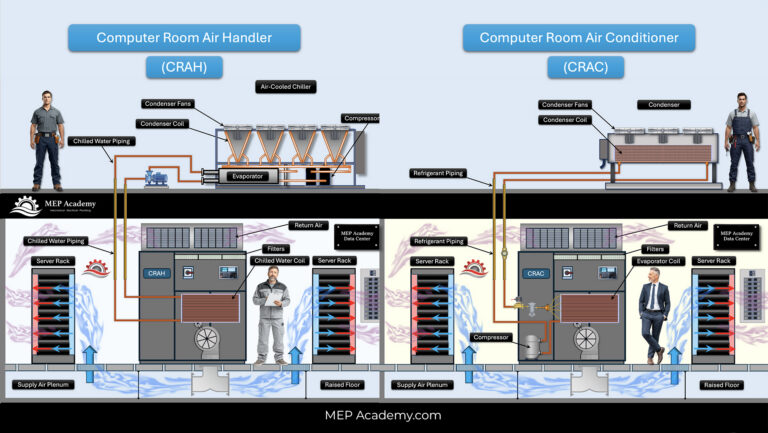
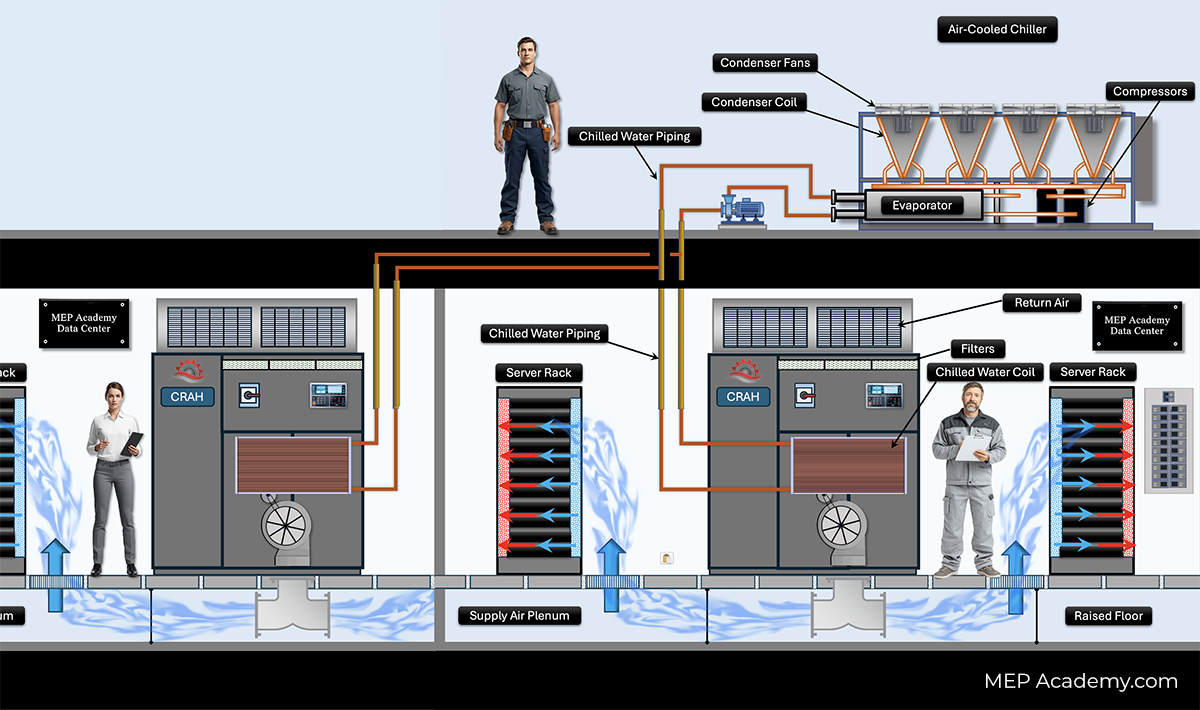
In an air-cooled chilled water system, indoor cooling units remove heat from the server room and transfer that heat to chilled water. The chilled water then returns to an air-cooled chiller, where condenser fans reject the heat directly to the outdoor air.
The final heat rejection medium is air.
Advantages of Air-Cooled Systems
Air-cooled systems offer several benefits:
Lower water consumption
No cooling towers required
Reduced water treatment requirements
Simpler mechanical systems
Easier installation in some locations
Suitable for smaller and modular facilities
Many edge data centers and smaller facilities use air-cooled systems because of their relative simplicity.
Disadvantages of Air-Cooled Systems
Air-cooled systems also have limitations.
Because air is not as effective at transferring heat as water, these systems generally require more energy to reject the same amount of heat.
Performance can also decline during periods of extreme outdoor temperatures.
As outdoor air becomes hotter, the cooling equipment must work harder to reject heat.
This often leads to:
Higher electrical consumption
Reduced efficiency
Increased operating costs during hot weather
What Is a Water-Cooled Data Center?
A water-cooled data center uses water to transport and reject heat.
The most common configuration includes:
Chilled water system
Water-cooled chillers
Condenser water pumps
Cooling towers
The process typically works like this:
Indoor cooling units remove heat from the server room.
Chilled water carries that heat back to the chiller.
The chiller transfers the heat to a condenser water loop.
The condenser water flows to a cooling tower.
The cooling tower rejects the heat through evaporation.
The final heat rejection process uses water and evaporation rather than outdoor air alone.
Why Water Is More Efficient Than Air
One reason water-cooled systems are popular in large data centers is because water transfers heat much more effectively than air.
Water can carry significantly more heat per unit volume than air.
This allows water-cooled systems to:
Move large amounts of heat efficiently
Support larger cooling capacities
Reduce energy consumption
Improve overall cooling performance
This advantage becomes increasingly important as rack densities continue to increase.
Why Hyperscale Data Centers Often Use Water Cooling
Many hyperscale data centers operate at massive scales and may contain thousands of server racks.
As cooling loads increase, energy efficiency becomes a major operational concern.
Water-cooled systems are often selected because they can:
Support very large cooling loads
Improve chiller efficiency
Reduce long-term energy costs
Enable advanced economizer strategies
Although these systems are more complex, the potential energy savings can be substantial over the life of the facility.
Water-Side Economizers and Free Cooling
One major advantage of many water-cooled systems is the ability to use economizers.
A water-side economizer can reduce or partially eliminate mechanical refrigeration during favorable outdoor conditions.
Instead of relying entirely on compressors, cooling towers or fluid coolers can help cool the water directly.
This can significantly reduce:
Chiller energy consumption
Utility costs
Overall facility PUE
Many large data centers take advantage of these opportunities whenever climate conditions allow.
The Biggest Drawback: Water Consumption
While water-cooled systems are often more energy efficient, they consume water.
Cooling towers reject heat through evaporation.
That evaporation requires continuous makeup water to replace water lost from the system.
Additional water is also required for:
Blowdown
Water treatment
Maintenance activities
This has become an important consideration as many new data centers are being built in regions facing water supply challenges.
As a result, some operators are shifting toward air-cooled or hybrid cooling systems to reduce water usage.
PUE vs WUE: The Modern Cooling Trade-Of
Today’s data center operators often evaluate cooling systems using two important metrics.
PUE – Power Usage Effectiveness
PUE measures energy efficiency.
It compares the total facility energy consumption to the energy consumed by the IT equipment.
Lower PUE values generally indicate a more energy-efficient facility.
WUE – Water Usage Effectiveness
WUE measures water consumption.
It evaluates how much water is used relative to the IT workload.
A facility may have an excellent PUE while consuming large amounts of water.
Likewise, a facility may conserve water but require more electrical energy.
Modern data center owners must balance both metrics when selecting cooling technologies.
A Common Misunderstanding
Air-Cooled vs Water-Cooled-Data Center common misunderstandings
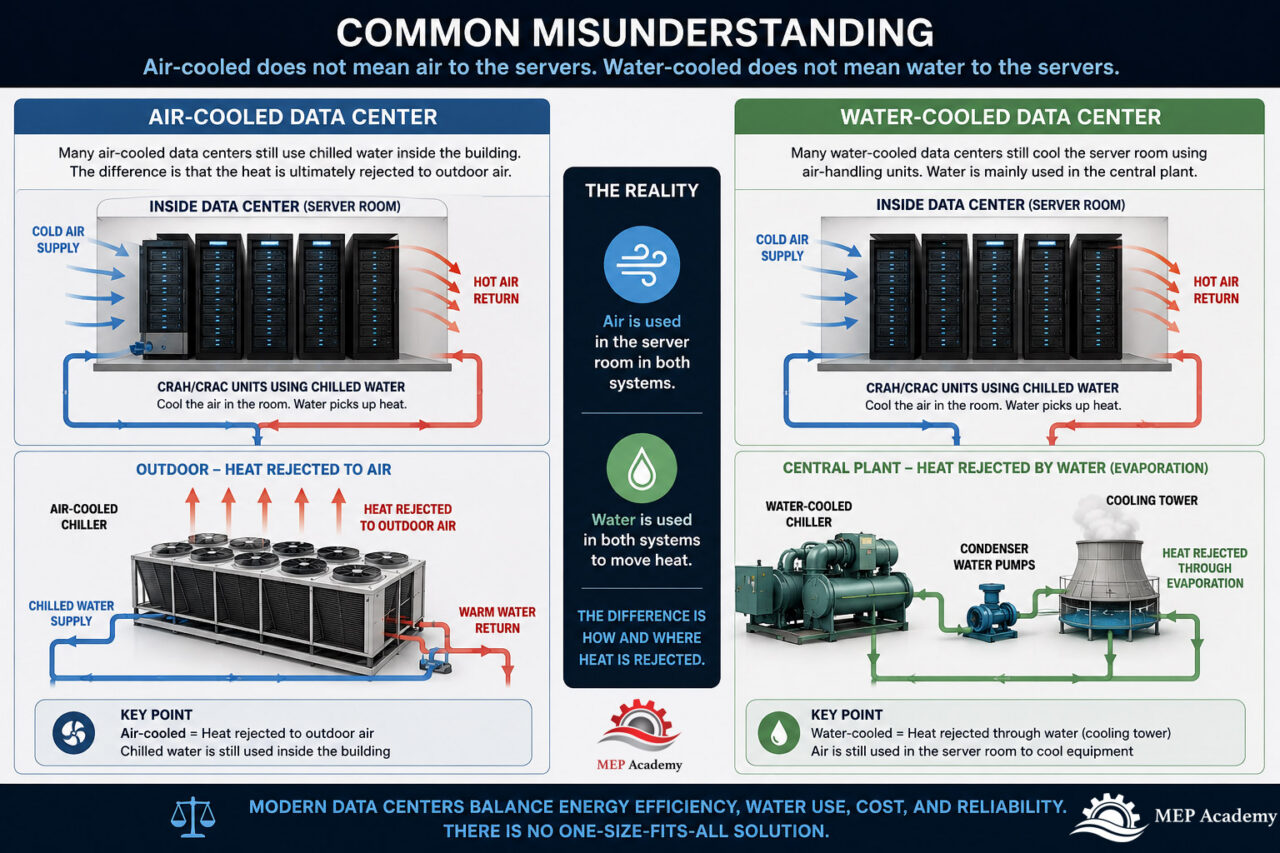
Many people assume that air-cooled and water-cooled systems describe how servers are cooled.
That is not always true.
Many air-cooled data centers still use chilled water inside the building.
The difference is that the heat is ultimately rejected to outdoor air.
Likewise, many water-cooled data centers still cool the server room using air-handling units and traditional airflow management strategies.
The water is primarily used within the central plant to transport and reject heat more efficiently.
The distinction is usually about the heat rejection system, not necessarily how air is delivered to the servers.
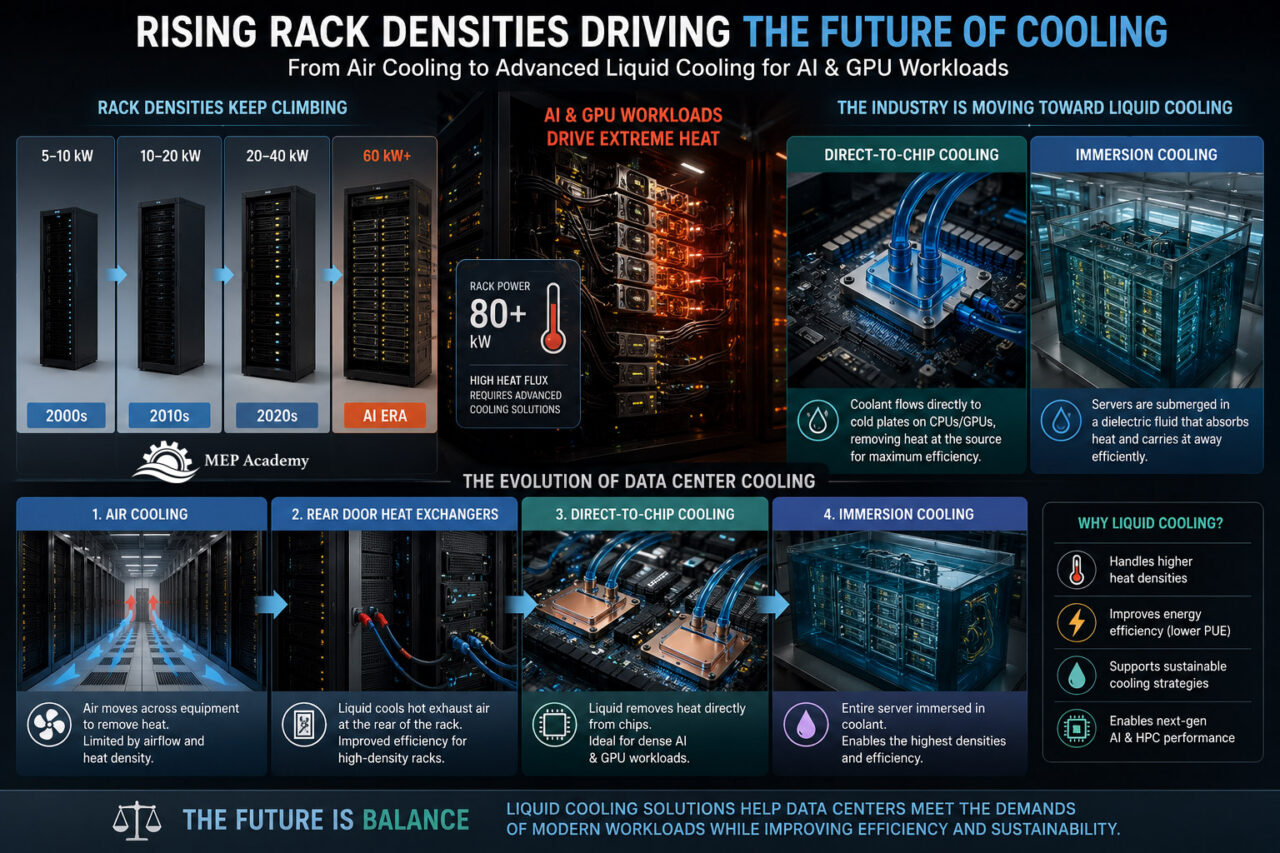
High-Density AI Workloads Are Changing Everything
Artificial intelligence is dramatically increasing data center cooling requirements.
Modern GPU clusters can generate significantly more heat than traditional server environments.
As rack densities continue to climb, operators are exploring technologies such as:
Direct-to-chip liquid cooling
Rear-door heat exchangers
Immersion cooling
Advanced liquid cooling systems
These technologies use liquid much closer to the IT equipment itself, allowing heat to be removed more effectively than traditional air cooling alone.
Although air-cooled and water-cooled central plants remain important, AI workloads are accelerating the industry’s move toward liquid cooling solutions.
Air-Cooled vs Water-Cooled: Side-by-Side Comparison
Feature
Air-Cooled
Water-Cooled
Water Usage
Very Low
Higher
Energy Efficiency
Moderate
Higher
Cooling Towers Required
No
Yes
Water Treatment Required
No
Yes
Mechanical Complexity
Lower
Higher
Maintenance Requirements
Lower
Higher
Suitable for Large Loads
Moderate
Excellent
Supports Economizers
Limited
Excellent
First Cost
Often Lower
Often Higher
Operating Cost
Often Higher
Often Lower
Which Cooling Method Is Better?
There is no universal answer.
The best cooling strategy depends on several factors:
Climate
Utility costs
Water availability
Rack density
Sustainability goals
Facility size
Long-term operating costs
A smaller facility in a drought-prone area may favor air-cooled systems.
A large hyperscale campus may benefit from the efficiency of water-cooled central plants.
Many modern facilities are now exploring hybrid approaches that combine the benefits of both technologies.
Final Thoughts
Air-cooled and water-cooled data centers are both designed to accomplish the same objective: safely remove heat from mission-critical IT equipment.
Air-cooled systems reject heat directly to outdoor air and minimize water usage.
Water-cooled systems use water and evaporation to improve heat transfer and energy efficiency.
As AI, cloud computing, and high-density computing continue to increase cooling demands, the balance between energy consumption, water usage, reliability, and sustainability will become even more important.
Understanding the strengths and limitations of both approaches is essential for anyone involved in designing, operating, or maintaining modern data centers.
Currently Published
How Data Centers Actually Work An overview of how modern data centers operate, explaining the critical electrical, mechanical, and IT infrastructure required to keep servers running 24/7.
How Data Center Electrical Systems Work Understand how data center electrical systems deliver continuous power using switchgear, UPS systems, generators, and redundancy design.
Data Center Refrigerant Economizer Discover how refrigerant economizer systems improve cooling efficiency by using outdoor conditions to reduce compressor operation and lower energy consumption.
How Data Center UPS Systems Work Understand how UPS systems provide instant backup power and protect data centers from outages and power disruptions.
Hot Aisle vs Cold Aisle Containment Hot aisle vs cold aisle containment explained. Learn how airflow control improves data center cooling efficiency and reduces energy costs.
Data Center Chilled Water Systems Explained Learn how chilled water systems cool data centers, including chillers, CRAH units, pumps, and how the entire system removes heat efficiently.
CRAC vs CRAH Units Explained Learn the difference between Computer Room Air Conditioners and Computer Room Air Handlers, including how DX refrigerant cooling compares with chilled water cooling in data center environments.
Air-Cooled vs Water-Cooled Data Centers Learn the difference between Computer Room Air Conditioners and Computer Room Air Handlers, including how DX refrigerant cooling compares with chilled water cooling in data center environments.
Immersion Cooling Explained Discover how immersion cooling is transforming AI data centers by submerging servers in a non-conductive dielectric fluid for highly efficient heat removal. Learn how single-phase and two-phase immersion cooling work, why AI is driving their adoption, and how these systems compare to traditional air cooling.
AI Data Centers Explained Learn how high-density GPU data centers deliver massive amounts of electrical power and remove the resulting heat using liquid cooling, CDUs, and advanced cooling infrastructure.
Heat Recovery Chillers Explained: How They Work and Why They Matter
Most HVAC systems are designed to move heat.
A cooling system removes heat from a building and rejects it somewhere else. A heating system adds heat to a building when spaces need to be warmed.
But in many commercial buildings, something interesting happens.
One part of the building may need cooling at the exact same time another part of the building needs heating.
An interior office area may need cooling because of people, lights, computers, and equipment, while perimeter zones near windows may need heating because of cold outdoor conditions.
In a hospital, laboratories and imaging rooms may need cooling year-round while the ventilation system still needs heating and reheat.
In a hotel, the building may need chilled water for guest rooms and kitchens while also needing domestic hot water for showers and laundry.
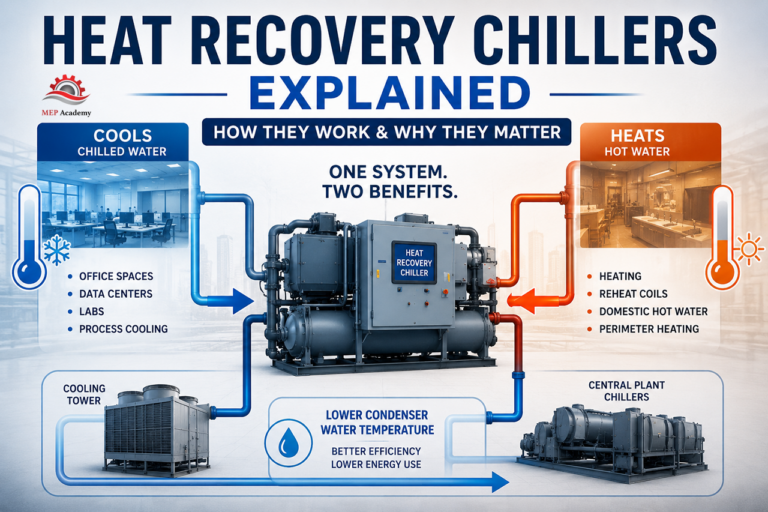
A Heat Recovery Chiller takes advantage of this situation.
Instead of wasting heat through the cooling tower, the system captures that heat and reuses it somewhere else in the building.
That is the basic idea behind heat recovery.
What Is a Heat Recovery Chiller?
A Heat Recovery Chiller is a special type of chiller that produces chilled water and useful hot water at the same time.
A normal water-cooled chiller removes heat from the building and rejects that heat through the condenser water system to a cooling tower.
A Heat Recovery Chiller still removes heat from the building, but instead of throwing all of the heat away, it transfers useful heat into a hot water loop.
That recovered heat can then be used for:
Heating hot water systems
Reheat coils
Domestic hot water preheat
Makeup air heating
Perimeter heating
Process heating
Pool heating
Snow melting systems
The chiller is doing two useful jobs at once.
It is cooling one load while heating another.
Why Heat Recovery Chillers Make Sense
In many conventional HVAC systems, chillers and boilers may operate at the same time.
The chiller removes heat from the building and rejects it outdoors.
Meanwhile, the boiler burns fuel to create heat somewhere else in the building.
That means the building is paying to reject heat and paying again to create heat.
A Heat Recovery Chiller changes that process.
Instead of wasting heat through the cooling tower, the building reuses that heat for another purpose.
This can:
Reduce boiler runtime
Reduce cooling tower load
Lower energy use
Improve overall plant efficiency
Reduce condenser water heat rejection
Lower cooling tower water makeup
The best applications are buildings with simultaneous heating and cooling loads.
How a Heat Recovery Chiller Works
The refrigeration cycle is very similar to a standard water-cooled chiller.
First, warm return chilled water comes back from the building.
Inside the evaporator, refrigerant absorbs heat from the chilled water.
The chilled water is cooled and sent back out to the building.
The compressor then raises the pressure and temperature of the refrigerant.
In a standard chiller, the condenser would reject this heat to condenser water and eventually to a cooling tower.
But in a Heat Recovery Chiller, the condenser transfers that heat into a useful hot water loop.
The hot water can then be used for heating elsewhere in the building.
So instead of treating condenser heat as waste, the system uses it as a valuable energy source.
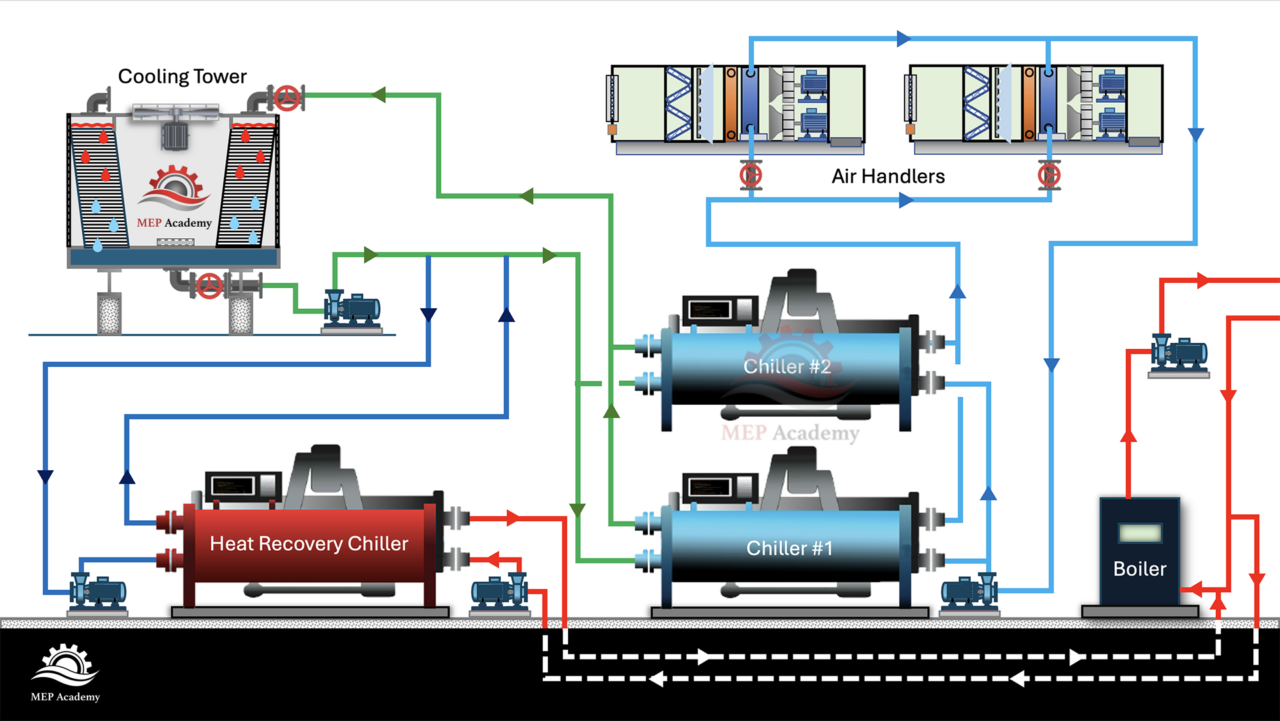
Application #1 — Cooling Condenser Water Before It Reaches the Main Chillers
One interesting application for Heat Recovery Chillers is in large central plants.
Heat Recovery Chiller – Central Plant Condenser Water System.
In this arrangement, the Heat Recovery Chiller is used to cool down the condenser water before it enters the main water-cooled chillers.
How It Works
In a normal central plant:
Cooling towers send condenser water to the chillers
The chillers reject heat into the condenser water
The condenser water returns to the cooling towers
The cooling towers reject the heat outdoors
The temperature of the condenser water is very important.
Generally, lower condenser water temperatures help the chillers operate more efficiently because the compressors do not have to work as hard to reject heat.
Now imagine placing a Heat Recovery Chiller in that condenser water loop.
The warmer condenser water first passes through the Heat Recovery Chiller.
The Heat Recovery Chiller removes heat from that condenser water and transfers the recovered heat into a hot water loop.
The condenser water then continues to the main chillers at a lower temperature.
This helps the main chillers operate more efficiently.
At the same time, the recovered heat is used somewhere useful in the building.
Typical Applications
This type of system is commonly used in:
Hospitals
University campuses
Large office towers
District cooling systems
Laboratory buildings
Central utility plants
For example, a hospital may need cooling for medical equipment and interior spaces year-round while also needing heating hot water for reheat coils and domestic water heating.
The Heat Recovery Chiller helps both systems at the same time.
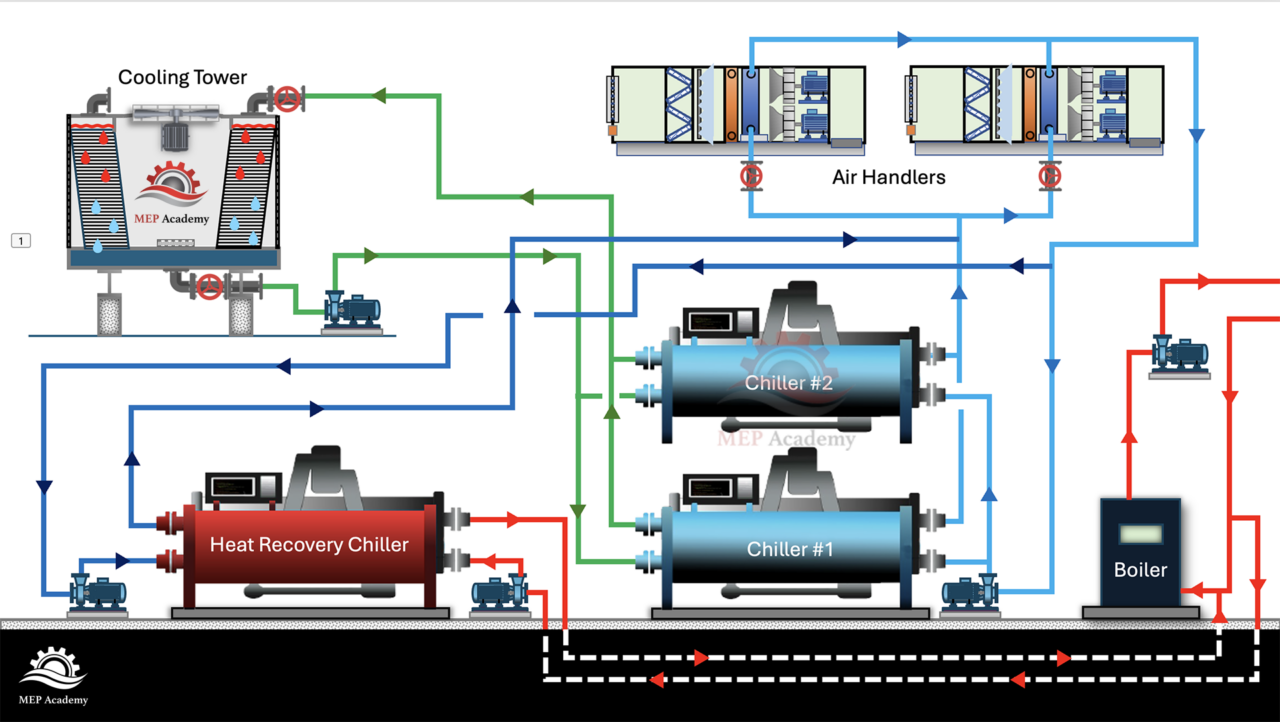
Application #2 — Producing Chilled Water and Hot Water Simultaneously
This is probably the easiest Heat Recovery Chiller application to understand.
Heat Recovery Chiller with simultaneous heating and cooling diagram
In this arrangement, the Heat Recovery Chiller directly produces chilled water for cooling and hot water for heating at the same time.
How It Works
The chilled water side serves cooling loads such as:
The Heat Recovery Chiller removes heat from the cooling side and transfers it to the heating side.
The system is literally moving heat from where it is not wanted to where it is needed.
Example: Office Building
An office building may have interior spaces that require cooling year-round because of lighting, people, and computers.
At the same time, the perimeter offices near the exterior walls may need heating during cold weather.
The Heat Recovery Chiller removes heat from the interior spaces and transfers that heat to the perimeter heating system.
Instead of wasting the heat outdoors, the building reuses it.
Domestic Hot Water Preheat Applications
Hotels, hospitals, dormitories, and multifamily buildings are excellent candidates for Heat Recovery Chillers because they often have large domestic hot water loads.
The Heat Recovery Chiller can preheat domestic water before it reaches the final water heater.
Cold domestic water enters a preheat tank or heat exchanger.
Recovered heat from the chiller raises the water temperature before it reaches the boiler or water heater.
The final heater then has less work to do.
This can significantly reduce energy consumption.
Heat Recovery Chillers and Condensing Boilers
Heat Recovery Chillers often work very well with condensing boiler systems.
Lower hot water temperatures generally improve Heat Recovery Chiller efficiency because the compressor does not need to work as hard.
Many modern heating systems now use lower-temperature hot water systems, especially with:
These buildings often have overlapping cooling and heating loads that make heat recovery practical.
Heating Priority vs Cooling Priority
Some systems operate in cooling priority.
In this mode, the chiller runs mainly because the building needs chilled water. If there is a useful heating load available, the system recovers heat.
Other systems operate in heating priority.
In this arrangement, the Heat Recovery Chiller operates mainly because the building needs hot water. The chilled water becomes the useful byproduct.
Large campus systems may operate in either mode depending on the season and plant demand.
Heat Recovery Chillers Are About Managing Heat
A Heat Recovery Chiller is not simply another type of chiller.
It is really a heat management strategy.
The system takes heat from where it is not wanted and moves it to where it is useful.
Instead of wasting condenser heat outdoors, the building uses that energy somewhere else in the system.
That is why Heat Recovery Chillers are becoming increasingly popular in modern HVAC central plants.
They help reduce waste, improve efficiency, lower boiler operation, and make better use of energy the building already has available.
Final Thoughts
The next time you look at a central plant, do not just ask how the building is making chilled water.
Ask where the rejected heat is going.
Is it being wasted through the cooling tower?
Or is it being recovered and used somewhere useful?
That question is the foundation of Heat Recovery Chiller design.
Because in the right application, the system is not just cooling the building.
It is intelligently managing energy throughout the entire plant.
Continue Learning About Data Center Systems
Continue exploring our complete series on HVAC systems, central plants, chilled water systems, cooling towers, CRAH units, CRAC units, data center cooling, and commercial mechanical systems at:
Data centers generate heat every second of every day. Servers, storage equipment, network switches, UPS systems, power distribution equipment, and high-density computing racks all produce heat that must be removed continuously.
If that heat is not removed, the result can be thermal throttling, equipment alarms, reduced server life, emergency shutdowns, or complete data center failure.
That is why data centers use precision cooling systems instead of ordinary comfort cooling systems.
Two of the most common room-based precision cooling systems used in data centers are CRAC units and CRAH units.
At first glance, they can look very similar. Both are large cooling cabinets. Both move air through the data center. And both help maintain temperature, humidity, and airflow. And both may be installed around the perimeter of the data hall, in mechanical galleries, or connected to raised floor or overhead air distribution systems.
But internally, they are very different.
A CRAC unit uses direct refrigeration.
A CRAH unit uses chilled water.
That one difference changes how the system is designed, how it is maintained, how much energy it uses, and where it is most commonly applied.
In this article, we’ll explain the difference between CRAC and CRAH units, how each system works, where they are used, and why this topic is becoming even more important as data centers move toward AI, high-density racks, and liquid cooling.
Watch the Video: CRAC vs CRAH Units Explained
In the video above, we explain the basic difference between CRAC and CRAH units and how they are used in data center cooling systems.
This article expands on that explanation with additional details for contractors, engineers, estimators, technicians, facility operators, and anyone learning how data center mechanical systems work.
Quick Answer: What Is the Difference Between CRAC and CRAH?
The simplest way to understand the difference is this:
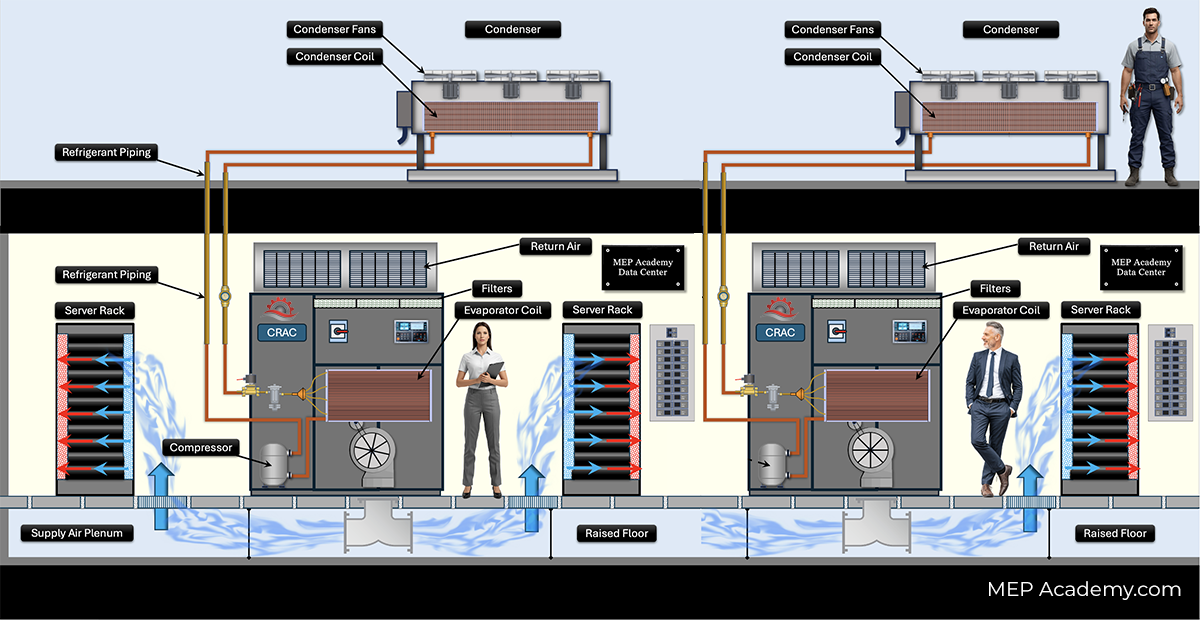
A CRAC unit is a Computer Room Air Conditioner. It typically uses a refrigerant-based direct expansion cooling system with compressors.
A CRAH unit is a Computer Room Air Handler. It uses chilled water from a central chiller plant and does not normally contain compressors inside the room unit.
Chilled water valves, coils, fans, pumps, chiller plant coordination
Typical System Type
DX cooling system
Chilled water air handling system
This table gives the basic comparison, but the real value comes from understanding how each system actually works.
What Is a CRAC Unit?
CRAC stands for Computer Room Air Conditioner.
A CRAC unit is a precision cooling unit that works similarly to a traditional direct expansion air conditioning system. It uses a refrigerant circuit to remove heat from the data center air.
CRAC – Computer Room Air Conditioner with Air-Cooled Condenser serving a Data Center
Inside or associated with the CRAC system, you may find components such as:
Compressors
Refrigerant piping
Evaporator coils
Expansion valves
Supply fans
Filters
Humidification or dehumidification components
Controls and sensors
Condensers or remote heat rejection equipment
The CRAC unit pulls warm return air from the data center. That air passes across a cold evaporator coil. Refrigerant inside the coil absorbs heat from the air. The cooled air is then supplied back into the data center.
The absorbed heat is then rejected outside the space through a condenser, dry cooler, or other heat rejection system.
In simple terms:
A CRAC unit creates cooling using a refrigerant-based mechanical cooling cycle.
That is why it is called an air conditioner.
How a CRAC Unit Works
A basic CRAC cooling cycle works like this:
Hot return air from the data center enters the CRAC unit.
The air passes over the evaporator coil.
Refrigerant inside the coil absorbs heat from the air.
The cooled air is supplied back into the data center.
The compressor moves refrigerant through the refrigeration cycle.
Heat is rejected outside through a condenser or other heat rejection equipment.
The cycle repeats continuously.
This is similar in principle to many commercial air conditioning systems, but CRAC units are designed for mission-critical environments where temperature, humidity, airflow, and reliability are more tightly controlled.
Important Clarification: Some CRAC Units Can Have Dual Cooling Coils
A CRAC unit is usually thought of as a DX or refrigerant-based cooling unit. However, some CRAC units can be configured with more than one cooling method.
For example, a CRAC unit may include:
A DX refrigeration coil as the primary cooling source
A chilled water coil as a secondary or backup cooling source
This gives the facility more flexibility.
In some designs, the CRAC unit may operate on DX cooling during normal operation and use chilled water under certain conditions. In other designs, chilled water may be used as the primary source when available, with DX cooling available as backup.
The exact sequence depends on the manufacturer, controls, and project design.
However, this does not make the unit the same as a CRAH unit.
The defining feature of a CRAC unit is that it can provide refrigerant-based mechanical cooling. A CRAH unit is primarily an air handler that relies on chilled water from a central plant.
So when comparing CRAC and CRAH units, the basic distinction is still:
CRAC units are generally refrigerant-based air conditioners. CRAH units are generally chilled-water air handlers.
What Is a CRAH Unit?
CRAH stands for Computer Room Air Handler.
A CRAH unit looks similar to a CRAC unit from the outside, but internally it operates differently.
CRAH Computer Room Air Handlers in a Data Center served by an Air-Cooled Chiller
A CRAH unit does not normally create cooling with its own compressor and refrigerant circuit. Instead, it uses chilled water supplied from a central chiller plant.
Inside a CRAH unit, you typically find:
Chilled water cooling coil
Supply fans
Filters
Control valves
Temperature sensors
Humidity controls
Airflow controls
Building automation or data center control integration
The CRAH unit pulls warm return air from the data center. That air passes across a chilled water coil. The chilled water absorbs heat from the air. The cooled air is then supplied back into the data center.
The warmed chilled water returns to the chiller plant, where the heat is removed and the water is cooled again.
In simple terms:
A CRAH unit does not create cooling inside the unit. It transfers cooling from the chilled water system into the data center air.
That is why it is called an air handler.
How a CRAH Unit Works
A basic CRAH cooling cycle works like this:
The central chiller plant produces chilled water.
Pumps circulate chilled water to the CRAH units.
Hot return air from the data center enters the CRAH unit.
The air passes over the chilled water coil.
Heat transfers from the air into the chilled water.
The cooled air is supplied back into the data center.
The warmed water returns to the chiller plant.
The chiller plant removes the heat and sends cooled water back to the CRAH unit.
This system separates the air handling function from the cooling production function.
The CRAH unit handles airflow.
The chiller plant produces the cooling.
This separation is one reason CRAH systems are common in large data centers.
Why the Difference Matters
The difference between CRAC and CRAH is not just terminology.
It affects almost every part of the data center cooling strategy.
It affects:
Electrical power consumption
Mechanical infrastructure
Maintenance responsibilities
Redundancy planning
First cost
Operating cost
Scalability
Energy efficiency
Controls integration
Space planning
Future expansion
A CRAC unit may be simpler to install for a smaller room or standalone facility.
A CRAH system may be more efficient and scalable for a large data center with a central chilled water plant.
This is why the right answer is not always “CRAH is better” or “CRAC is better.”
The right answer depends on the facility.
CRAC Units: Advantages and Disadvantages
Advantages of CRAC Units
CRAC units are often used because they are relatively self-contained and familiar to HVAC technicians.
Some advantages include:
Good for smaller data centers and server rooms
Can be easier to install where chilled water is not available
Familiar DX refrigeration technology
Useful for retrofit applications
Can be deployed in modular or standalone environments
Less dependent on central plant infrastructure
Can provide dedicated cooling to a specific room or zone
For small data centers, telecom rooms, network rooms, or edge facilities, a CRAC unit may be a practical solution because it does not require a large chilled water plant.
Disadvantages of CRAC Units
CRAC units also have limitations.
Some disadvantages include:
Compressors consume significant electrical power
Refrigerant systems require specialized maintenance
More moving parts inside or associated with the cooling system
Less efficient at very large scale compared with optimized chilled water systems
Heat rejection equipment must be coordinated outside the data hall
Refrigerant piping length and design limitations may apply
Scaling many DX systems can become complex
For large data centers, installing many individual refrigerant-based units can become less efficient and harder to manage than a centralized chilled water system.
CRAH Units: Advantages and Disadvantages
Advantages of CRAH Units
CRAH units are often used in larger data centers because they work well with central chilled water infrastructure.
Some advantages include:
Excellent scalability for large cooling loads
No compressor inside the CRAH unit
Can be highly energy efficient at scale
Works well with central chiller plants
Can integrate with water-side economizers
Can use variable speed fans and control valves
Can support large data halls and high cooling capacities
Maintenance can be centralized around the chiller plant and water systems
Because CRAH units rely on chilled water, they can be part of a larger, optimized cooling strategy that includes chillers, pumps, cooling towers, dry coolers, economizers, and advanced controls.
Disadvantages of CRAH Units
CRAH systems also have challenges.
Some disadvantages include:
Requires chilled water infrastructure
Higher first cost for large central plant systems
More piping, valves, pumps, and controls
More coordination between the data hall and mechanical plant
Potential water leak concerns inside or near critical spaces
More complex redundancy planning
Requires skilled operation of the central plant
A CRAH unit may be simpler than a CRAC unit internally, but the overall chilled water system can be much more complex.
That complexity must be designed, installed, commissioned, and maintained correctly.
Airflow: Raised Floor, Slab Floor, and Containment
Both CRAC and CRAH units are used to move air through the data center. But how that air is delivered depends on the facility design.
Traditional data centers often used raised floors.
In a raised floor design, the cooling unit supplies cold air into the underfloor plenum. The air travels under the raised floor and rises through perforated floor tiles in front of server racks.
The servers pull the cold air through the equipment, and hot air exits into the hot aisle.
This is where hot aisle and cold aisle layout becomes important.
In modern data centers, many facilities use slab floors instead of raised floors. In these designs, air may be supplied through:
Overhead ductwork
Supply air galleries
Fan walls
Perimeter cooling units
In-row cooling units
Containment systems
Rear-door heat exchangers
Direct liquid cooling systems
This is important because CRAC and CRAH units are not the only cooling methods used in data centers.
They are two of the most common room-based precision cooling systems, but many high-density facilities now use hybrid systems that combine air cooling and liquid cooling.
CRAC and CRAH Units Are Not the Only Data Center Cooling Systems
A common mistake is to think that data center cooling is only about CRAC and CRAH units.
That may have been a reasonable assumption in many traditional data centers, but modern facilities use a wider range of cooling technologies.
Other data center cooling methods include:
In-row cooling units
Rear-door heat exchangers
Fan wall systems
Air-cooled chillers
Water-cooled chillers
Indirect evaporative cooling
Direct-to-chip liquid cooling
Immersion cooling
Liquid cooling distribution units
Hybrid air and liquid cooling systems
As rack densities increase, especially with AI and GPU-based computing, air cooling alone may not always be enough.
This does not mean CRAC and CRAH units are obsolete.
It means they are part of a larger cooling strategy.
Many data centers still use room-based air cooling for general heat removal, while liquid cooling handles the highest-density racks.
Temperature and Humidity Control
Data center cooling is not only about temperature.
It is also about maintaining the proper environmental conditions for IT equipment.
ASHRAE thermal guidelines are commonly used as a reference for data center environmental conditions. ASHRAE’s recommended temperature range for many classes of IT equipment is commonly cited as 18°C to 27°C, or approximately 64.4°F to 80.6°F. Humidity is also controlled using dew point and relative humidity limits to reduce risks such as electrostatic discharge, condensation, and corrosion. (xp20.ashrae.org)
This is one reason data centers use precision cooling systems instead of standard comfort cooling systems.
A comfort cooling system is designed primarily for people.
A precision cooling system is designed for equipment, airflow, reliability, and continuous operation.
Why CRAH Units Are Common in Large Data Centers
Large data centers often use CRAH units because chilled water systems can be very effective at scale.
A central chilled water plant can serve many CRAH units across multiple data halls. This allows the facility to centralize cooling production and optimize plant efficiency.
A chilled water plant may include:
Chillers
Primary pumps
Secondary pumps
Condenser water pumps
Cooling towers
Dry coolers
Heat exchangers
Water treatment systems
Expansion tanks
Controls and automation systems
With the right design, chilled water systems can use variable speed equipment, economizers, and plant optimization strategies to reduce energy use.
This is especially important because cooling can represent a major portion of the data center’s total energy consumption.
In a large data center, even a small improvement in cooling efficiency can create significant long-term savings.
Why CRAC Units Are Still Used
Even though CRAH systems are common in large data centers, CRAC units are still widely used.
CRAC units can be a good fit for:
Small server rooms
Edge data centers
Telecom rooms
Network closets
Legacy data centers
Retrofit projects
Facilities without chilled water
Dedicated cooling zones
Smaller enterprise data centers
In these applications, installing a central chilled water plant may not make sense.
A CRAC unit can provide dedicated cooling without requiring a large chilled water system.
That makes CRAC units practical in many smaller or existing facilities.
Maintenance Differences Between CRAC and CRAH Units
Maintenance is another major difference between CRAC and CRAH systems.
CRAC Maintenance
CRAC maintenance may include:
Checking refrigerant charge
Inspecting compressors
Cleaning evaporator coils
Inspecting condenser coils or remote condensers
Checking expansion valves
Testing controls and sensors
Replacing filters
Inspecting fans and belts where applicable
Checking condensate drains
Verifying humidity control operation
Because CRAC units use refrigeration, technicians must understand refrigerant circuits, compressors, superheat, subcooling, leak detection, and heat rejection.
CRAH Maintenance
CRAH maintenance may include:
Cleaning chilled water coils
Inspecting control valves
Checking chilled water supply and return temperatures
Verifying water flow
Replacing filters
Inspecting fans and motors
Testing controls and sensors
Checking humidification systems
Coordinating with chiller plant operation
Inspecting strainers and piping components
The CRAH unit itself may have fewer refrigeration components, but the overall system depends heavily on the chilled water plant.
That means maintenance must consider both the air handler and the central plant.
Redundancy: What Happens if a Unit Fails?
Data centers are designed around reliability.
Cooling redundancy is often described using terms like:
N
N+1
2N
Distributed redundancy
With CRAC systems, redundancy may involve installing extra units so that if one CRAC unit fails, another unit can carry the load.
With CRAH systems, redundancy must account for both the CRAH units and the chilled water infrastructure.
That means the design must consider redundancy for:
A chilled water data center can be extremely reliable, but only if the entire cooling chain is properly designed.
A CRAH unit cannot cool the data hall if chilled water is not available.
That is why redundancy planning must look upstream, not just at the room cooling unit.
Controls and Monitoring
Modern CRAC and CRAH units rely heavily on controls.
The cooling unit must respond to changing loads, changing rack densities, and changing environmental conditions.
Controls may monitor:
Return air temperature
Supply air temperature
Rack inlet temperature
Humidity
Dew point
Fan speed
Chilled water valve position
Refrigerant pressures
Compressor operation
Alarm conditions
Differential pressure
Airflow
Leak detection
Power consumption
In many data centers, the goal is not just to keep the room cold.
The goal is to deliver the right temperature air to the server inlets while minimizing wasted energy.
This is why rack inlet temperature is often more important than general room temperature.
If cold air bypasses the racks and returns directly to the cooling unit, energy is wasted.
If hot exhaust air recirculates into the server inlets, equipment temperatures can rise even if the room average temperature looks acceptable.
Good airflow management is just as important as cooling capacity.
The Role of Hot Aisle and Cold Aisle Containment
CRAC and CRAH units work best when the data center has good airflow management.
In a traditional hot aisle/cold aisle layout, server racks are arranged so that cold air enters the front of the racks and hot air exits the rear.
Cold aisles face cold aisles.
Hot aisles face hot aisles.
This helps separate supply air from return air.
Containment systems improve this further by physically separating hot and cold air streams.
There are two common approaches:
Cold aisle containment encloses the cold aisle so that cold supply air is delivered directly to the server inlets.
Hot aisle containment encloses the hot aisle so that hot exhaust air is captured and returned directly to the cooling units.
Containment can improve cooling performance for both CRAC and CRAH systems because it reduces air mixing and improves return air temperature.
Higher return air temperatures can also improve cooling coil performance and system efficiency.
Energy Efficiency and PUE
Data centers often measure energy efficiency using PUE, or Power Usage Effectiveness.
PUE compares the total facility power to the power used by the IT equipment.
A lower PUE means more of the facility’s energy is going directly to IT equipment instead of support systems such as cooling, lighting, and power distribution losses.
Cooling system selection can have a major impact on PUE.
CRAC systems may be appropriate for smaller facilities, but large numbers of compressor-based units can increase energy use.
CRAH systems can often support better energy performance at scale because the chilled water plant can be optimized using:
Variable speed chillers
Variable speed pumps
Cooling towers
Waterside economizers
Airside economizers where applicable
Higher chilled water temperatures
Improved containment
Advanced controls
However, a CRAH system is not automatically efficient.
Poor controls, poor airflow management, low chilled water temperature, excessive fan energy, or inefficient plant operation can reduce performance.
The system must be designed and operated correctly.
CRAC vs CRAH for AI Data Centers
AI data centers are changing the cooling conversation.
Traditional server racks may have been cooled effectively with room-based air cooling. But AI and GPU clusters can create much higher rack densities.
As rack power increases, each rack generates dramatically more heat.
This creates several challenges:
More airflow is required
Higher fan energy may be needed
Hot spots become more likely
Air distribution becomes more difficult
Cooling redundancy becomes more critical
Liquid cooling may become necessary
CRAH systems and chilled water infrastructure can support large cooling loads, but even they may not be enough for the highest-density AI racks.
That is why many modern data centers are adding:
Direct-to-chip liquid cooling
Rear-door heat exchangers
Coolant distribution units
Liquid-cooled racks
Hybrid air and liquid systems
In many cases, the future is not CRAC versus CRAH.
The future is air cooling plus liquid cooling working together.
Common Misconceptions About CRAC and CRAH Units
Misconception 1: CRAC and CRAH Mean the Same Thing
They do not.
A CRAC unit is generally a refrigerant-based computer room air conditioner.
A CRAH unit is generally a chilled-water computer room air handler.
They may look similar, but the cooling source is different.
Misconception 2: CRAH Units Are Always Better
Not always.
CRAH units can be excellent for large data centers with chilled water infrastructure. But for a small server room, a CRAH unit may be impractical if there is no chilled water plant.
Misconception 3: CRAC Units Are Obsolete
Many applications still use CRAC units, especially smaller rooms, edge sites, telecom spaces, and retrofit projects.
Airflow management, containment, redundancy, controls, humidity, maintenance, and commissioning all matter.
A poorly managed cooling system with enough capacity can still have hot spots.
Misconception 5: Room Temperature Is the Only Important Measurement
The most important temperature is often the temperature at the server inlet.
A room average temperature can look acceptable while certain racks are still overheating due to poor airflow or recirculation.
Which System Should Be Used?
There is no single answer.
A CRAC unit may be the better choice when:
The facility is small
Chilled water is not available
The project is a retrofit
A specific room needs dedicated cooling
Simpler infrastructure is preferred
The cooling load is moderate
A CRAH unit may be the better choice when:
The facility is large
A central chilled water plant is available
Energy efficiency at scale is important
The facility needs large cooling capacity
The project requires long-term scalability
The data center uses centralized mechanical infrastructure
The correct selection depends on the total data center design.
That includes the IT load, rack density, redundancy requirements, available utilities, building infrastructure, budget, energy goals, and future expansion plan.
What Contractors and Estimators Should Pay Attention To
For contractors and estimators, CRAC and CRAH systems create different scope requirements.
CRAC Scope Considerations
For CRAC systems, review:
Unit capacity and configuration
Refrigerant piping requirements
Condenser location
Electrical power requirements
Controls integration
Condensate drain requirements
Humidifier water requirements
Service clearances
Rigging access
Startup and commissioning
Leak detection requirements
Refrigerant code requirements
CRAH Scope Considerations
For CRAH systems, review:
Chilled water supply and return piping
Pipe sizing and insulation
Control valves
Balancing valves
Strainers
Flow meters
Pumps
Chiller plant capacity
Condensate drains
Leak detection
Controls integration
Water treatment
Testing and balancing
Commissioning requirements
This is where many estimating mistakes happen.
A CRAC unit may require refrigerant piping and heat rejection equipment.
A CRAH unit may require chilled water piping, valves, insulation, pumps, controls, and central plant coordination.
The equipment name alone does not define the full scope.
Always read the mechanical schedules, specifications, piping diagrams, controls drawings, and commissioning requirements.
Commissioning Considerations
In data centers, technicians must commission the cooling systems carefully.
Commissioning may include:
Factory startup
Functional performance testing
Airflow verification
Water flow verification
Controls testing
Alarm testing
Redundancy testing
Failure mode testing
Power loss simulation
Chiller plant response testing
Temperature and humidity trend review
Integrated systems testing
For CRAC systems, commissioning should verify the refrigeration circuit, compressor operation, condenser operation, airflow, humidity control, and alarms.
For CRAH systems, commissioning should verify chilled water flow, valve operation, coil performance, fan operation, chiller plant response, and controls sequencing.
In mission-critical environments, it is not enough to know that the unit turns on.
The system must perform under normal operation, partial failure, maintenance conditions, and emergency scenarios.
Final Summary: CRAC vs CRAH
CRAC and CRAH units are both important data center cooling systems, but they are not the same.
A CRAC unit is a Computer Room Air Conditioner. It typically uses direct expansion refrigeration, compressors, refrigerant, evaporator coils, and heat rejection equipment.
A CRAH unit is a Computer Room Air Handler. It uses chilled water from a central chiller plant and transfers that cooling into the data center air through a chilled water coil.
The easiest way to remember the difference is:
CRAC creates cooling with refrigerant. CRAH transfers cooling from chilled water.
CRAC units are common in smaller data centers, server rooms, telecom rooms, edge facilities, and retrofit projects.
CRAH units are common in larger data centers, colocation facilities, hyperscale campuses, and facilities with central chilled water plants.
As data centers continue to grow, especially with AI and high-density computing, cooling systems are becoming more complex. CRAC and CRAH units remain important, but they are now part of a broader cooling strategy that may also include containment, chilled water optimization, rear-door heat exchangers, direct liquid cooling, and immersion cooling.
Understanding the difference between CRAC and CRAH units is one of the foundational steps in understanding how data center mechanical systems work.
Continue Learning about Data Center Systems
This article is the hub of our Data Center Educational Series, where we break down each major system in detail.
Currently Published
How Data Centers Actually Work An overview of how modern data centers operate, explaining the critical electrical, mechanical, and IT infrastructure required to keep servers running 24/7.
How Data Center Electrical Systems Work Understand how data center electrical systems deliver continuous power using switchgear, UPS systems, generators, and redundancy design.
Data Center Refrigerant Economizer Discover how refrigerant economizer systems improve cooling efficiency by using outdoor conditions to reduce compressor operation and lower energy consumption.
How Data Center UPS Systems Work Understand how UPS systems provide instant backup power and protect data centers from outages and power disruptions.
Hot Aisle vs Cold Aisle Containment Hot aisle vs cold aisle containment explained. Learn how airflow control improves data center cooling efficiency and reduces energy costs.
Data Center Chilled Water Systems Explained Learn how chilled water systems cool data centers, including chillers, CRAH units, pumps, and how the entire system removes heat efficiently.
CRAC vs CRAH Units Explained Learn the difference between Computer Room Air Conditioners and Computer Room Air Handlers, including how DX refrigerant cooling compares with chilled water cooling in data center environments.
Air-Cooled vs Water-Cooled Data Centers Learn the difference between Computer Room Air Conditioners and Computer Room Air Handlers, including how DX refrigerant cooling compares with chilled water cooling in data center environments.
Immersion Cooling Explained Discover how immersion cooling is transforming AI data centers by submerging servers in a non-conductive dielectric fluid for highly efficient heat removal. Learn how single-phase and two-phase immersion cooling work, why AI is driving their adoption, and how these systems compare to traditional air cooling.
AI Data Centers Explained Learn how high-density GPU data centers deliver massive amounts of electrical power and remove the resulting heat using liquid cooling, CDUs, and advanced cooling infrastructure.
Hot Gas Reheat Explained: HVAC Humidity Control for Gyms, Indoor Pools, and Commercial Buildings
Humidity control is one of the most misunderstood aspects of commercial HVAC design. Many people assume that if an air conditioning system lowers the room temperature, it must also be controlling humidity properly. In reality, temperature and humidity are two very different challenges, and in many commercial buildings, humidity becomes the dominant concern.
This is especially true in facilities such as indoor swimming pools, gymnasiums, aerobic studios, schools, healthcare facilities, supermarkets, and other high-occupancy buildings where large amounts of moisture are constantly introduced into the air. In these environments, the HVAC system often needs to continue removing moisture even after the space no longer requires additional sensible cooling.
That is where Hot Gas Reheat becomes one of the most valuable humidity-control strategies used in modern HVAC systems.
What Is Hot Gas Reheat?
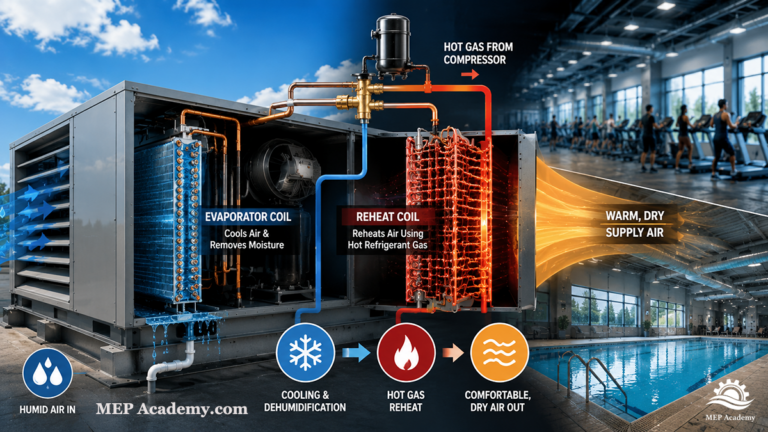
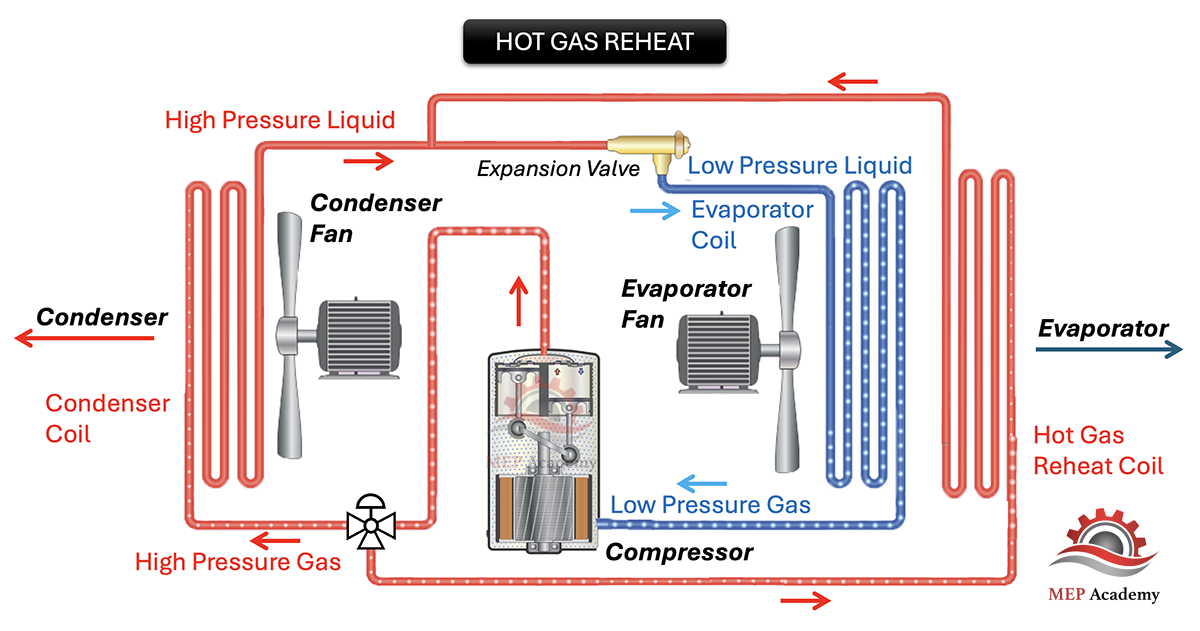
Hot Gas Reheat is a dehumidification method used in direct expansion (DX) cooling systems and packaged rooftop units. The system intentionally overcools the air to remove additional moisture, then reheats the air using hot refrigerant gas from the compressor before supplying the air back into the occupied space.
Hot Gas Reheat in an HVAC Packaged Rooftop Unit
This allows the HVAC system to continue removing humidity without overcooling the building.
In simple terms, the system performs three steps:
Cool the air aggressively
Remove moisture from the air
Reheat the air to a comfortable supply temperature
The result is dry air without creating an excessively cold indoor environment.
Understanding Sensible Heat vs Latent Heat
To understand why Hot Gas Reheat is necessary, it is important to understand the difference between sensible heat and latent heat.
Sensible heat refers to heat that changes air temperature. When the thermostat lowers the room temperature from seventy-five degrees to seventy degrees, the HVAC system is removing sensible heat.
Latent heat refers to moisture contained within the air. When the system condenses water vapor out of the air at the evaporator coil, it is removing latent heat.
In many commercial buildings, the latent load can become extremely high due to occupancy levels, outdoor ventilation air, evaporation, and moisture generation within the space.
Buildings with high latent loads include:
Indoor swimming pools
Fitness centers
Aerobic studios
Locker rooms
Schools
Auditoriums
Restaurants
Healthcare facilities
Supermarkets
Humid climate office buildings
These spaces generate enormous amounts of moisture from perspiration, breathing, wet surfaces, outdoor air, and occupant activity.
Why Humidity Control Matters
Humidity affects much more than comfort.
Without proper humidity control, buildings can experience:
Mold growth
Condensation
Corrosion
Odors
Poor indoor air quality
Fogged windows
Damage to finishes and building materials
Occupants may also feel cold and clammy even when the thermostat indicates a normal room temperature.
This occurs because standard thermostats primarily monitor temperature and do not directly control humidity levels.
A space can feel uncomfortable even at a perfectly acceptable temperature if the humidity remains too high.
In fact, many buildings that appear to have cooling problems are actually suffering from poor humidity control.
How Hot Gas Reheat Works
The process begins when warm humid return air enters the HVAC unit.
The air first passes across the evaporator coil, which becomes cold enough to condense moisture out of the air. As water vapor contacts the cold coil surface, condensation forms and drains away through the condensate system.
The colder the coil surface temperature becomes, the greater the moisture removal capability.
However, this creates a challenge.
The leaving air temperature may now be too cold for the occupied space. For example, the system may need fifty-degree supply air to remove sufficient moisture, but the room itself may only require sixty-five-degree supply air for occupant comfort.
Without reheating, the space would become excessively cold.
Hot Gas Reheat solves this problem by redirecting a portion of the hot compressor discharge gas through a reheat coil located downstream of the evaporator coil.
Instead of rejecting all compressor heat at the condenser, part of that heat is recycled and used to warm the cold supply air after dehumidification has already occurred.
The supply air leaves the unit:
Dry
Neutral in temperature
Comfortable for occupants
This allows the HVAC system to continue removing humidity while maintaining proper space temperature.
The Refrigeration Cycle in a Hot Gas Reheat System
In a standard DX refrigeration system, the compressor raises the temperature and pressure of the refrigerant gas before sending it to the condenser where heat is rejected outdoors.
In a Hot Gas Reheat system, a portion of this hot refrigerant gas is diverted before reaching the condenser and routed through a dedicated reheat coil.
The sequence generally works like this:
Warm humid air enters the evaporator coil
The evaporator coil cools the air and removes moisture
Compressor discharge gas is diverted through the reheat coil
The reheat coil warms the cold dry air
Neutral dry supply air is delivered to the occupied space
This allows continuous latent heat removal without excessive sensible cooling.
Common Applications for Hot Gas Reheat
Indoor Pools and Natatoriums
Indoor pools create extremely large latent loads because of continuous water evaporation. Without proper dehumidification, windows fog up, metal corrodes, and building materials begin to deteriorate.
Natatorium HVAC systems often rely heavily on Hot Gas Reheat to maintain proper humidity levels while keeping the space comfortable for occupants.
Gymnasiums and Aerobic Studios
Fitness facilities generate substantial moisture due to heavy occupant activity and perspiration.
Large groups of active occupants can rapidly increase indoor humidity levels, especially when combined with outdoor ventilation requirements.
Hot Gas Reheat allows these spaces to remain dry and comfortable without overcooling occupants.
Schools and Auditoriums
High occupancy combined with outdoor ventilation air can create significant humidity swings throughout the day.
Hot Gas Reheat helps stabilize indoor conditions and improve comfort during peak occupancy periods.
Healthcare Facilities
Many healthcare and therapy spaces require strict indoor humidity control to maintain comfort, reduce contamination risks, and protect equipment and finishes.
Supermarkets
Supermarkets often use dehumidification strategies to reduce condensation around refrigerated display cases and improve indoor comfort.
Why Not Simply Shut Off the Cooling System?
One of the biggest misconceptions in HVAC is the assumption that once the thermostat setpoint is reached, the cooling system should stop operating.
The problem is that humidity may still remain too high.
To remove moisture effectively, the evaporator coil must stay cold enough for condensation to continue forming.
If the cooling system cycles off too early, humidity levels can rise rapidly even though the room temperature appears acceptable.
Hot Gas Reheat allows the system to continue operating for dehumidification purposes without making the occupants uncomfortable.
Hot Gas Reheat vs Electric Reheat
Some HVAC systems use electric resistance heaters to reheat the air after cooling.
In these systems, the evaporator coil cools the air and removes moisture, then electric heating elements warm the air back up before it enters the space.
While effective, electric reheat consumes a significant amount of electrical energy because the system is essentially cooling and heating at the same time.
Hot Gas Reheat is often considered more energy efficient because it reuses compressor heat already available within the refrigeration cycle.
Instead of wasting all condenser heat outdoors, part of that heat is recycled and used for reheating.
Although Hot Gas Reheat still increases compressor runtime and is not considered “free cooling,” it is generally more efficient than electric resistance reheat.
Hot Gas Reheat vs Hot Gas Bypass
Both Hot Gas Reheat and Hot Gas Bypass are frequently confused because both involve compressor discharge gas, but they serve completely different purposes.
Hot Gas Reheat is designed for humidity control. The system intentionally removes additional moisture from the air and then reheats the supply air to maintain occupant comfort.
Hot Gas Bypass, on the other hand, is primarily used for compressor capacity control and evaporator coil protection during low-load conditions. In a Hot Gas Bypass system, hot refrigerant gas is injected back into the suction side or evaporator circuit to artificially maintain refrigeration load and prevent coil freezing.
In simple terms:
Hot Gas Reheat controls humidity and supply air temperature
Hot Gas Bypass protects refrigeration operation during low-load conditions
The two systems may appear similar within the refrigeration circuit, but their purposes are entirely different.
Modern HVAC Control Strategies
Modern packaged rooftop units and dedicated dehumidification systems often incorporate advanced controls for managing humidity.
These may include:
Space humidity sensors
Dew point sensors
Supply air temperature sensors
Variable speed fans
Modulating compressors
Dedicated outdoor air systems (DOAS)
Energy recovery systems
Building automation system integration
When humidity rises above the desired setpoint, the system can continue operating in dehumidification mode while Hot Gas Reheat maintains comfortable supply air temperatures.
These advanced strategies improve both occupant comfort and energy performance.
The Importance of Proper HVAC Design
Humidity control is not simply about comfort. It is also about protecting the building itself.
Improper humidity management can lead to:
Mold remediation costs
Corrosion damage
Premature equipment deterioration
Indoor air quality complaints
Occupant discomfort
Condensation issues
Damage to ceilings, finishes, and insulation
This is why proper latent load calculations and dehumidification strategies are critical in HVAC design.
In many commercial buildings, the HVAC system does not necessarily need colder air.
What the building truly needs is drier air.
Final Thoughts
Hot Gas Reheat is one of the most important dehumidification strategies used in commercial HVAC systems. By separating moisture removal from temperature control, the system can aggressively remove humidity while still maintaining comfortable indoor conditions.
Whether serving an indoor pool, fitness center, school, healthcare facility, or other high-occupancy building, Hot Gas Reheat helps improve:
Occupant comfort
Indoor air quality
Moisture control
Building protection
Long-term HVAC performance
Understanding how Hot Gas Reheat works is essential for HVAC technicians, engineers, estimators, facility managers, and anyone involved in commercial mechanical systems.
Because in many buildings, comfort is not just about temperature.