Home Blog Page 4

How Data Centers Work: Power, Cooling, and Infrastructure Explained

Modern digital life depends on data centers. Every website visit, online purchase, video stream, cloud application, or artificial intelligence request relies on powerful computer servers operating inside these highly specialized facilities.

But servers alone are not enough.

A data center must provide continuous electrical power, precise cooling, secure infrastructure, and reliable network connectivity. If any of these systems fail, the servers inside can shut down within seconds.

This is why modern data centers are engineered with extremely robust mechanical, electrical, and infrastructure systems designed to maintain continuous operation 24 hours a day, 365 days a year.

A data center is a specialized facility that houses computer servers, networking equipment, storage systems, and the electrical and cooling infrastructure required to keep them operating continuously.

In This Complete Guide to Data Centers

In this guide, we explain the major systems that allow data centers to operate continuously:

• Electrical power infrastructure
• Cooling systems and heat removal
• Redundancy and reliability design
• Server racks and IT equipment
• Supporting building infrastructure

You can also explore our detailed articles on each topic:

• Data Center Power Flow: From Utility Grid to Server Rack
• Data Center Cooling Methods Explained
• Data Center Redundancy Explained (N, N+1 and 2N Systems)
• How Data Center Electrical Systems Work
• How Data Center UPS Systems Work
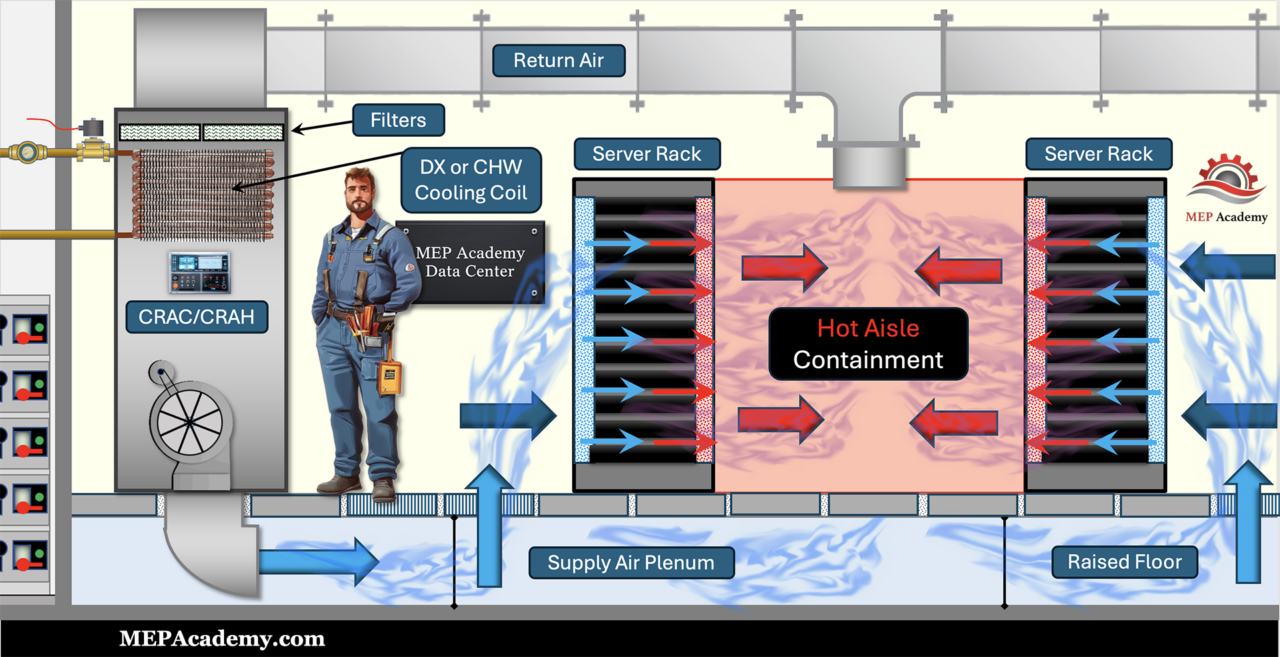
• Hot Aisle vs Cold Aisle Containment
Data Center Refrigerant Economizer
• Data Center HVAC Systems

These articles provide deeper explanations of each system used in modern data centers.

This article also serves as the central hub for our Data Center Learning Series, linking to detailed articles that explore each subsystem in greater depth.

The Core Systems Inside Every Data Center

Every data center relies on three major infrastructure systems working together:

  1. Electrical Power Systems
  2. Cooling Systems
  3. IT Infrastructure (Servers, Networking, Storage)

Each system must operate continuously and reliably to support the computing equipment inside the building.

Data Center Power System comprised of UPS, Backup Generators, PDU's and Rack Power Distribution
Data Center Power System

Electrical Systems: Supplying Reliable Power

Electricity is the most critical resource in a data center. Without power, servers stop instantly.

Because outages are unacceptable for many digital services, data centers are designed with multiple layers of electrical reliability.

The Power Flow in a Data Center

Power typically moves through the facility in the following sequence:

  1. Utility Grid Connection
    Electrical power enters the facility from the local power utility.
  2. Medium Voltage Switchgear
    Switchgear equipment manages incoming power and distributes it to transformers.
  3. Transformers
    Voltage levels are stepped down to usable levels for building systems.
  4. Uninterruptible Power Supply (UPS)
    UPS systems provide instant backup power using battery systems if the utility power fails.
  5. Backup Generators
    Diesel or natural gas generators start automatically during outages to provide long-duration backup power.
  6. Power Distribution Units (PDUs)
    PDUs distribute electricity to rows of server racks.
  7. Rack Power Distribution (RPPs or Busways)
    Electricity finally reaches individual servers through rack-level power systems.

Because downtime is extremely costly, most data centers use redundant electrical paths.

Learn More

For a detailed walkthrough of this process:

→ Read: Data Center Power Flow: From Utility Grid to Server Rack

Cooling Systems: Removing Massive Amounts of Heat

Servers consume large amounts of electricity, and nearly all of that energy becomes heat.

If that heat is not removed quickly, servers will overheat and shut down.

Modern data centers use a variety of cooling technologies to control temperature and airflow.

Common Data Center Cooling Methods

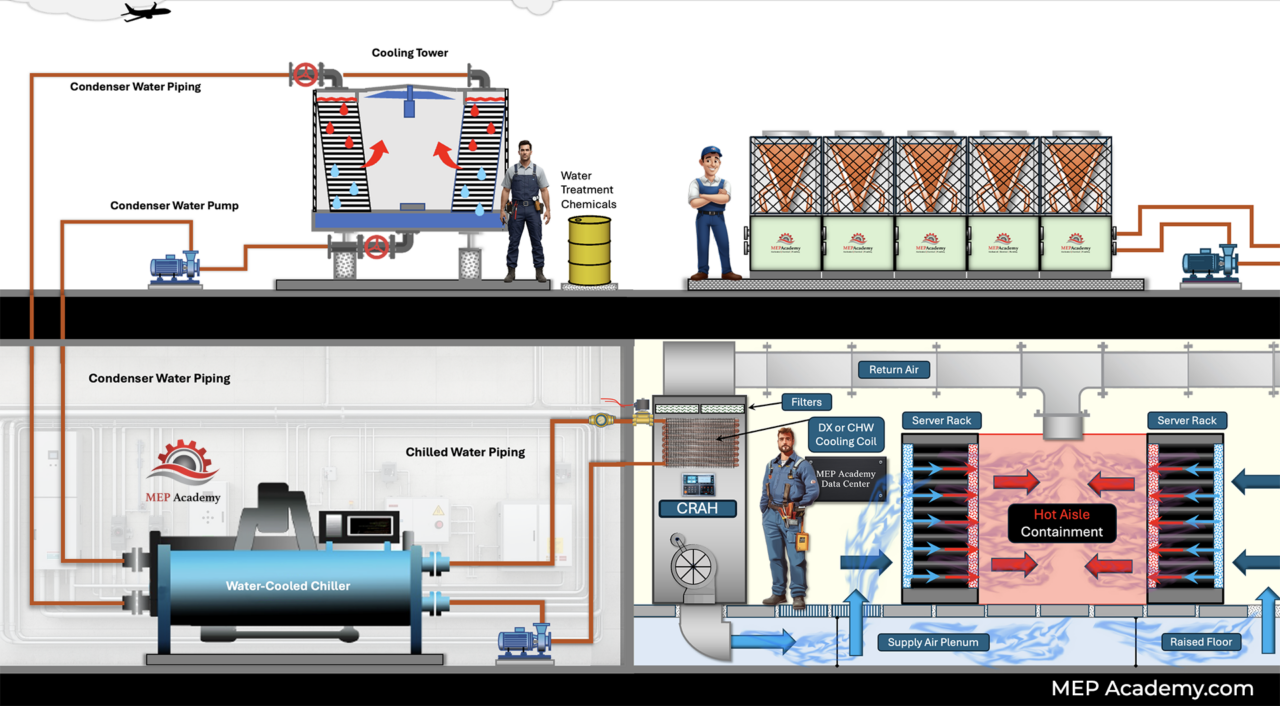
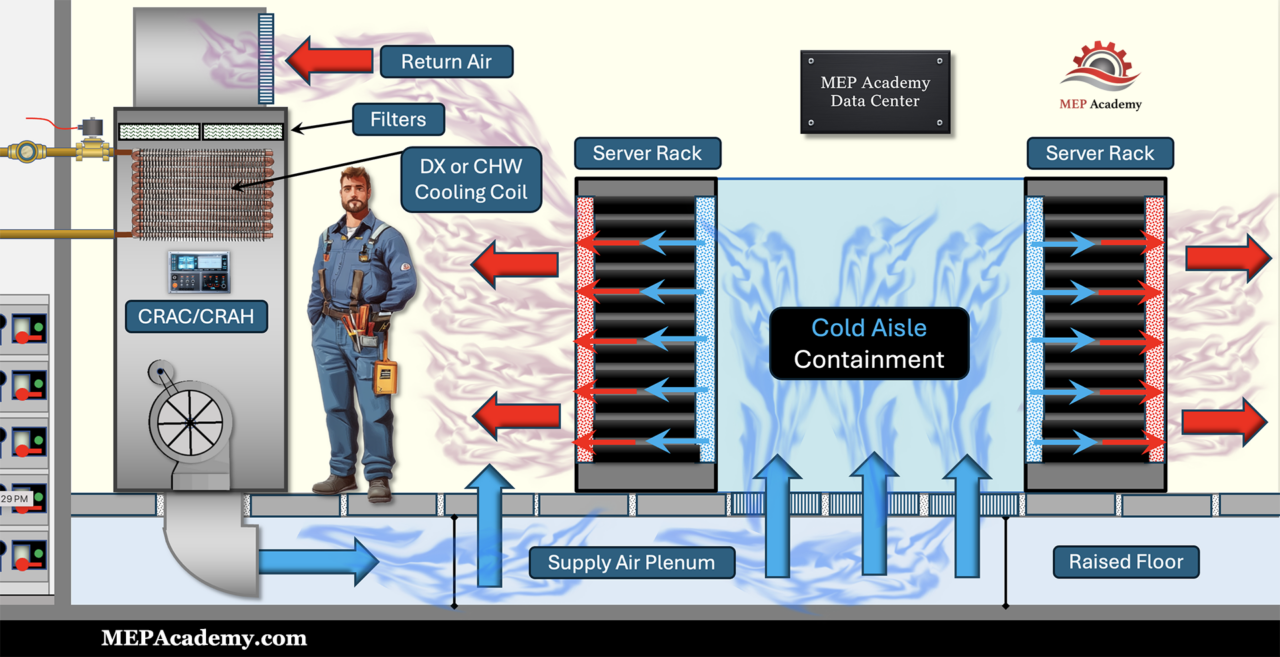
Typical Data Center Cooling Methods, Hot Aisle/Cold Aisle Containment, Liquid Cooling, In-Row Cooling, CRAH and CRAC units.
Typical Data Center Cooling Methods

Computer Room Air Conditioners (CRAC Units)

CRAC units function similarly to traditional air conditioners, using refrigerant systems to cool air before circulating it through the server room.

Chilled Water Cooling

Large facilities often use chilled water plants that circulate cold water through cooling coils inside air handling units.

In-Row Cooling

In-row cooling units sit between server racks, blowing cold air directly into the cold aisle to remove heat more efficiently.

Liquid Cooling

New AI and high-density computing environments sometimes use direct liquid cooling or immersion cooling to remove heat directly from servers.

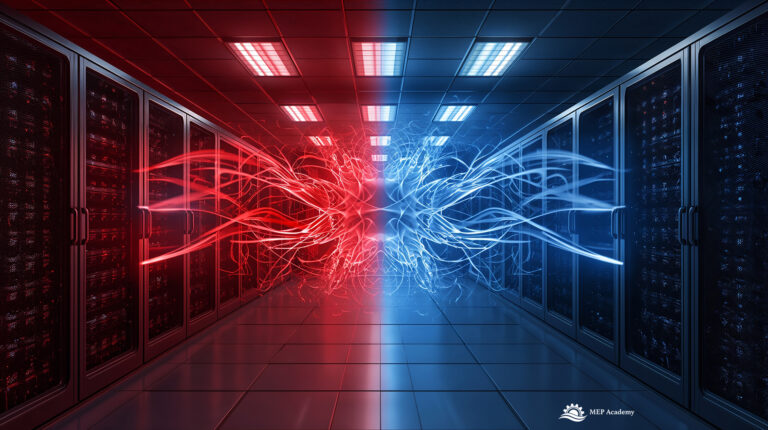
Hot Aisle / Cold Aisle Containment

Server racks are arranged in alternating aisles:

  • Cold aisle: Cold air supplied to server intakes
  • Hot aisle: Heated exhaust air removed by cooling systems

This configuration greatly improves cooling efficiency.

Learn More

For a full explanation of cooling strategies:

→ Read: Data Center Cooling Methods Explained

Redundancy: Designing Systems That Never Fail

Because downtime can cost millions of dollars per hour, data centers are designed with redundant systems.

Redundancy means extra equipment is installed so that the system continues operating even if a component fails.

Common Redundancy Configurations

N (No Redundancy)

Only the required equipment is installed.

If a component fails, the system may shut down.

N+1 Redundancy

One additional backup component is installed.

Example:

  • 3 cooling units required
  • 4 installed

If one fails, the remaining units can still handle the load.

Data Center Redundancy of Equipment. Minimum Requirement versus N+1 Option

2N Redundancy

Two completely independent systems exist.

Example:

  • Two separate UPS systems
  • Two independent electrical distribution paths

This provides extremely high reliability.

Tier Classifications

Many facilities follow the Uptime Institute Tier system, which classifies data centers based on redundancy and reliability levels.

Learn More

For a deeper explanation of redundancy strategies:

→ Read: Data Center Redundancy Explained: N, N+1, and 2N Systems

The IT Infrastructure: Servers, Storage, and Networking

Inside the server hall, thousands of computer systems perform the actual computing work.

Key Components Inside Server Racks

Servers

Servers perform the computing tasks required for:

  • Cloud applications
  • Websites
  • Artificial intelligence processing
  • Databases
  • Enterprise software

Storage Systems

Storage arrays hold the massive amounts of data used by applications and users.

Network Switches

Network switches connect servers to each other and to the internet through high-speed fiber networks.

Rack Infrastructure

Servers are installed in standardized 19-inch racks which organize equipment vertically.

These racks also support:

  • Cable management
  • Power distribution
  • Airflow control

Additional Critical Data Center Systems

Large facilities include many other systems that support operations.

Fire Protection Systems

Common systems include:

  • Pre-action sprinkler systems
  • Clean agent fire suppression systems

These systems protect equipment without damaging electronics.

Security Systems

Data centers use extensive security measures such as:

  • Biometric access control
  • Security checkpoints
  • Surveillance systems

Monitoring and Building Management

Facility operators continuously monitor:

  • Power usage
  • Cooling performance
  • Environmental conditions
  • Equipment alarms

This monitoring helps operators respond quickly to any issues.

Why Data Centers Are So Important

Data centers are the backbone of the modern digital economy.

They support:

  • Cloud computing platforms
  • Artificial intelligence systems
  • Online banking
  • Streaming services
  • Enterprise software
  • Global communication networks

Without reliable data centers, the digital services we depend on daily would not exist.

As computing demands grow — especially with artificial intelligence — data centers are becoming larger, more complex, and more energy-intensive.

Data Center Learning Series

This article is the hub of our Data Center Educational Series, where we break down each major system in detail.

Currently Published

Upcoming Articles


• Inside a Data Center Server Rack
• Hyperscale Data Centers Explained
• Data Center Liquid Cooling Technologies

Final Thoughts

Data centers combine advanced electrical engineering, mechanical cooling systems, and IT infrastructure to support the digital world.

Understanding how these systems interact helps engineers, contractors, technicians, and technology professionals better understand the facilities that power modern computing.

If you’re interested in learning more about how these facilities operate, explore the articles in our Data Center Learning Series, where we dive deeper into each system and the engineering behind it.

Data Center Redundancy Explained: N, N+1, and 2N Systems

Modern data centers are designed around one fundamental requirement: they must remain operational at all times.

Servers inside data centers support cloud applications, financial systems, artificial intelligence platforms, and critical digital infrastructure used by businesses around the world. Even a short interruption in power or cooling can cause servers to shut down, which may result in significant financial losses or service disruptions.

Because of this, data centers are engineered with redundancy, which means installing additional infrastructure so that systems can continue operating even when equipment fails or requires maintenance.

In data center design, redundancy is commonly described using the terms N, N+1, and 2N. These terms are used to define the level of backup capacity installed within the facility’s electrical and cooling systems.

Understanding these redundancy strategies is essential for engineers, contractors, and facility operators working with modern data center infrastructure.

Data centers rely on several interconnected systems.
To understand how these systems work together, see our guide How Data Centers Work.

What Data Center Redundancy Means

Data center redundancy refers to the practice of installing extra infrastructure capacity to ensure continuous operation during equipment failures, maintenance events, or unexpected disruptions. See How Data Centers Actually Work if you missed the first video in this series on Data Centers.

Redundancy is applied to multiple critical systems within a data center, including:

  • Electrical power distribution
  • Utility power connections
  • Uninterruptible Power Supply (UPS) systems
  • Backup generators
  • Cooling systems
  • Chilled water plants
  • Pumps and cooling towers
  • Air distribution units inside the data hall

By designing these systems with redundancy, data centers can achieve extremely high levels of uptime, often measured in 99.999% availability, commonly referred to as “five nines” reliability.

Understanding the Meaning of “N

The term N represents the minimum number of components required for the system to operate normally.

In other words, N is the amount of infrastructure needed to support the full operational load of the data center.

For example, imagine a data center requires three chillers to remove all the heat produced by the servers.

In this scenario:

N = 3 chillers

If all three chillers are operating, the cooling demand is satisfied. However, if one of those chillers fails, the facility no longer has enough cooling capacity to support the full load.

Chiller plant with no redundancy

The same concept applies to electrical systems.

If a data center requires four UPS modules to support the electrical load of the servers, those four modules represent N capacity.

Operating at an N configuration means the system has no redundancy. If any component fails, the facility may experience reduced capacity or even downtime.

For this reason, most modern data centers do not operate at pure N capacity.

N+1 Redundancy

The most common redundancy level used in data centers is N+1.

In an N+1 configuration, the facility installs one additional component beyond what is required to support the load.

This extra component acts as a backup if one unit fails or requires taking offline for maintenance.

Cooling System Example

Assume a data center requires three chillers to meet its cooling demand.

An N+1 configuration would install:

3 chillers required (N)
+1 additional backup chiller
---------------------------
4 total chillers installed

Under normal operation, three chillers carry the load while the fourth unit remains available as a backup.

Water-cooled chillers used in redundant data center cooling systems
N+1 Chiller Redundancy using 3 Chillers plus 1 Additional Chiller as backup

If one chiller fails, the backup chiller automatically starts and maintains full cooling capacity. See Data Center Cooling Systems Explained our 3rd video in our series on Data Centers.

Electrical System Example

Electrical infrastructure often follows the same design principle.

For example, a UPS system may require four modules to support the full IT load.

In an N+1 configuration, the facility installs:

4 UPS modules required
+1 redundant module
--------------------
5 total UPS modules

If one module fails or requires removal for maintenance, the remaining units continue to support the servers without interruption.

Because N+1 provides a good balance between reliability and cost, it is widely used in many enterprise and colocation data centers. See Data Center Power Flow: from Utility Grid to Server Rack our 2nd video in our series on Data Centers.

2N Redundancy

A more advanced redundancy architecture is known as 2N redundancy.

In a 2N design, the entire system is fully duplicated.

Instead of adding one backup component, the facility installs two completely independent systems, each capable of supporting the full load by itself.

Cooling System Example

Suppose a facility requires three chillers to cool the data center.

Redundant Chiller Plant with 2N Redundancy

A 2N design would install two separate chiller plants:

Plant A (N)
3 chillersPlant B (N)
3 chillers

In this configuration, either plant can support the entire cooling demand.

If Plant A fails or requires maintenance, Plant B can continue operating without affecting the servers.

Electrical System Example

Electrical infrastructure may also follow a 2N architecture.

A typical 2N electrical system might include:

  • Two independent utility power feeds
  • Two separate switchgear lineups
  • Two UPS systems
  • Two independent power distribution paths
  • Dual power supplies on each server

Servers connect to both electrical paths so that if one path fails, the other path continues delivering power.

This design dramatically increases reliability and fault tolerance.

High voltage electrical transmission lines supplying redundant power to a data center

Redundancy in Data Center Cooling Systems

Cooling systems are one of the most critical components of data center infrastructure.

Servers generate large amounts of heat, and maintaining the correct operating temperature is essential to prevent hardware failures.

A typical data center cooling system may include redundancy at multiple levels, including:

  • Chillers
  • Cooling towers
  • Chilled water pumps
  • Condenser water pumps
  • Computer Room Air Handlers (CRAH units)
  • In-row cooling systems

For example, a chilled water plant may include:

4 chillers (N+1 configuration)
4 chilled water pumps
4 condenser water pumps

Inside the data hall, multiple cooling units distribute cold air to the server racks.

If one cooling unit fails, the remaining units increase airflow and maintain temperature control.

This layered redundancy helps ensure that a single equipment failure does not cause servers to overheat.

Redundancy in Data Center Electrical Systems

Electrical infrastructure is another critical area where redundancy is essential.

Data centers typically receive power from the electrical grid, but they also include several layers of backup systems to maintain continuous operation.

These systems may include:

Utility Power Feeds

Many data centers receive electricity from two separate utility feeders, often from different substations. This allows the facility to continue receiving power if one feeder fails.

Backup Generators

Facilities commonly install diesel generators to provide long-duration backup power in the event of a utility outage.

Uninterruptible Power Supply (UPS)

UPS systems provide short-term battery backup power to maintain electrical supply while generators start and stabilize.

Power Distribution

Switchgear, power distribution units (PDUs), and busway systems distribute electrical power to the server racks.

Redundant electrical systems ensure that power remains available even if a component fails or requires maintenance.

Redundancy and Data Center Tier Classifications

Redundancy levels are closely related to data center tier ratings, which classify facilities based on reliability and fault tolerance.

The most widely recognized classification system was developed by the Uptime Institute.

Typical tier classifications include:

Tier I

  • Basic infrastructure
  • Little or no redundancy

Classification Tier II

  • Includes some redundant components
  • Often uses N+1 redundancy

Tier III

  • Concurrently maintainable infrastructure
  • Maintenance can occur without shutting down systems

Tier IV

  • Fully fault-tolerant systems
  • Often uses 2N or similar architectures

Higher-tier facilities require more infrastructure investment but provide greater reliability.

Why Redundancy Is Critical for Data Centers

Redundancy is essential because failures are inevitable.

Equipment may fail due to:

  • mechanical wear
  • electrical faults
  • cooling issues
  • maintenance requirements
  • external power outages

Data centers install redundant systems to ensure that when one component fails, another system immediately takes over.

This design philosophy allows modern data centers to deliver the extremely high uptime levels required by today’s digital economy.

Final Thoughts

Data center redundancy is one of the most important concepts in modern digital infrastructure design.

When you see terms such as N, N+1, and 2N they describe how much backup capacity is installed to protect critical systems.

Both electrical infrastructure and cooling systems rely on redundancy strategies to maintain reliable operation and prevent downtime.

As demand for cloud computing, artificial intelligence, and large-scale data processing continues to grow, redundancy will remain a central design principle in the construction and operation of data centers around the world.

Common Redundancy Configurations in Data Centers

Example list:

N configuration
N+1 configuration
2N configuration
2N+1 configuration
Distributed redundant systems

Data Center Engineering Series

This article is the hub of our Data Center Educational Series, where we break down each major system in detail.

Currently Published

This article is part of our Data Center Engineering Series where we explain how data centers are powered, cooled, and designed.

Data Center Cooling Methods Explained: Air Cooling vs Liquid Cooling

Modern data centers generate enormous amounts of heat. Every watt of electricity used by servers eventually becomes heat that must be removed to keep equipment operating reliably.

As computing power increases—especially with the rapid growth of artificial intelligence and GPU computing—the challenge of removing heat from server racks has become one of the most important engineering problems in data center design.

In this article, we explain the four primary data center cooling methods used in modern facilities, how they work, and why the industry is increasingly moving from traditional air cooling toward liquid-based solutions.

Data centers rely on several interconnected systems.
To understand how these systems work together, see our guide How Data Centers Work.

Why Data Center Cooling Is So Important

Data centers run continuously—24 hours a day, 7 days a week, 365 days a year. All the servers, networking equipment, and storage devices inside a data center produce heat during operation.

Historically, server racks produced relatively small amounts of heat. Typical racks operated in the range of:

  • 3–5 kilowatts per rack

Today, many modern data centers operate racks in the range of:

  • 10–20 kilowatts per rack

AI and GPU clusters are pushing densities even further, sometimes exceeding:

  • 50–100 kilowatts per rack

Because heat output increases with power consumption, cooling systems must evolve to keep up with these increasing thermal loads.

The Thermodynamic Challenge

The reason cooling is so difficult in high-density environments comes down to a basic thermodynamic principle:

Air has relatively low heat capacity compared to liquid.

This means that air cannot absorb and transport heat as efficiently as liquids such as water or specialized coolants.

As a result, traditional air cooling systems eventually reach physical limits when rack power densities become very high.

This is why the industry is gradually shifting toward liquid cooling technologies.

The Four Major Data Center Cooling Methods

There are four primary cooling strategies used in modern data centers:

  1. Room-Based Air Cooling
  2. Close-Coupled Air Cooling
  3. Direct-to-Chip Liquid Cooling
  4. Immersion Cooling

Each method represents a different approach to removing heat from servers.

Four major Data Center Cooling Methods including Air and Liquid Cooling

1. Room-Based Air Cooling

Room-based cooling is the traditional approach used in many data centers.

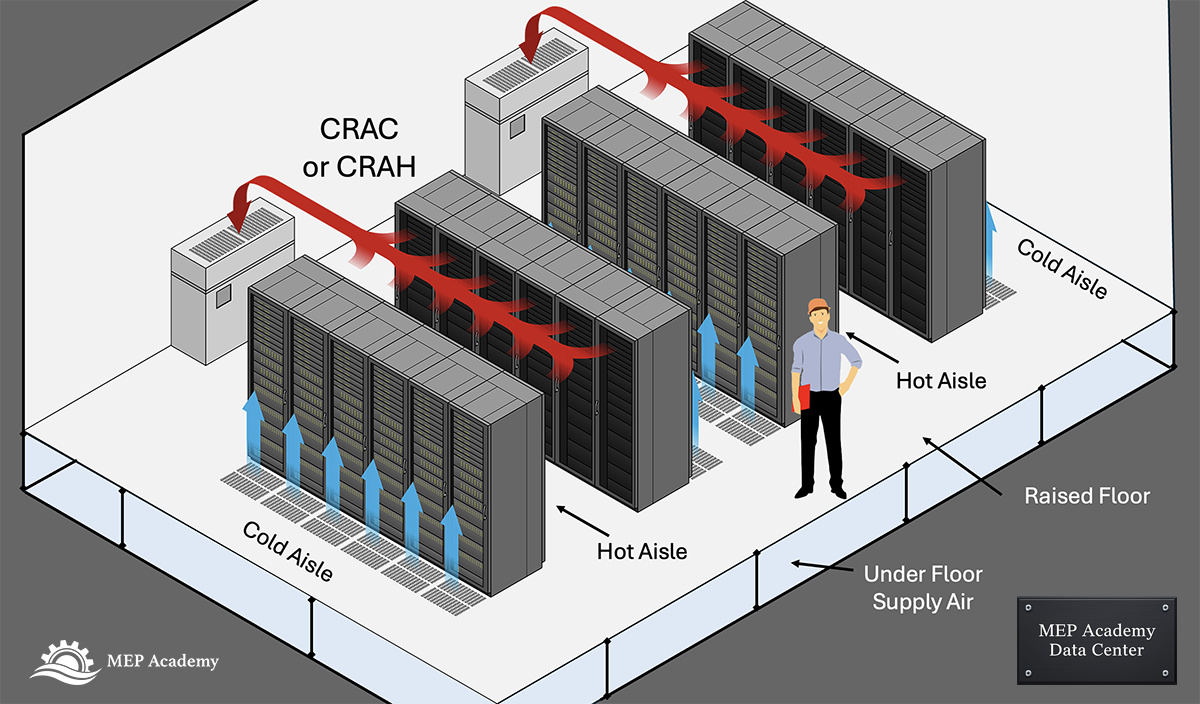
In this design, large cooling units known as CRAC (Computer Room Air Conditioners) or CRAH (Computer Room Air Handlers) supply cold air into the data center space.

Cold air is delivered through raised floor plenums and distributed through perforated floor tiles located in front of server racks.

The servers pull cold air through the front of the rack, where it absorbs heat from the equipment, and the heated air exits through the back of the rack.

To improve airflow management, racks are arranged in hot aisle and cold aisle configurations:

  • Cold aisles supply cool air to the front of the servers
  • Hot aisles collect the hot exhaust air

This layout helps prevent mixing between hot and cold air streams, improving cooling efficiency.

Hot and Cold Aisle Data Center Strategy

While room-based cooling works well for lower density environments, it becomes less efficient as rack power increases.

2. Close-Coupled Air Cooling

Close-coupled cooling systems bring the cooling equipment closer to the heat source.

Instead of relying solely on perimeter cooling units, these systems position cooling equipment directly within the server rows.

Common examples include:

  • In-row cooling units
  • Rear door heat exchangers

In-row units sit between server racks and pull hot air directly from the hot aisle, cool it, and discharge the cooled air back into the cold aisle.

Rear door heat exchangers mount on the back of server racks and remove heat immediately as air exits the servers.

Because the cooling source is located closer to the heat source, close-coupled systems reduce airflow losses and improve efficiency.

However, these systems still depend on moving air through the servers, which can become inefficient at very high rack densities.

A data center in-row cooling unit positioned tightly between two rows of server racks, with multiple vertically stacked fans pushing cold air outward into the cold aisle to cool the servers.

3. Direct-to-Chip Liquid Cooling

Direct-to-chip liquid cooling removes heat directly from the most heat-intensive components inside the server.

Instead of relying on airflow, cold plates are mounted directly onto processors such as CPUs and GPUs.

Coolant circulates through these cold plates, absorbing heat and transporting it away from the server.

The heated liquid flows to a Cooling Distribution Unit (CDU) where the heat is transferred to the facility’s cooling system.

The facility then rejects this heat using equipment such as:

  • Cooling towers
  • Dry coolers
  • Heat exchangers

Liquid cooling is extremely effective because liquids can transport heat much more efficiently than air.

This allows data centers to support very high rack densities, which are becoming common in AI computing environments.

Direct to Chip Cooling in a Data Center using a Cooling Distribution Unit (CDU)

4. Immersion Cooling

Immersion cooling takes liquid cooling even further.

In this system, servers are submerged directly into a tank filled with a dielectric liquid that does not conduct electricity.

The liquid absorbs heat directly from the server components.

There are two common immersion approaches:

Single-phase immersion

The liquid absorbs heat and is pumped through a heat exchanger.

Two-phase immersion

The liquid boils at low temperature, absorbing heat through evaporation before condensing back into liquid.

Immersion cooling can support extremely high power densities and eliminates the need for large airflow systems.

However, it requires specialized server hardware and operational practices.

Alt Text: Data center immersion cooling tank with servers submerged in dielectric fluid
Data center immersion cooling system

Air Cooling vs Liquid Cooling

Choosing the right cooling method depends largely on rack density.

Typical ranges include:

Low density racks (3–10 kW)
Room-based air cooling

Medium density racks (10–25 kW)
Close-coupled air cooling

High density racks (25–80 kW)
Direct-to-chip liquid cooling

Extreme density racks (80 kW and above)
Liquid cooling or immersion cooling

Other factors influencing cooling design include:

  • Energy costs
  • Climate conditions
  • Water availability
  • Redundancy requirements
  • Facility design constraints

The Future of Data Center Cooling

As computing power continues to increase, cooling systems must evolve to keep pace.

AI workloads are driving rack densities higher than ever before, forcing many operators to adopt liquid cooling technologies.

In the coming years, data centers will likely use a combination of cooling approaches depending on workload requirements and facility design.

Understanding these systems is essential for engineers, contractors, and IT professionals working with modern computing infrastructure.

Watch the Full Data Center Cooling Video

If you’d like to see a full visual explanation of these cooling methods, watch the video below.

This video is part of our Data Center Systems series, where we explain how modern data centers operate—from electrical power distribution to cooling infrastructure and redundancy strategies.

Explore the Full Data Center Series

You can watch the entire playlist here:

Data Center Systems Playlist

Videos in this series include:

  • How Data Centers Actually Work
  • Data Center Power Flow: From Utility Grid to Server Rack
  • Data Center Cooling Methods Explained
  • Data Center Redundancy (N, N+1, 2N)

Key Takeaways

  • Data centers produce massive amounts of heat that must be removed continuously.
  • Traditional air cooling works for lower-density racks.
  • Close-coupled air cooling improves efficiency by placing cooling near the heat source.
  • Liquid cooling removes heat directly from processors and supports higher densities.
  • Immersion cooling offers extremely high heat removal capability for specialized environments.

As computing continues to evolve, cooling technologies will remain one of the most critical aspects of modern data center design.

Data Center Engineering Series

This article is the hub of our Data Center Educational Series, where we break down each major system in detail.

Currently Published

This article is part of our Data Center Engineering Series where we explain how data centers are powered, cooled, and designed.

Data Center Power Flow: Utility to Server Rack Explained

Understanding Data Center Power Flow is critical for engineers, contractors, and facility designers working on mission-critical infrastructure. From the utility grid to the server rack, Data Center Power Flow moves through multiple layers of protection, transformation, conditioning, and distribution to ensure uptime and reliability.

Data centers rely on several interconnected systems.
To understand how these systems work together, see our guide How Data Centers Work.

From the utility grid to the server rack, electrical energy passes through multiple layers of transformation, protection, conditioning, and distribution. Each component exists for one reason: uptime.

This article walks step-by-step through the complete electrical path and explains the purpose of each major system along the way.

1. Utility Power Generation

Every data center begins as a customer of the electrical grid.

Electricity is generated at power plants — natural gas turbines, nuclear facilities, hydroelectric dams, wind farms, or solar arrays. The energy mix varies by region, but regardless of source, power must travel long distances before reaching the data center.

At this stage, the facility has no control. It depends entirely on grid stability.

2. High-Voltage Transmission: Efficiency Over Distance

To move electricity efficiently across long distances, utilities transmit power at very high voltage and low amperage.

Why?

Power loss in transmission lines is proportional to current squared (I²R losses). By increasing voltage, current decreases for the same power level. Lower current reduces line losses and allows smaller conductors relative to delivered capacity.

Transmission voltages may range from 69kV to 500kV depending on region and infrastructure.

Before reaching the facility, power is stepped down at regional substations and delivered to the data center campus at medium voltage.

Data Center Electrical Power - From Utility to Server Racks
Data Center Electrical Power – From Utility to Server Racks

3. Service Entrance Switchgear

When power arrives on-site, it enters through service entrance switchgear.

This is the first major piece of electrical infrastructure inside the facility.

Service entrance switchgear:

  • Receives incoming medium-voltage utility power
  • Provides main overcurrent protection
  • Contains protective relays and metering
  • Segments downstream distribution
  • Allows isolation for maintenance

This equipment establishes the facility’s internal electrical control boundary.

From here forward, the data center manages its own reliability.

4. Transformers: Stepping Down Voltage

Utility power typically arrives at medium voltage — often between 12kV and 34.5kV in the United States.

Transformers step this down to low-voltage building distribution levels, commonly 480V.

The transformer performs two critical functions:

  1. Voltage conversion
  2. Electrical isolation

In many facilities, transformers are arranged to support redundancy and load balancing across multiple distribution paths.

5. Generator Paralleling Gear and Automatic Transfer Controls

Utility power is not guaranteed.

If a grid outage occurs, backup generators must take over.

In smaller installations, an Automatic Transfer Switch (ATS) detects utility loss and transfers load to generators.

In larger data centers, transfer logic is integrated into generator paralleling switchgear. This system:

  • Detects voltage abnormalities
  • Starts multiple generators
  • Synchronizes frequency and phase
  • Transfers load safely
  • Manages load sharing between units

This ensures a controlled transition from utility to generator power.

Data Center Electrical Power Diagram

6. Backup Generators and N+1 Redundancy

Backup generators provide full facility power during extended outages.

Most data centers use diesel or natural gas generator systems sized to carry the entire critical load.

Redundancy is key.

In an N+1 configuration, one additional generator is installed beyond what is required to carry the design load. If the facility requires N generators to operate, the +1 unit protects against a single generator failure.

An Uptime Tier II design includes redundant capacity components like extra generators but may not include fully redundant distribution paths.

The objective: no single equipment failure should cause downtime.

7. UPS Systems: Bridging the Gap

Generators take seconds to start and stabilize.

Servers cannot tolerate even milliseconds of interruption.

The Uninterruptible Power Supply (UPS) bridges this gap.

A modern double-conversion UPS:

  • Converts incoming AC to DC
  • Charges batteries
  • Inverts DC back to clean AC output
  • Provides instantaneous ride-through power during transfer events

Historically, UPS systems relied on VRLA (valve-regulated lead-acid) batteries.

Today, high-density facilities increasingly use lithium-ion batteries because they offer:

  • Higher energy density
  • Reduced footprint
  • Longer lifespan
  • Lower maintenance requirements

UPS systems are commonly designed in modular N+1 configurations. If one UPS module fails, the remaining modules continue supporting the load.

Most systems also include static bypass and maintenance bypass capability to allow servicing without shutting down operations.

8. UPS Output Switchboards and Distribution Panels

After conditioning by the UPS, power flows into distribution switchboards.

These panels:

  • Provide breaker protection
  • Segment electrical feeders
  • Support maintenance isolation
  • Feed downstream distribution equipment

At this stage, power is clean, regulated, and protected.

9. Power Distribution Units (PDUs)

Power Distribution Units are typically located near the data hall.

PDUs often:

  • Step voltage from 480V down to 208V or 415V
  • Provide branch circuit protection
  • Monitor electrical loads
  • Distribute power to groups of racks

They serve as the transition between facility-level distribution and rack-level distribution.

10. Remote Power Panels (RPPs)

Remote Power Panels extend branch circuits deeper into the white space.

They provide:

  • Additional breaker capacity
  • Flexible layout configuration
  • Scalability for future expansion

RPPs reduce the need to return to main distribution panels when expanding rack density.

11. Rack Power Distribution Units (rPDUs)

Rack PDUs are mounted directly inside server cabinets.

They distribute electricity to individual servers and network devices.

Modern intelligent rPDUs provide:

  • Per-outlet monitoring
  • Remote switching capability
  • Load balancing data
  • Real-time power consumption metrics

This is the final stage of electrical distribution before energy reaches IT equipment.

12. Servers: Electrical Energy Becomes Heat

When electricity reaches the servers, it is converted into computational work.

Nearly all consumed electrical energy becomes heat.

Every kilowatt delivered must be removed by mechanical systems to maintain safe operating temperatures.

This is the direct relationship between electrical infrastructure and cooling design.

Electrical load equals thermal load.

The Bigger Picture: Power and Uptime

From utility generation to rack-level distribution, the data center electrical system is built in layers:

  • Protection
  • Redundancy
  • Conditioning
  • Segmentation
  • Monitoring

Each layer reduces risk.

Each layer protects uptime.

Understanding this flow is critical for engineers, contractors, and estimators working on mission-critical projects.

In the next phase of the discussion, we follow that same energy — now as heat — into the cooling systems that keep the facility operational.

Data Center Engineering Series

This article is the hub of our Data Center Educational Series, where we break down each major system in detail.

Currently Published

This article is part of our Data Center Engineering Series where we explain how data centers are powered, cooled, and designed.