Essential Tools for Every Refrigeration Technician: A Comprehensive Review
Are you intrigued by the inner workings of refrigeration systems and the vital role they play in our everyday lives? Whether you’re an aspiring refrigeration technician or a seasoned pro, understanding the tools of the trade is essential.
In this comprehensive review, we delve into the top tools that every refrigeration mechanic should have in their arsenal. These tools are not mere conveniences; they are the very instruments that empower technicians to diagnose, repair, and maintain refrigeration systems efficiently and effectively.
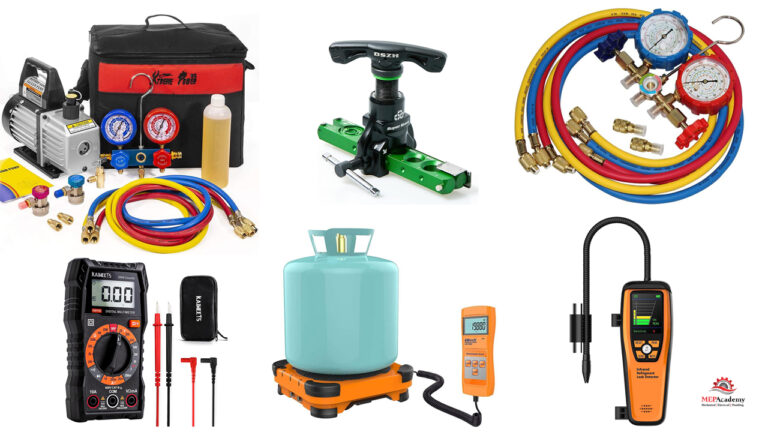
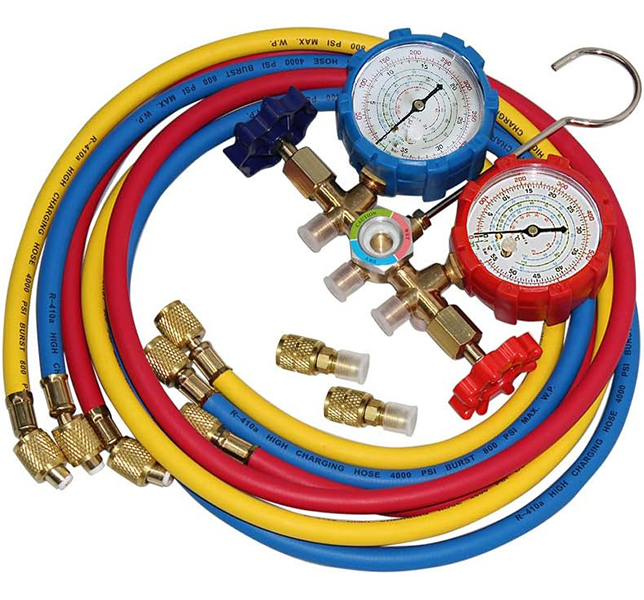
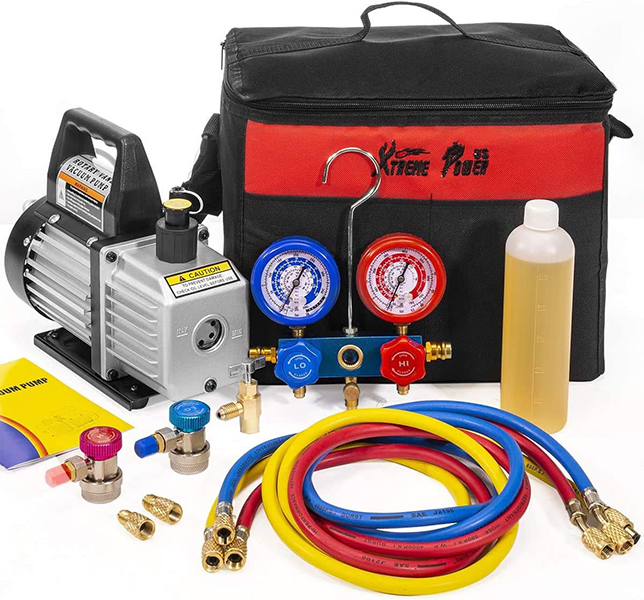
1. Manifold Gauge Set: Refrigeration mechanics rely on manifold gauge sets to simultaneously measure high and low side pressures in refrigeration systems. These sets are like the eyes of the technician, providing critical insights into the system’s condition. By providing real-time data, refrigerant gauges are essential for diagnosing issues and ensuring optimal system performance.
2. Vacuum Pump: A vacuum pump may seem unassuming, but its role is monumental. It evacuates air and moisture from refrigeration systems before the introduction of refrigerant, ensuring that the system operates efficiently without unwanted contaminants.
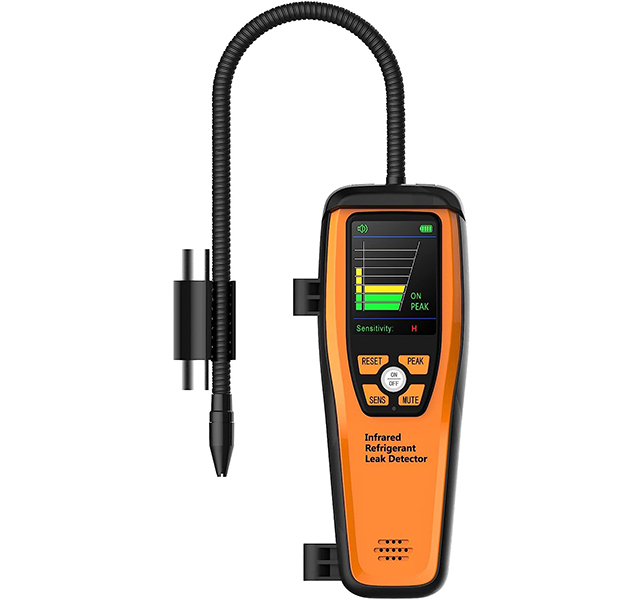
3. Leak Detection Tools: Finding elusive refrigerant leaks is a challenge without the right tools. Leak detection tools, including electronic detectors and bubble solutions, play a crucial role in environmental protection and system efficiency by pinpointing these leaks.
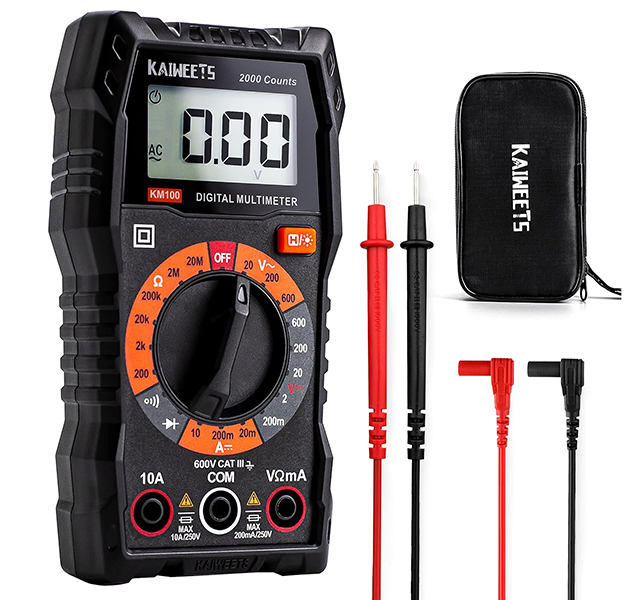
4. Digital Multimeter: An HVACR technician’s electrical diagnostic prowess relies heavily on a digital multimeter. This tool measures voltage, current, and resistance in electrical components, making it indispensable for troubleshooting electrical issues.
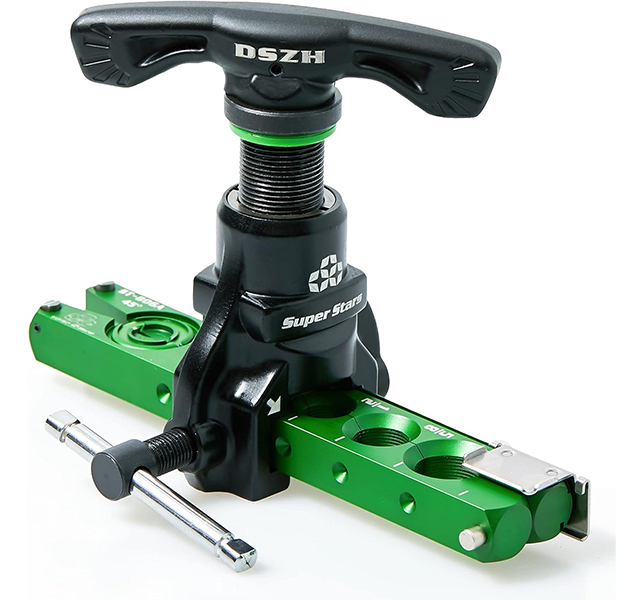
5. Pipe Cutters and Flaring Tools: Copper pipes are the lifeblood of many refrigeration systems, and pipe cutters and flaring tools ensure these essential components are accurately cut and shaped for the job.
6. Pipe Benders: The importance of smooth, kink-free bends in copper pipes cannot be overstated. Pipe benders are the secret to achieving these precise bends without compromising the integrity of the pipe.
7. Thermometers and Thermocouples: When it comes to temperature measurement, accuracy is key. Thermometers and thermocouples help technicians monitor temperatures at various points in the system, assisting in both diagnostics and cooling optimization.
8. Tubing Tools: Properly preparing tubing for installation is a fundamental step in any refrigeration project. Tubing tools, such as deburrers and reamers, ensure that tubing is ready for action.
9. Hex Key Set: Hexagonal screws and bolts are commonplace in refrigeration systems. A set of hex keys is a technician’s trusty companion for swiftly disassembling and reassembling components.
10. Oil Pump and Oil Injector: Lubricating oil is the lifeblood of compressors. Oil pumps and injectors ensure that the compressor functions optimally by delivering the right amount of lubrication.
11. Torque Wrench: Precision matters in refrigeration systems. Torque wrenches guarantee that bolts and nuts are tightened to precise specifications, safeguarding components and maintaining proper seals.
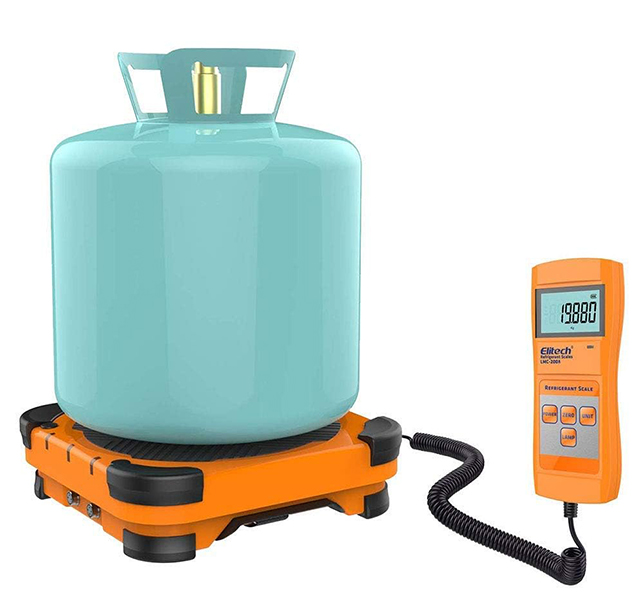
12. Digital Scale: In the intricate world of refrigeration, precision is paramount. This is where a digital scale steps in as a silent but indispensable partner for refrigeration mechanics. Why? Because refrigerants, lubricants, and various chemicals must be added to systems with meticulous accuracy.
A digital scale ensures that the right quantities are added, helping maintain the system’s efficiency, performance, and, perhaps most importantly, the environment. It’s not just about getting the job done; it’s about getting it done right, and that’s where the digital scale shines. So, let’s weigh in on the importance of this often-overlooked tool in the refrigeration technician’s toolkit.
These tools are the cornerstone of any refrigeration technician’s toolkit. Stay tuned as we dive deeper into each of these essential instruments, unveiling the art and science behind their usage, and why they’re indispensable for refrigeration technicians around the globe.
In this article we’ll answer a question that we get all the time. What filter, if any, can filter out the SARS-CoV-2 virus which leads to COVID-19, the disease? We’ll show you how efficient the different air filters are at filtering out various items for asthma and allergy sufferers, and the virus that leads to COVID-19.
If you prefer to watch the Video of this presentation, then scroll to the bottom or click on the following link. Air Filters vs COVID-19
The ability of an air filter to remove microorganism, dust, pollen, dust mites, mold spores, pet dander, bacteria and viruses is indicated by a numerical value. This number, which is indicated as a MERV rating, states the filter’s efficiency at removing various sizes of these items. We’ll show you which filters, if any, work the best to protect you from these potentially harmful organisms.
MERV Rating
Minimum Efficiency Reporting Values, or MERVs, indicate the filter’s ability to capture larger particles, those 0.3 microns and larger. The higher the numerical rating, the greater the air filter is at removing particles from the air stream. A MERV-13 is better than a MERV-11 filter at removing particles, but how good are they against bacteria and a very small virus that leads to COVID-19.
Virus and Bacteria Removal
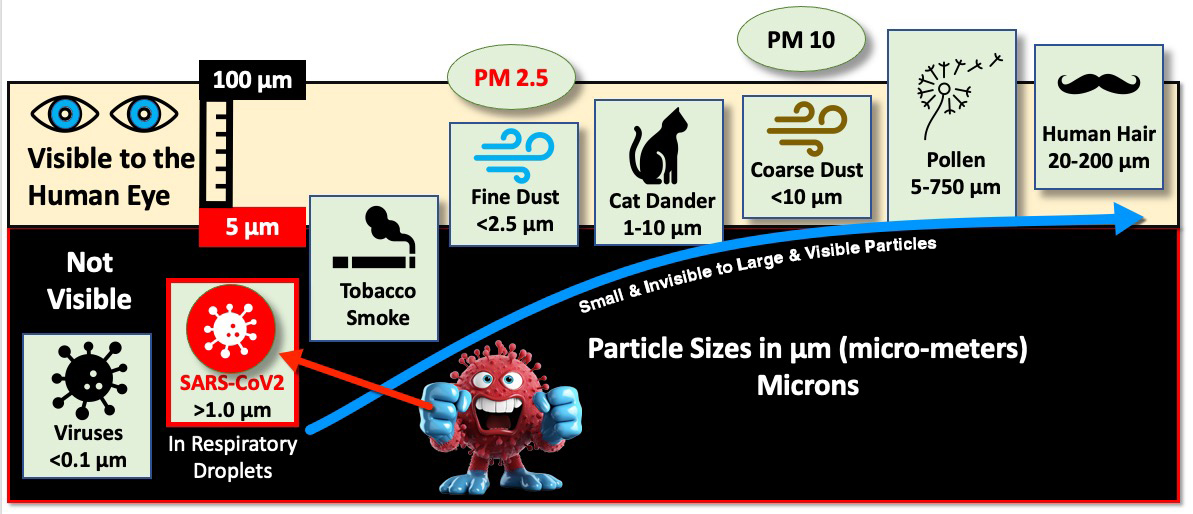
According to ASHRAE, research has shown that the particle size of the SARS-CoV-2 virus that leads to COVID-19 is around 0.1 microns. This is much smaller than what may be picked up by these air filters. As this chart shows, the virus lives in the invisible region, while others like dust, cat dander and human hair are visible to the human eye.
Sizes of various items shown in Microns. Invisible items in black area on chart, including the SARS-CoV-2 Virus.
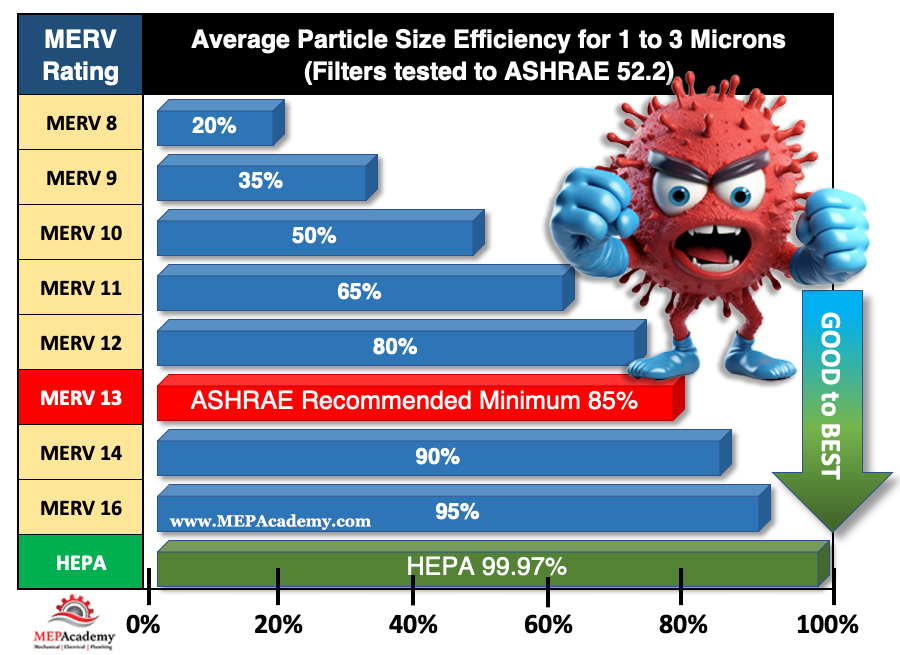
Luckily, the SARS-CoV-2 virus doesn’t travel through the air own its own. It rides on respiratory droplets and droplet nuclei (dried respiratory droplets) that are predominately 1 micron in size and larger. These filters have various efficiencies at capturing the viruses that are in the 1-to-3-micron range according to ASHRAE.
The SARS-CoV-2 virus riding a respiratory droplet in the 1 to 3 micron range
ASHRAE
As the chart shows, ASHRAE recommends using a minimum of a MERV 13 filter, which is at least 85% efficient at capturing particles in the 1 to 3-micron size range. A MERV 14 filter is at least 90% efficient at capturing those same particles. High-efficiency particulate air (HEPA) filters are even more efficient at filtering human-generated infectious aerosols.
MERV Rating and Air Filter Efficiency for Particle sizes 1 to 3 microns in size
By definition, a HEPA air filter must be at least 99.97% efficient at capturing particles 0.3 micron in size. This 0.3-micron particle approximates the most penetrating particle size (MPPS) through the filter. HEPA filters are even more efficient at capturing particles larger AND smaller than the MPPS. Thus, HEPA air filters are more than 99.97% efficient at capturing airborne viral particles associated with SARS-CoV-2 which leads to COVID-19.
HEPA filters can capture and trap microorganisms, including viruses and bacteria, helping to reduce the risk of respiratory infections. So, if possible, use the highest MERV rated air filter with your system, or get a portable HEPA air filter for your room or office. HEPA filters are the most efficient at capturing small microorganisms like the SARS-CoV-2 virus.
Where are HEPA Filters used?
HEPA air filters are used in residential, commercial, and industrial facilities. In homes there are portable types that can be moved from room to room, and others that can be installed in a central air conditioning system serving the whole house.
HEPA air filters are also used along with ULPA filters in cleanrooms, labs, and other spaces requiring a very clean environment.
Asthma and Allergy Management
For individuals with asthma, HEPA filters help reduce asthma triggers like airborne irritants and respiratory allergens. According to the Asthma and Allergy Foundation of America (AAFA), nearly 26 million people have asthma in the United States. There are 4.8 million children under the age of 18, and nearly 21 million adults suffering from asthma. On average, 10 people in the unites States die every day from asthma. A total of 3,517 deaths in 2021.
According to the AAFA over 100 million people each year in the United States experience various types of allergies. Allergies are the sixth leading cause of chronic illness in the U.S. HEPA filters are highly effective at removing allergens such as pollen, dust mites, and pet dander, providing relief to allergy sufferers.
Editorial Process:
Some of the links in this article may be affiliate links, which can provide compensation to the MEPAcademy at no cost to you if you decide to purchase. Our reviews and articles are made by an industry professional experienced in the engineering and construction of commercial buildings.
Are you paying too much for your HVAC equipment? How do you know if the quote you received for your equipment is a fair price? Do you have a method of comparing what you have paid for various HVAC equipment with what is being quoted currently?
Keeping track of the cost of HVAC Equipment allows you to quickly provide budgets and check the cost of equipment before you purchase. This database allows you to easily keep track of the most common HVAC equipment.
HVAC Equipment Cost Database
Using an HVAC Equipment cost database will save you a lot of money by avoiding the costly mistake of paying too much for equipment.
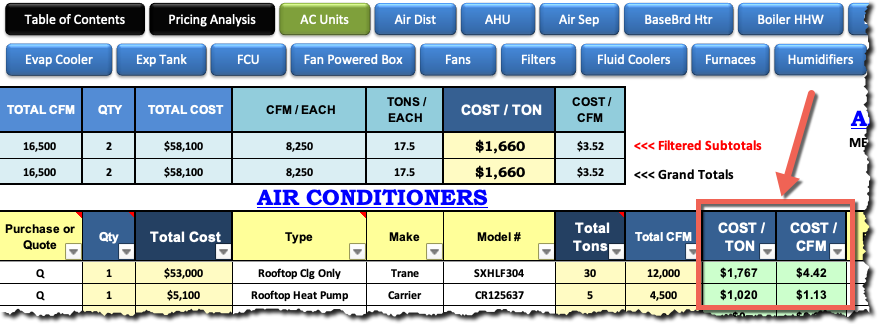
Air Conditioners in Historical Pricing HVAC Equipment Database
The HVAC Equipment Cost database keeps track of all your equipment quotes or purchases for easy reference and parametric checks, such as cost per ton ($/Ton), cost per CFM ($/CFM)
For an HVAC Piping Estimators the need for quick budgets for the installation of piping is best handled with a spreadsheet of different material types and sizes. Having an estimating software program can make this process a lot easier, as the material pricing is always up to date and can be entered into the spreadsheet quickly. You can get a copy of this spreadsheet to help you price piping fast and efficiently.
HVAC Piping Unit Pricing Calculator
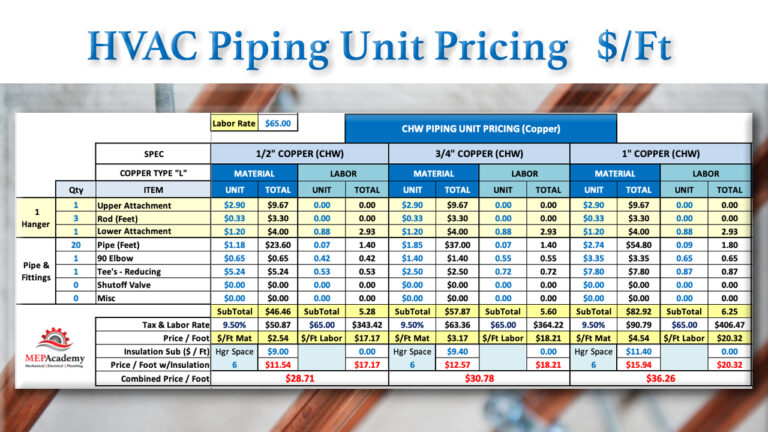
HVAC PIPING UNIT PRICING
Often the requirements of the RFP or bidding instructions will call for the price per foot to install piping beyond that which is required by the contract drawings. Such pricing maybe used for change-orders. Having these numbers available and updated often also gives you a quick reference for budgeting projects. It’s good to know when doing job site comparisons of different piping options or during discussions with engineering, what the cost is for the various piping sizes and types of materials.
HVAC Piping Unit Pricing Calculator for Copper and Carbon Steel from 1/2″ to 14″
COST PER FOOT
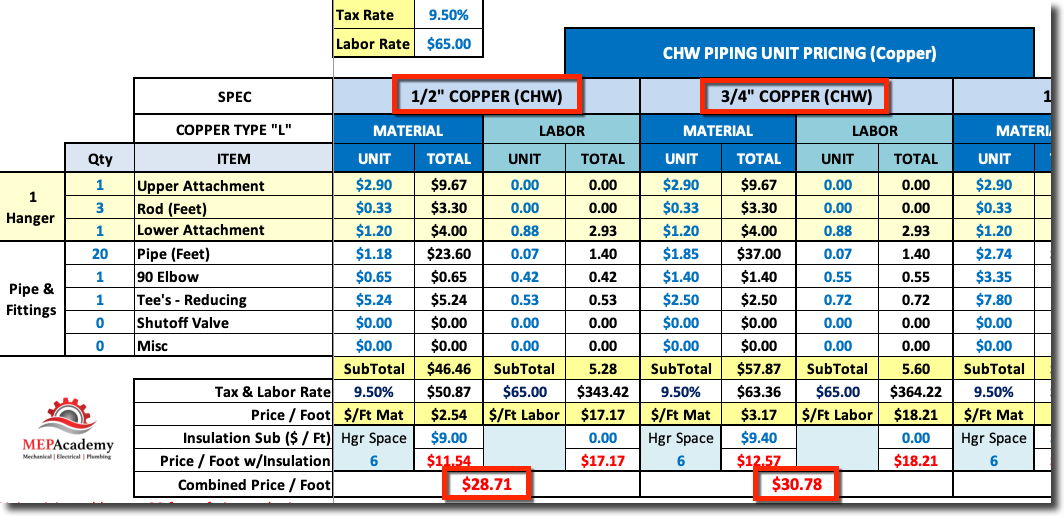
The cost per foot for the installation of piping needs to include fittings and hangers prorated into the value. It’s best to look at a standard length of pipe and then figure that you will have a Tee and 90 degree elbow in that length.
So for example, using twenty feet of copper water pipe with a Tee and 90 degree elbow plus the hangers to build a unit price would represent a field condition of a fitting every ten feet.
For higher density projects like Hospitals you could put more fittings in your unit pricing. Total those cost up and then divide by 20 to derive at a cost per foot for that particular size and material type.
20 feet of pipe + 2 Fittings + 3 Hangers / 20 = Cost per Foot
If the piping is insulated, you can also put the values in for insulation.
The Estimating Wizard provides two spreadsheets for tracking unit pricing, one for HVAC Piping and the other for Plumbing piping. Get a copy and start tracking your cost per foot, or be prepared to give a quick budget based on your knowledge from your spreadsheet of unit prices. Watch the video below to see how quick and easy it is to track the cost per foot for various sizes and material types.
MEP Academy HVAC Piping Unit Pricing Spreadsheet
The MEP Academy provides a spreadsheet that makes calculating unit pricing simple. The spreadsheet is available by following this link, HVAC Piping Unit Pricing Spreadsheet
HVAC Piping Unit Pricing Calculator Example
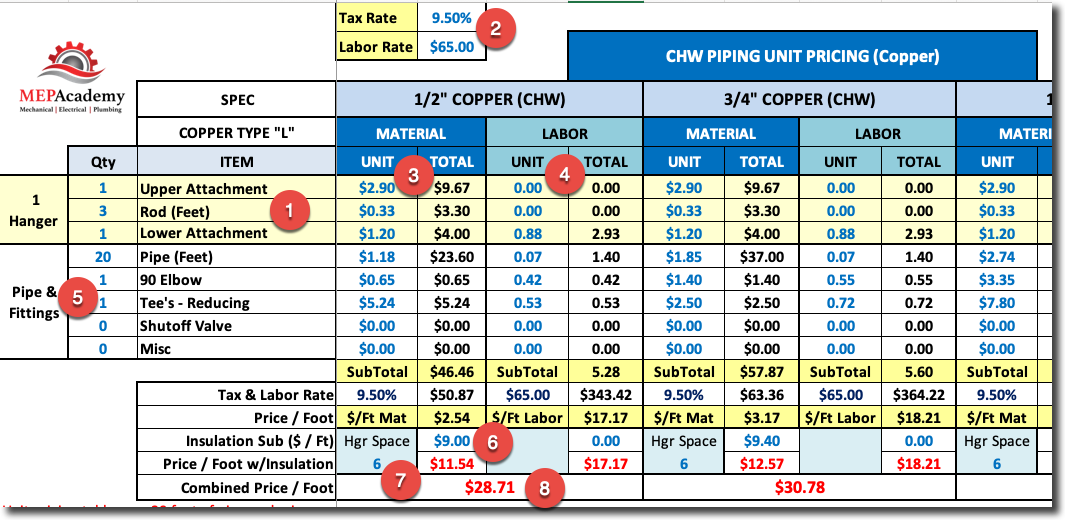
In the screenshot above there is a place for you to build your hanger requirements (#1), and a place to put your tax rate and hourly labor rate (#2).
For each size of pipe and material type you would insert the unit cost for Material (#3) and Labor (#4).
Under item (#5) you would build your typical run of pipe and enter the quantity of fittings you might expect for the type of building and system. You would add whatever you think will be required for every so many feet of pipe. In the example above we are showing that for every 20 feet of pipe you will have 1 Elbow and 1 Reducing Tee.
Under item (#6) you would add the cost per lineal foot for insulation if required. You could also look at insulation as a separate value and leave the pipe bare.
Line item (#7) is where you indicate the hanger spacing, and for each hanger you defined under item (#1) you will get the quantity as defined by the linear feet in item (#5) divided by your hanger spacing, which will affect your cost.
Line item (#8) is the calculated cost per linear foot of piping for that size and material type of pipe.
Summary Sheet
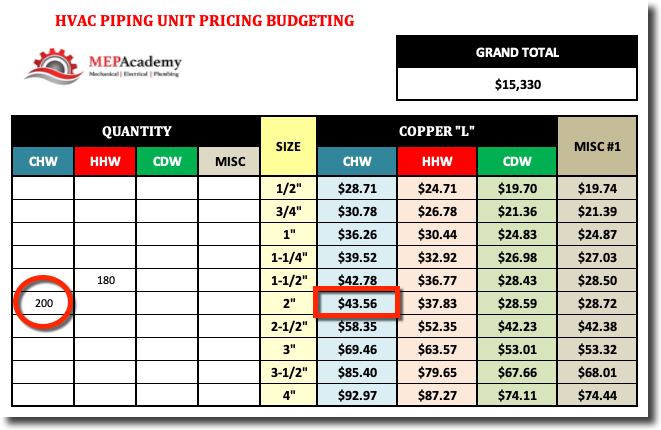
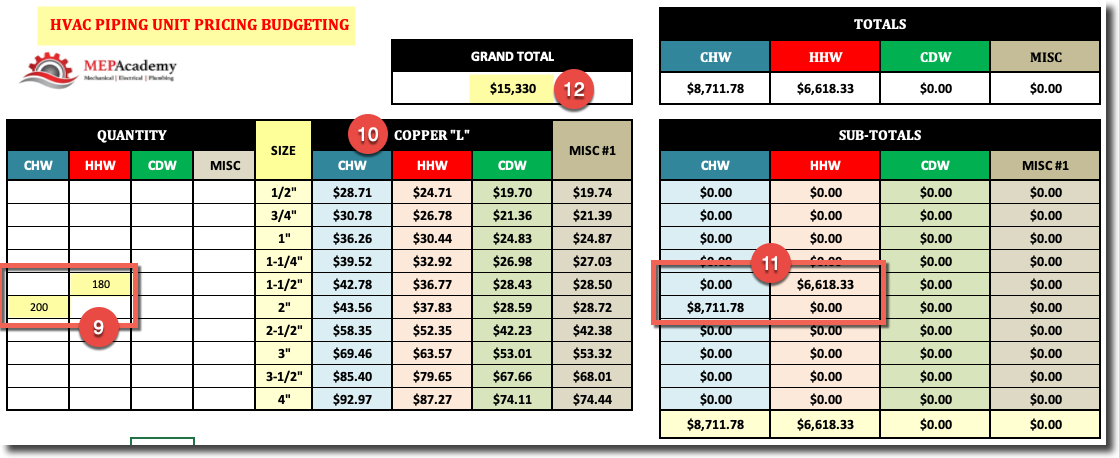
After you have all your unit pricing information inputted into the spreadsheet, all you have to do to get a budget for installing piping is to enter the quantity of piping (#9) for each size and material type (#10). The system will automatically calculate the cost (#11) to install that run of piping based on your unit pricing data. The total cost will be shown at the top of the spreadsheet (#12).
The proper sizing and layout of condensate drain lines is important for the protection of property and for the proper functioning of the air conditioning equipment.
If you prefer to watch our YouTube version of this presentation, scroll to the bottom.
Condensate Drain Pipe Sizing
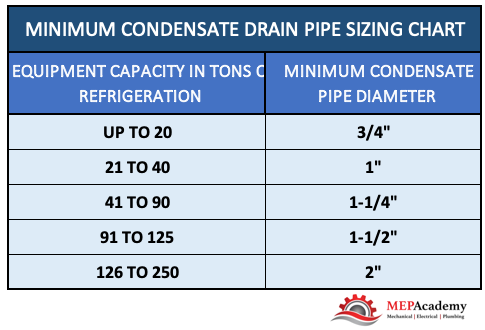
The size required for the condensate pipe is dictated by the local code. Enclosed you will find the requirements for many local codes, but be sure to check your code for your local requirements. If the outlet size of the equipment’s condensate drain is larger than what’s shown in this chart then your required to use the larger outlet size.
Minimum Condensate Drain Pipe Sizing Chart
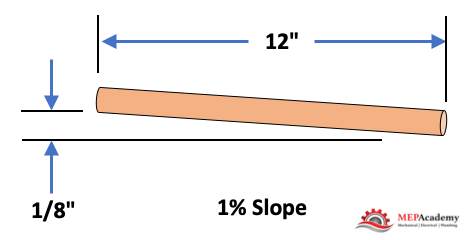
Slope to be at least 1/8” per foot or 1 percent, that is for every 12” horizontally there must be at least an 1/8” drop vertically.
Condensate drain piping to slope a minimum of 1/8″ per every 12″ horizontal
Attics or Furred Spaces
If the Air Conditioner is suspended above an inaccessible ceiling, such as a gypsum board ceiling or attic space then you will need to provide a means for protecting the building elements from the overflow of the primary drain and for indicating that there is a leak.
Also, drain pans that are poorly drained can cause water to stay in the pan risking the possibility of algae and bacteria growth. Below are some possible solutions, but as always check your local code for the approved method.
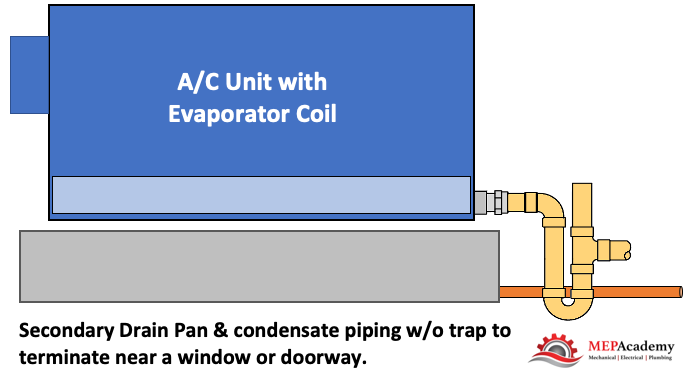
Option 1 – Secondary drain pan with drain piping. This would hang below the Air Conditioning unit in case the A/C units primary pan overflowed. Also, there is a requirement to provide secondary drain piping to a point of termination that would provide notification to the occupants that there is a leak, such as terminating above a window or doorway.
Option 1 – Secondary drain pan with piping terminating in observable location
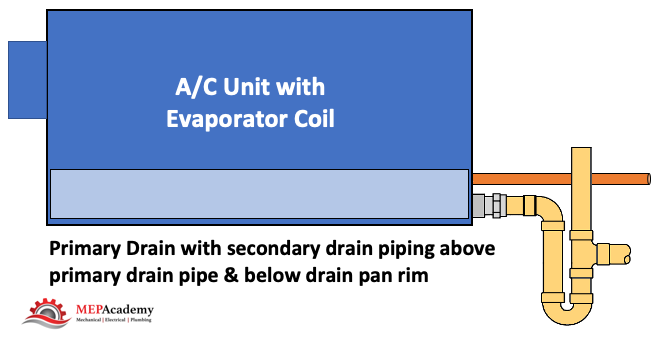
Option 2 – An additional drain pipe connection that sits above the primary drain connection and whereby the secondary drain piping terminates in a location to alert the occupants of the clogged primary drain.
Option 2 – Secondary drain piping connection to primary drain pan
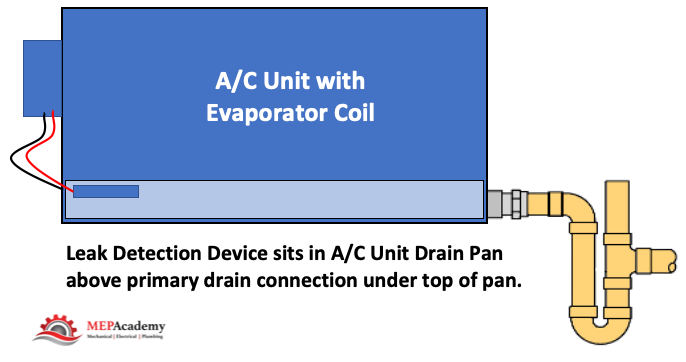
Option 3 – Leak detection device that automatically shuts down the Air Conditioner if the primary drain becomes clogged.
Option 3 – Primary drain with leak detection device
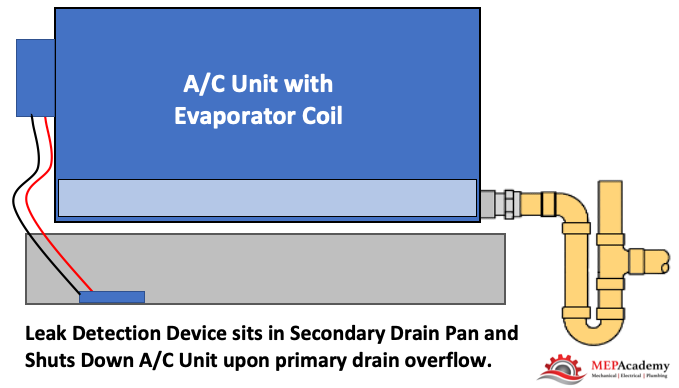
Option 4 – Secondary drain pan with leak detection, located beneath the coil that shuts down the unit upon a leak.
Option 4 – Secondary drain pan with leak detection
The additional drain pan or drain pan connection shall be provided with a drain pipe that will determinate in an observable area, such as in front a window or above a doorway, and be of a size not less than 3/4”. Secondary drain pan shall not be less than 1-1/2” in height and extend 3” wider on each side of the coil or AC unit.
Secondary drain piping terminating above window. Pipe doesn’t have to be visible as shown.
Drain Termination
Where can and can’t you terminate the air conditioners condensate drain piping? There are several options where you can terminate the condensate drain line;
Indirect Drain
Condensate Pump to Indirect Drain
Drywell
Leach pits
Landscaped areas that are properly designed to handle the volume of condensate
To Properly designed stormwater treatment systems.
Indirect Drain
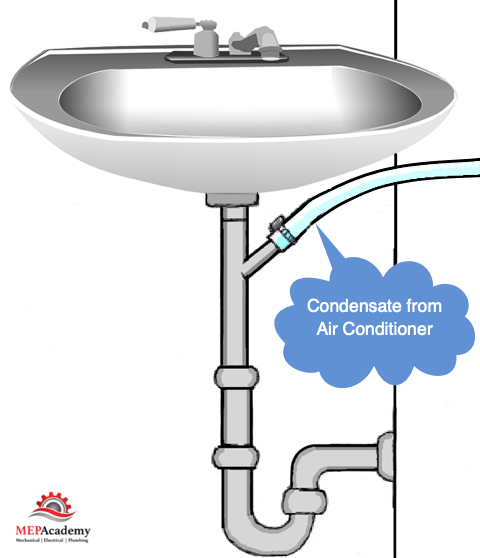
Lavatory tailpiece in the same tenant space as the air conditioner
Laundry standpipe
Janitors Sink
Inlet of Bathtub Overflow – Must be accessible
Collect and send to cooling tower (See description below)
Cooling Coil condensate to sink tailpiece.
The connection to a plumbing fixtures tailpiece has to be made within the same tenant space as the air conditioner cooling coil that is generating the condensate.
Drywell
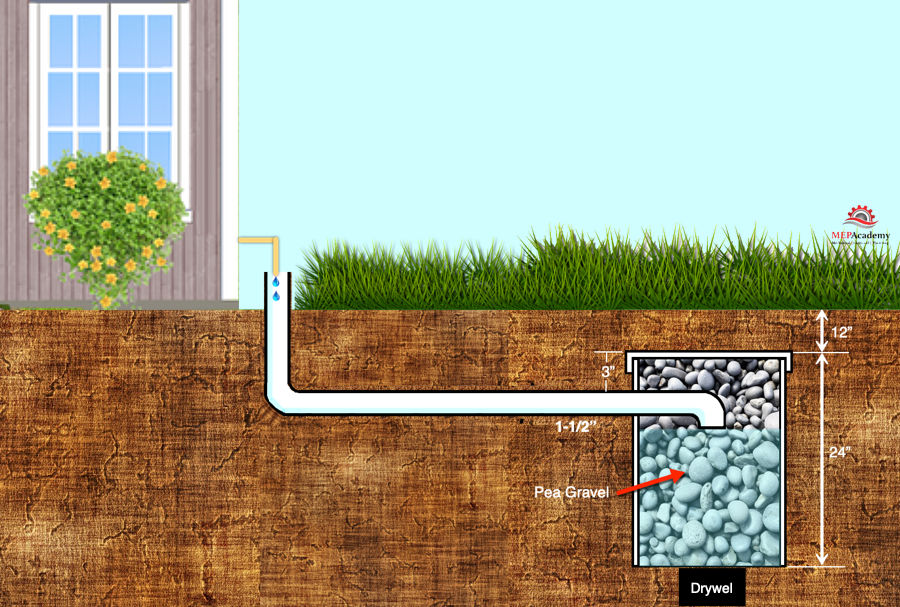
A drywell can be used for the termination of your air conditioners condensate drain. Check your local code for the specifics, but generally it includes some or all of the following depending on whether it’s for residential or a commercial project:
A minimum size hole, such as 2 foot by 2 foot by 3 feet deep, or a round hole such as 12” diameter by 3 feet deep.
A minimum of 6” of soil or concrete shall provide cover above the rocks
Some form of barrier between the soil and the top of the drywell where the rock begins, such as building paper or plastic
Drywell to be filled with gravel or crushed rock, often with a stated minimum size rock such as 1 inch diameter
The termination of the condensate drain pipe shall connect indirectly to the drywell drain pipe.
The drywell drain pipe to be a minimum of 1-1/2” PVC or other approved material.
Drywell to be at least three feet away from the building structure or any footings.
Drywall for Air Conditioner Cooling Coil Condensate
There are various methods of providing drywells depending on the local code. There are prefabricated drywells that can be used and ones that are made by using a large diameter piece of PVC pipe or similar material.
Some codes will require you to collect the condensate from cooling coil drain pans and return it to the cooling tower if the equipment is served by a cooling tower and the total combined capacity of the HVAC cooling coils exceeds a certain amount like 65,000 btu/hr.
This is a water conservation measure, and there are some exceptions to this requirement, such as if the total capacity of the AC Equipment cooling coils are less than 10% of the total capacity of the cooling tower, or if the location of those AC Cooling coils are in a remote location, far from the tower.
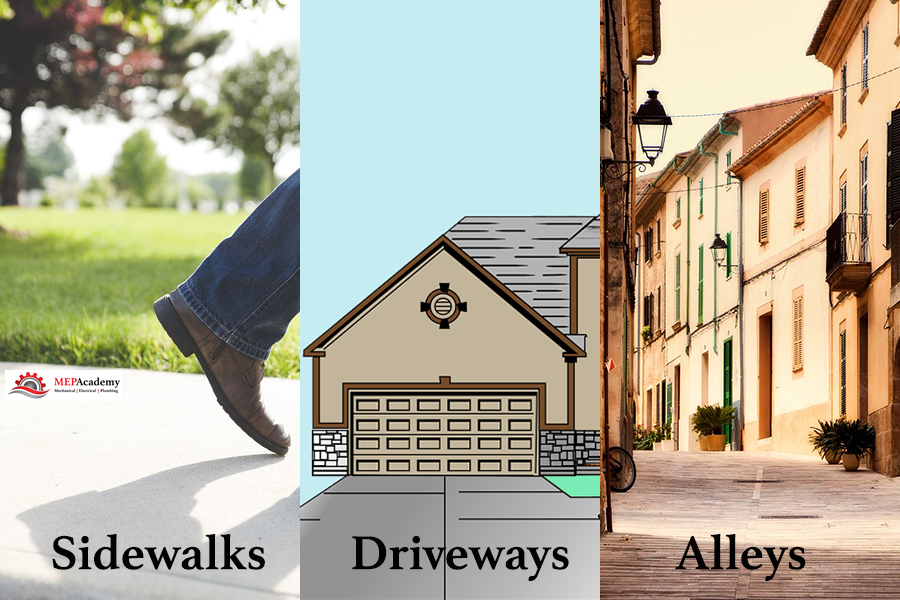
Some locations where you can’t terminate condensate;
Public ways
Sidewalks
Driveways
Alleys
No termination of condensate on public area ways
Excluded from Code Requirements
Excluded from these codes are non-condensing type of equipment like radiant cooling panels that are designed to prevent condensate from occurring by keeping the temperature of the chilled water above the dew point temperature/vapor pressure of the surrounding air. These are system designed to operate in sensible cooling only modes.
Piping Material
The material types that can be used for condensate drain piping varies by jurisdiction but the most commonly cited materials are:
Copper
PVC – DWV
CPVC
ABS – DWV
Polyethylene
Galvanized steel
Cast iron.
Also the use of short radius 90-degree elbows are often prohibited. You can normally use standard fittings until you reach a certain size at which point you might be required to use drainage pattern fittings (DWV)
Traps
Traps are to be installed as required per the manufactures recommendation. No traps are required on the secondary drain pan, this is to allow immediate notification that the primary drain has failed.
Cleanouts
Cleanouts are required in case of plugged drain pipes. Provide as required to prevent the need to cut drain pipes for unplugging. Some of the following maybe used for cleanouts if approved by your local code authority;
Plugged tees
Union connections
Short clamped hoses at the unit (see image above)
When you have more than one air conditioning unit condensate tied to a main condensate pipe, then every change of direction shall have some method of cleanout. Check your local code as this maybe a requirement for even a single air conditioners condensate piping.
Condensate Pumps
Condensate pumps can be used to elevate the condensate vertically to a point where it will then discharge into a code approved gravity sloping condensate drain line. The condensate pump should be interlocked with the Air Conditioning Unit to prevent its operations if the condensate pump is inoperable.
Please remember that code requirements are always changing, so check for the most current code in your area at the time of design and installation. Or ask an inspector for the current installation practice.
Having an MEP Academy Estimating Spreadsheet that automates portions of your estimates, will save you valuable time that could be used to make more sales. All aspects of the cost of furnishing and installing an HVAC and/or a Plumbing system is contained in one spreadsheet made specifically for the MEP industry. For plumbing only see below.
For a Plumbing only Spreadsheet, use this Commercial & Residential Version. Plumbing Only. For a simple Residential HVAC & Plumbing Spreadsheet. Residential version.
Dashboard
The Main Dashboard provides you with all the information you need to make a quick decision on whether to make further adjustments, or if one of the metrics looks out of place based on historical data. The Dashboard gives you a quick overview of all that is going on within the Estimating Spreadsheet.
Estimating Dashboard within the MEP Academy Estimating Spreadsheet
Your MEP Academy Estimating Spreadsheet needs to be able to handle rental equipment, general conditions, subcontractors, piping and plumbing takeoffs, sheet metal, labor rate tables with crew mix capabilities, , and a bid summary. Each sheet in the estimating spreadsheet automatically calculates the values you enter, showing you a new total bid amount.
Will cover portions of the MEP AcademyEstimating Spreadsheet starting at the back of the Excel spreadsheet and working our way toward the front summary page last.
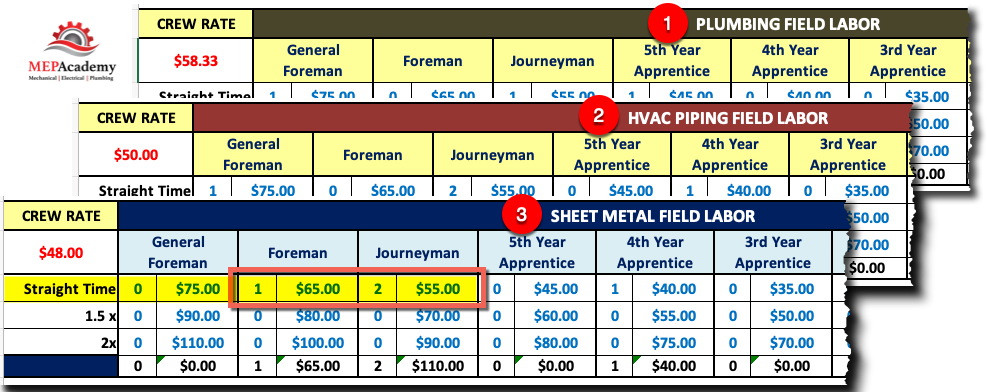
Choose your crew mix based on the level of experience and the different pay scales based on each project. Pick any combination and quantity of tradesman based on the requirements of the project.
Labor Rates and Crew Size within the MEP Academy Estimating Spreadsheet
There is a separate crew labor rate for HVAC Piping Shop & Field, Sheet Metal Shop & Field, and Plumbing.
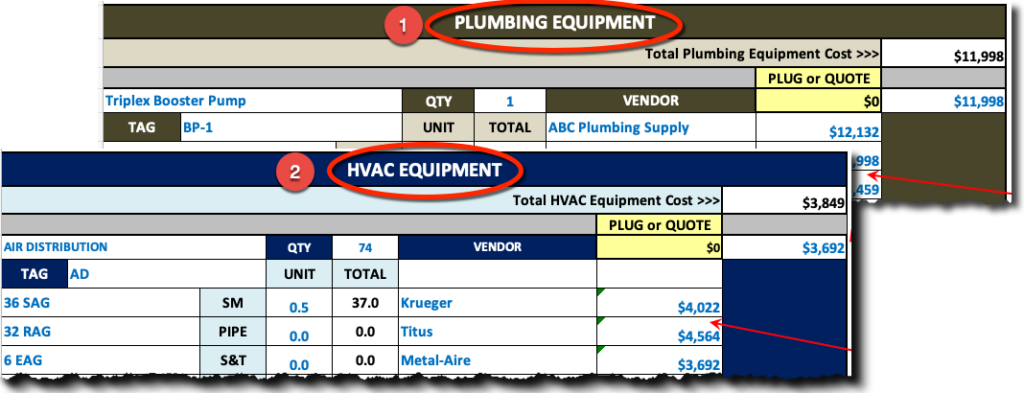
Enter the project equipment price and labor to rig the HVAC and Plumbing equipment into place. Compare supplier pricing easily side by side. The MEP Academy Estimating Spreadsheet automatically selects the lowest bidder but lets you override that decision.
HVAC Equipment page within the Estimating SpreadsheetHVAC & Plumbing Equipment Sheets
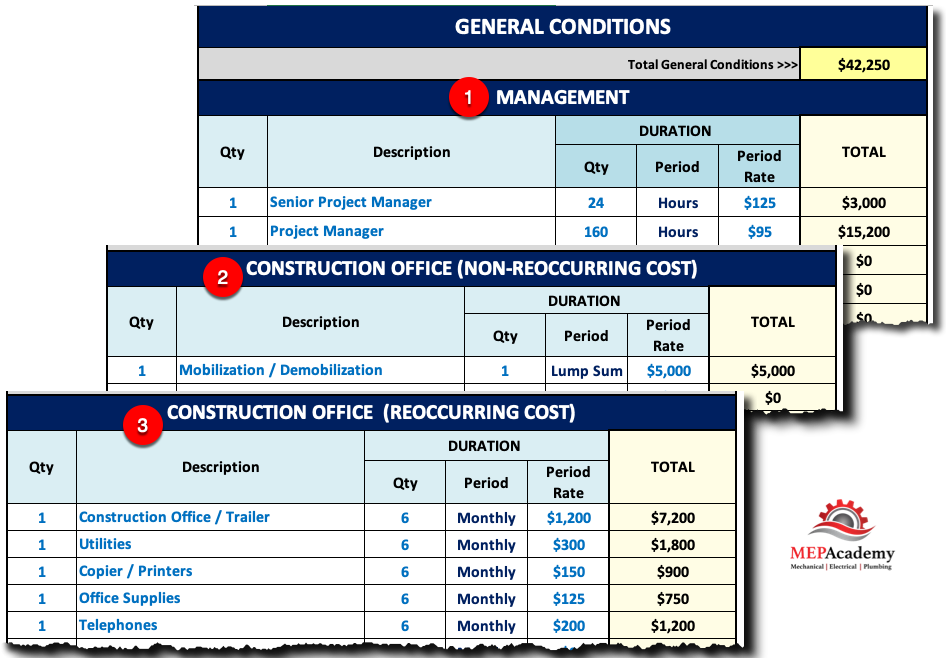
Do you need a jobsite trailer or onsite management? Enter the quantity and level of the staff required to run the project, whether one person or dozens. Set the quantity and duration of each general condition, along with the rate. General Conditions is broken down into three sections as follows: #1 – Management, #2 – Construction Office (Non-Reoccurring Expenses), and #3 – Construction Office (Reoccurring Expenses).
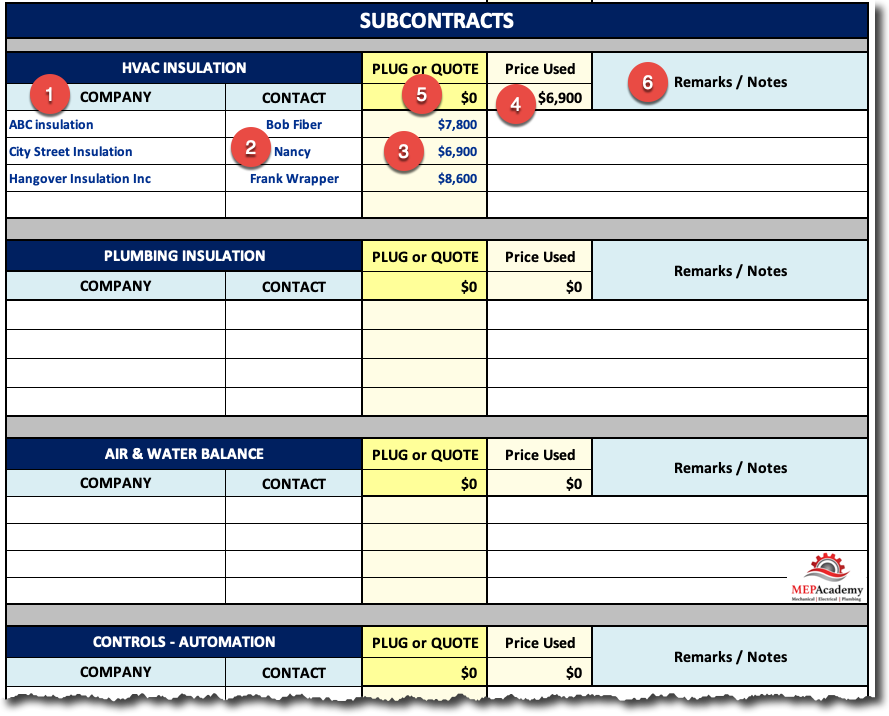
HVAC & Plumbing contractors often subcontract out for Air & Water Balance, Sheet Metal & Piping Insulation, Water Treatment, Building Automation, Excavation and other specialty trades that they don’t self-perform. This spreadsheet was made especially for the HVAC & Plumbing contractor and their most often used subcontractors.
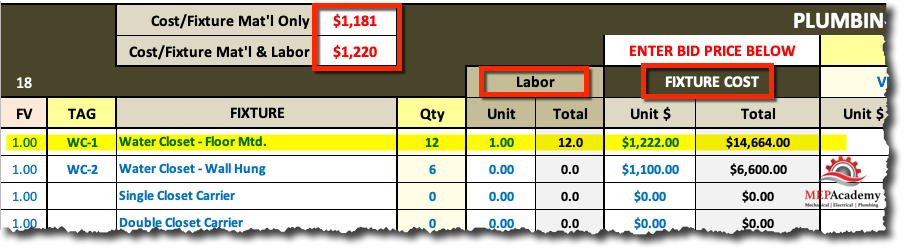
For those contractors that do plumbing the following Plumbing Fixture sheet will give you a place to record your vendors quotes and the labor it takes to install each type of fixture. What is also revealed is the overall cost per fixture.
Plumbing Fixtures page within the Estimating Spreadsheet
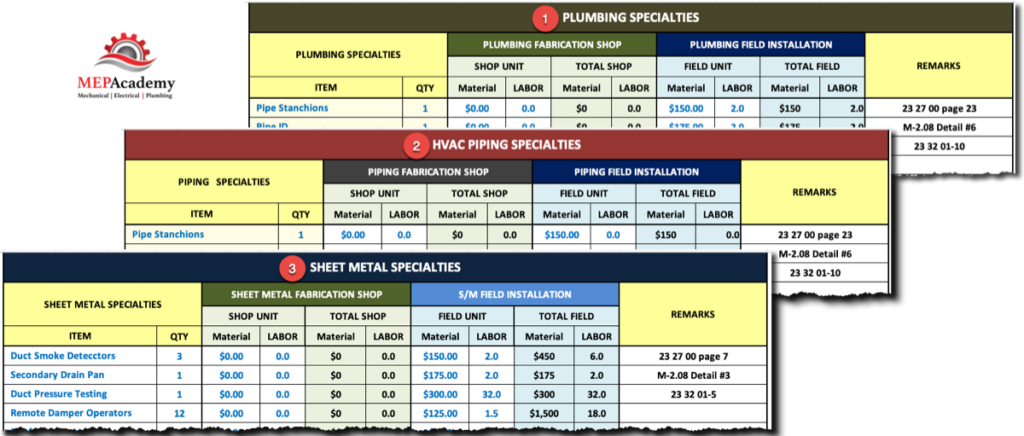
Each trade has a specialty sheet for those items that aren’t considered equipment or a fixture, but for which there is a cost impact. The MEP Academy Estimating Spreadsheet includes Sheet Metal, HVAC Piping & Plumbing Specialty sheets.
HVAC and Plumbing Specialty Pages within the Estimating SpreadsheetSpecialty Sheets in Estimate Spreadsheet
Material & Labor Summary Sheets
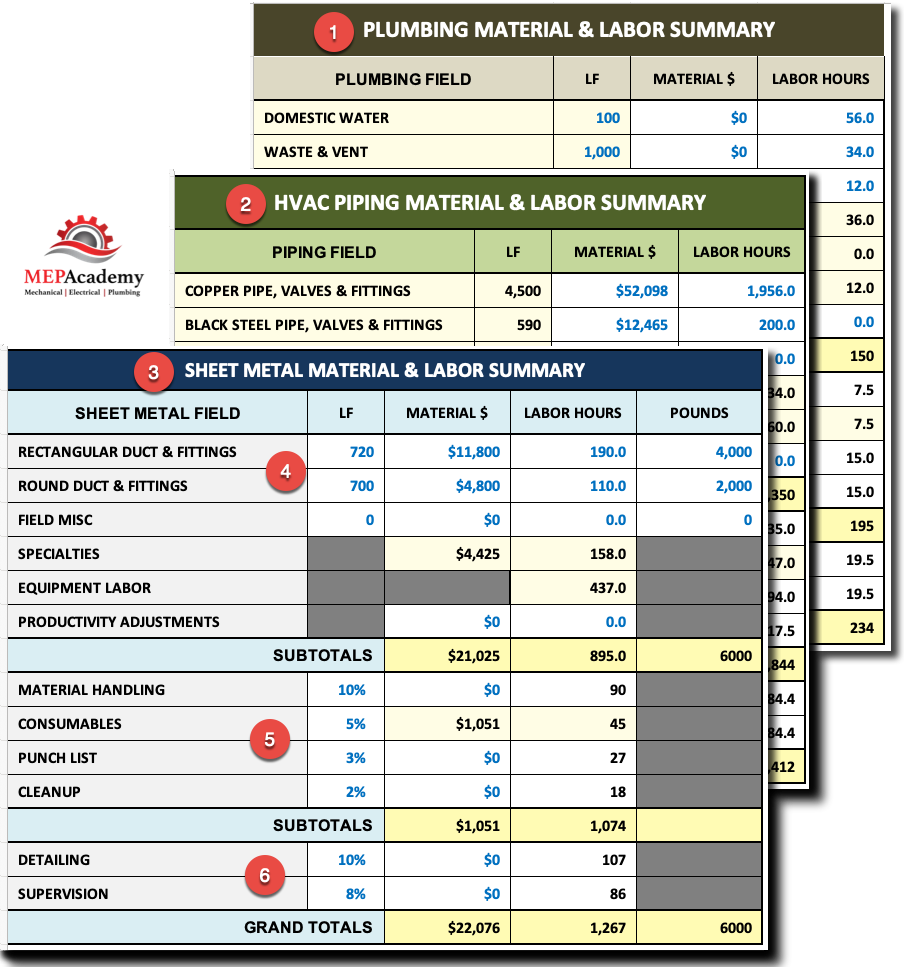
You will find a Sheet Metal, HVAC Piping & Plumbing material & labor summary sheets where all of the other specialty sheets are summarized for your review and last minute edits. Each sheet will be divided between field & shop fabrication work. The first section covers the field installation items.
Sheet Metal Material and Labor Summary – Estimating Spreadsheet
Each of the field labor summary sheets contain a row to add for the following
Material Handling
Consumables
Punch List
Cleanup
Detailing
Supervision
Shop Fabrication Summary Section
For those of you that have a fabrication shop, there is a section to add material and labor.
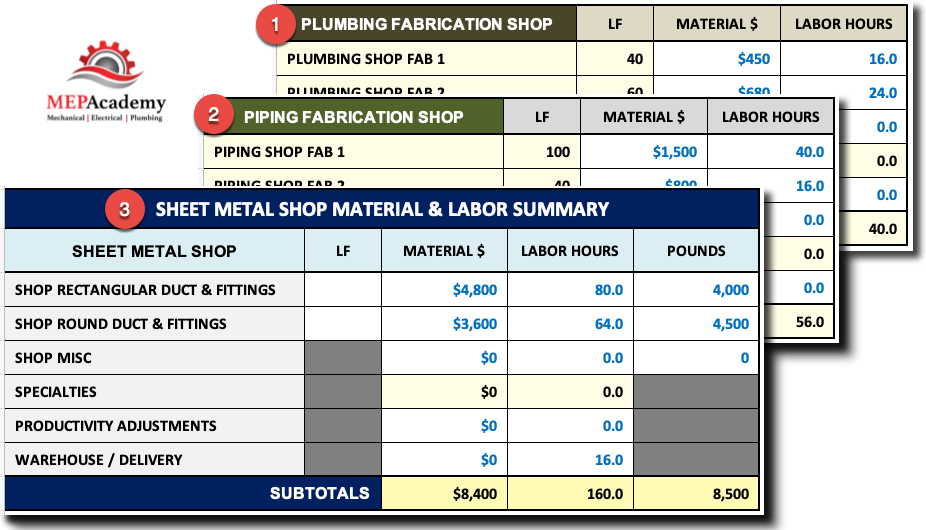
Shop Fabrication Summary
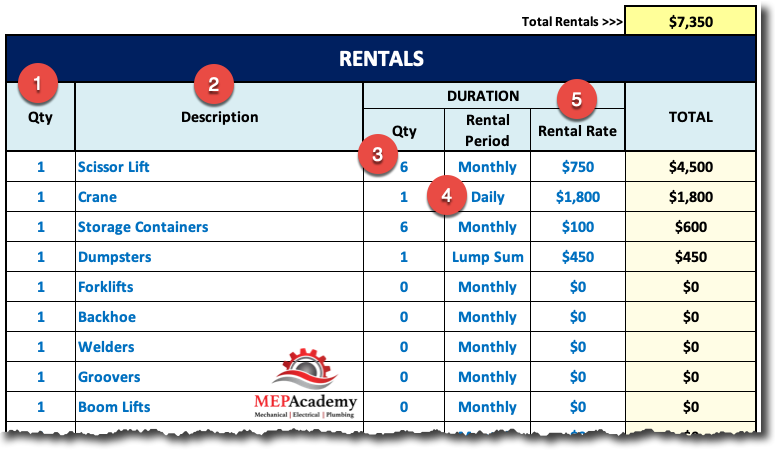
Rentals
For those HVAC air conditioning and Plumbing projects that require a crane, fork lift, scissor lift or any other equipment that you don’t own but will be required on the project. Having a spreadsheet that maintains a list of the most common equipment you normally rent along with their rental rate will save you time and money while avoiding having to call for pricing on every job.
Rental Sheet in Estimating Spreadsheet
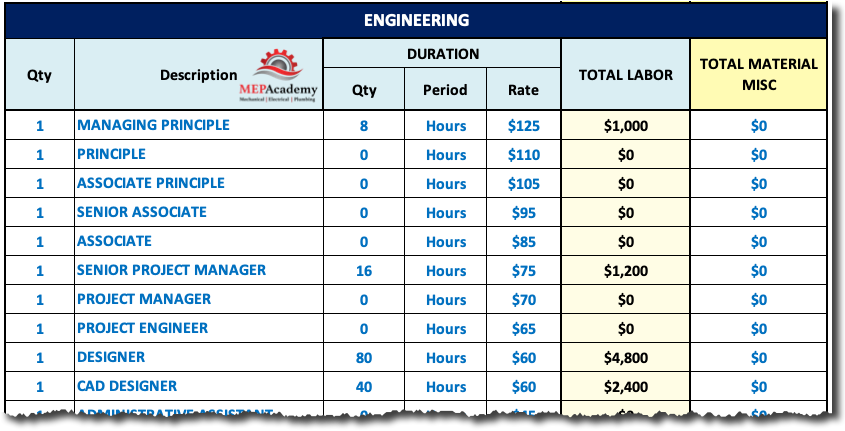
Engineering
If you do your own design then you should have a sheet of each of the personnel responsible for spending time on the engineering task. If you’re doing design/build work, but don’t do the engineering yourself, but hire a third party, then you should add some engineering review time. It’s your responsibility to manage your third-party engineer to make sure they design within your cost parameters.
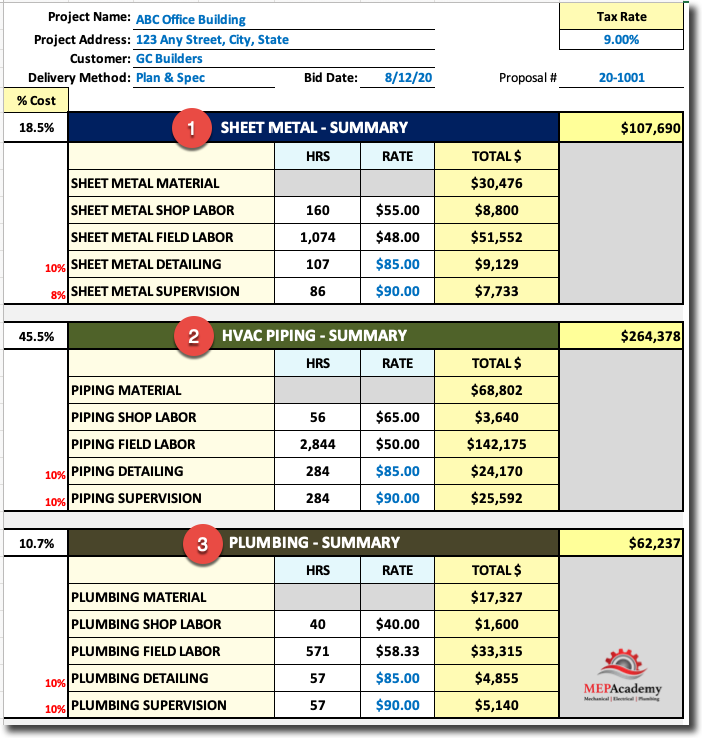
All of your estimates are summarized on the last tab of the MEP Academy Estimating Spreadsheet for easy review. You can quickly scan each of the categories to see where all the project cost has shown up. There is the labor and material summary for HVAC Sheet Metal, HVAC Piping, and Plumbing and another section for Subcontractors, General Conditions, Rentals, etc.
Estimating Spreadsheet Summary PageMEP Academy Estimating Spreadsheet Summary
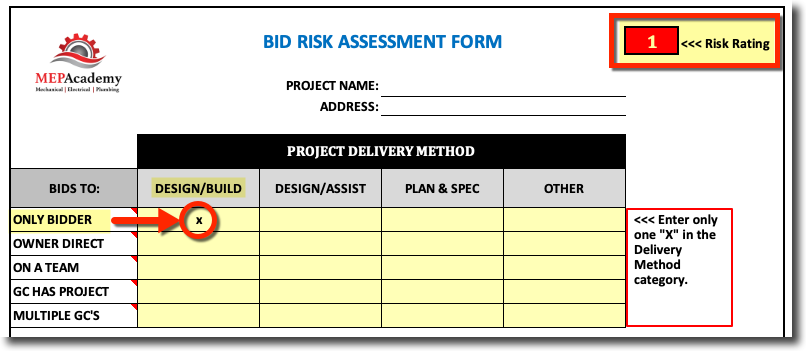
The MEP Academy Estimating Spreadsheet contains a bid risk assessment form that rates the success of winning any particular project that you are contemplating pursuing. The risk assessment form will help you determine if the project is worth bidding based on a set of questions that rate your answers.
Bid Risk Assessment
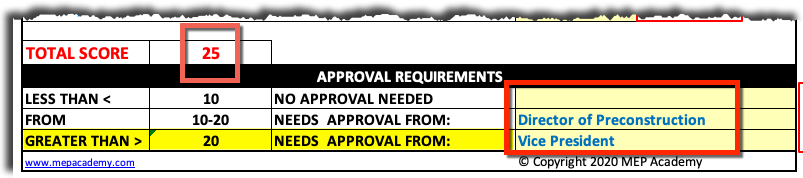
The answers to these questions will give you a score from which you can use to see how the project rates on a scale of risk and reward. The total risk assessment score will also inform you which level of approval is required within your company depending on how you rate your risk values as the example shown below. The total score is 25, which according to this contractor would require the Vice President to sign-off on the project or approve the decision to pursue bidding on the project.
The MEP Academy Estimating Spreadsheet is used to gather all the information for estimating a project, putting it into a format where you can make quick adjustments and decisions while the spreadsheet gives you an immediate update on the price.
Purchase this spreadsheet at its currently reduced price of ONLY $245.00, which usually sells for $599.00
Watch the YouTube video below to see the MEP Academy Estimating Spreadsheet in action.
HVAC technicians sometimes sound like they’re speaking another language. They talk about starving coils, hunting valves, squirrel cages, and ghost flow. These HVAC terms describe real equipment and operating conditions, but their meanings aren’t always obvious to beginners.
This guide explains 24 common HVAC slang expressions and technical terms in plain English. Whether you’re an apprentice, building owner, estimator, or someone starting an HVAC career, these short definitions will help you follow the conversation.
Watch the video below for funny visual interpretations followed by the actual HVAC meanings.
1. What Is a Squirrel Cage in HVAC?
A squirrel cage is the nickname for a cylindrical centrifugal blower wheel. Its closely spaced blades resemble an animal’s exercise wheel.
Driven by a motor, the blower moves air through a furnace, air handler, or duct system. Dirt buildup on the wheel can reduce its performance.
2. What Are Duct Socks?
Duct socks are fabric ducts that distribute conditioned air through their surfaces or engineered openings.
Duct socks, also called fabric ducts or air socks, distribute conditioned air through fabric surfaces or engineered openings.
These lightweight alternatives to metal air-distribution ducts are often suspended from ceilings in gyms, warehouses, and other large spaces.
3. What Is Pookie in HVAC?
Pookie is a trade nickname for duct mastic used to seal joints and seams against air leakage.
Pookie is slang for duct mastic, a sealant applied to duct joints and seams to reduce air leakage.
Technicians brush or spread it over properly prepared connections. Suitable products and application methods depend on the duct material and installation requirements.
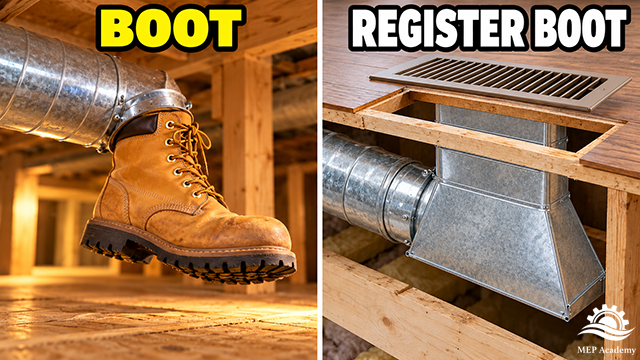
4. What Is a Duct Boot?
A duct boot connects a duct run to a register opening in a floor, wall, or ceiling.
A duct boot, or register boot, connects a duct run to a register opening in a floor, wall, or ceiling.
The fitting transitions between the duct and the shape of the air outlet. A register installed over the opening delivers air into the room.
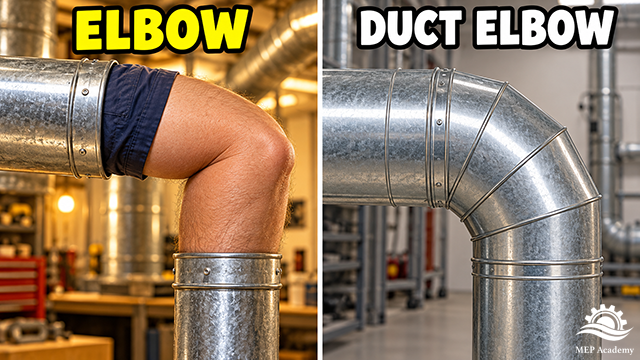
5. What Is an HVAC Elbow?
A duct elbow changes airflow direction; its geometry affects resistance and pressure loss.
An elbow is a duct or pipe fitting that changes the direction of airflow or fluid flow.
Common examples include 45-degree and 90-degree elbows. Their shape and construction affect resistance, pressure loss, and sometimes noise.
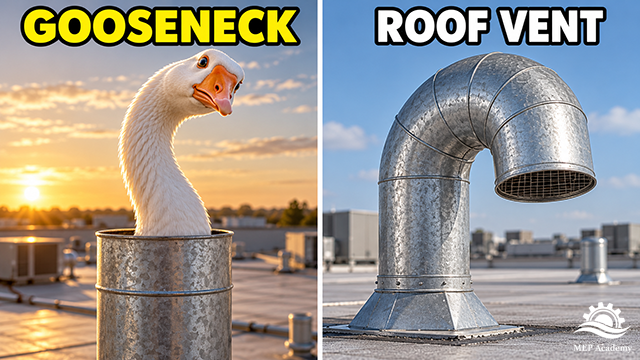
6. What Is a Gooseneck Vent?
A rooftop gooseneck turns the vent opening downward to help limit rain entry.
A gooseneck is a curved duct or pipe arrangement named for its resemblance to a goose’s neck.
A rooftop gooseneck vent commonly turns its opening downward to help limit rain entry. Its size, clearance, and screening depend on the application.
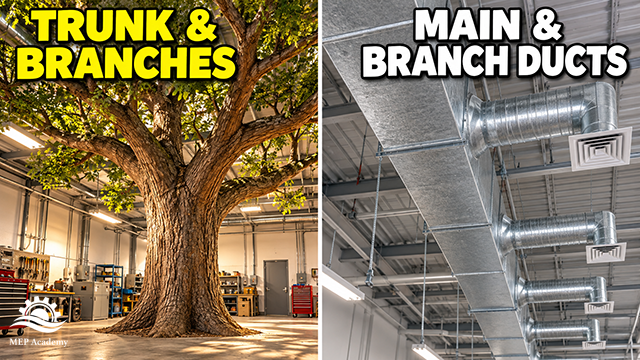
7. What Are Trunk and Branch Ducts?
The trunk is the main distribution duct; branch ducts carry air to individual areas.
A trunk duct is a main duct that carries air through a distribution system. Branch ducts connect to the trunk and serve individual rooms or areas.
The names resemble a tree: one large trunk divides into smaller branches. Proper sizing helps deliver the intended airflow throughout the building.
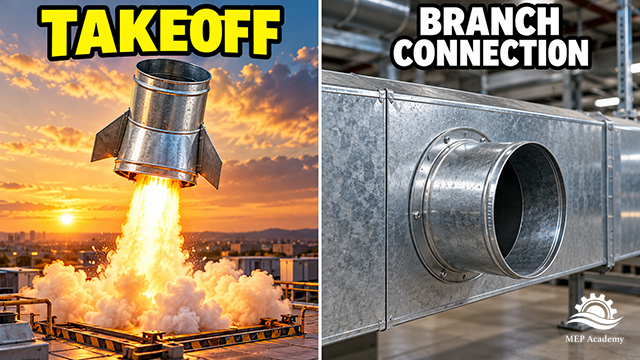
8. What Is a Duct Takeoff?
A takeoff provides a connection between a main duct or plenum and a branch duct.
A duct takeoff is a fitting that connects a branch duct to a larger main duct or plenum.
It provides a path for part of the airflow to enter the branch. Takeoff design affects how easily air enters that connection.
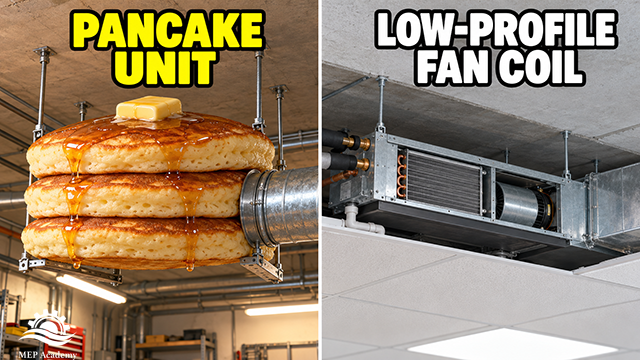
9. What Is a Pancake Unit?
Pancake unit is an informal name for shallow horizontal HVAC equipment designed for limited ceiling space.
A pancake unit is an informal name for a shallow horizontal fan coil or similar air-handling unit.
Its low profile allows installation above ceilings where vertical space is limited. The nickname varies by region and manufacturer, so confirm which equipment is being discussed.
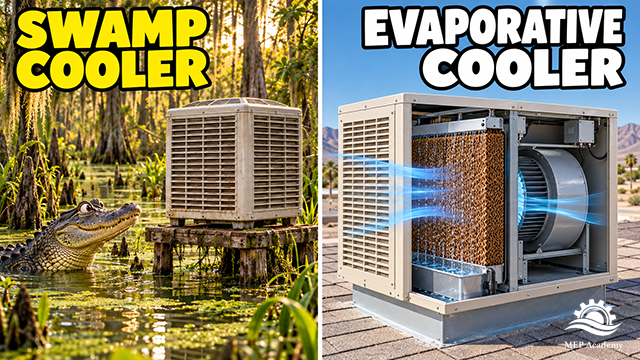
10. What Is a Swamp Cooler?
A swamp cooler lowers air temperature by drawing outdoor air through water-wetted media.
A swamp cooler is a common name for a direct evaporative cooler. It draws outdoor air through wet media, lowering the air temperature as water evaporates.
Evaporative cooling adds moisture to the air and works best in dry climates. It becomes less effective as outdoor humidity increases.
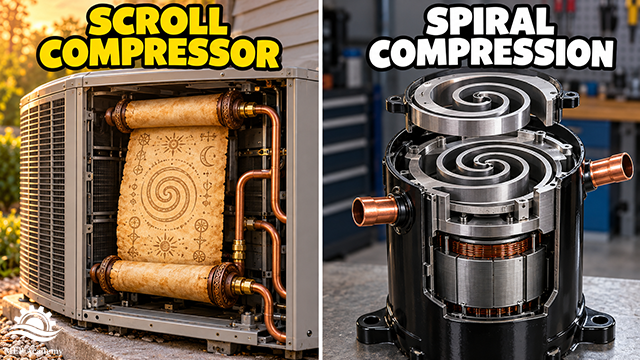
11. What Is a Scroll Compressor?
A scroll compressor uses intermeshing spiral elements to compress refrigerant vapor.
A scroll compressor compresses refrigerant vapor using two intermeshing spiral-shaped elements.
One scroll remains stationary while the other orbits. Refrigerant becomes trapped in progressively smaller pockets, increasing its pressure before discharge.
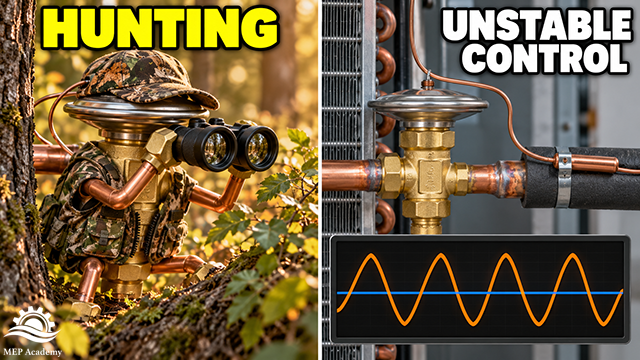
12. What Does Hunting Mean in HVAC?
Hunting occurs when a control repeatedly overshoots and corrects instead of settling into stable operation.
Hunting describes a control that repeatedly overshoots and corrects instead of settling into stable operation.
An expansion valve that hunts can cause refrigerant feed and superheat to fluctuate. Dampers and other controlled devices can also hunt.
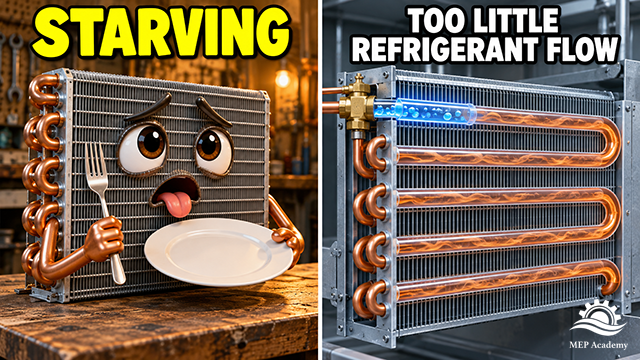
13. What Is a Starving Evaporator?
A starving evaporator receives too little refrigerant for its operating conditions.
A starving evaporator receives too little refrigerant for its operating conditions. The refrigerant finishes evaporating early, leaving more of the coil handling superheated vapor.
High superheat is a common indicator. Possible causes include insufficient charge, a restriction, or a metering-device problem—not automatically a need to add refrigerant.
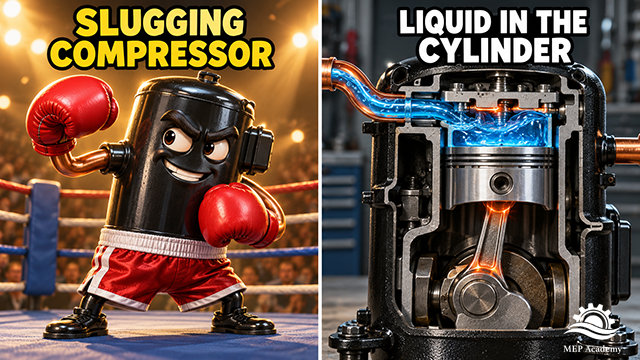
14. What Is Compressor Slugging?
Slugging occurs when liquid enters the compression mechanism and creates potentially damaging forces.
Compressor slugging occurs when liquid enters the compression mechanism.
Compressors are designed to compress vapor. Because liquid does not compress like vapor, slugging can produce damaging mechanical forces. It is related to liquid floodback, but the terms describe different conditions.
15. What Does Pulling a Vacuum Mean?
Pulling a vacuum means evacuating a refrigerant circuit to remove air and help remove moisture.
Pulling a vacuum means using a vacuum pump to evacuate a refrigerant circuit before charging or returning it to service.
Evacuation removes air and helps remove moisture. A micron gauge measures the vacuum; reaching a low reading alone does not establish that the system is dry and leak-free.
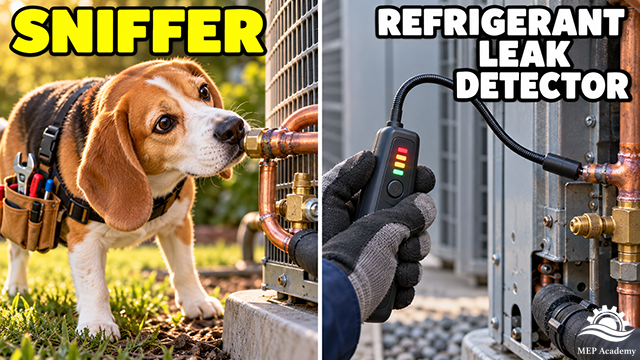
16. What Is a Refrigerant Sniffer?
A sniffer is an electronic leak detector suitable for identifying escaping refrigerant.
A sniffer is a nickname for an electronic refrigerant leak detector.
Technicians move its sensing tip around fittings, valves, coils, and other potential leak locations. The detector must be suitable for the refrigerant being checked.
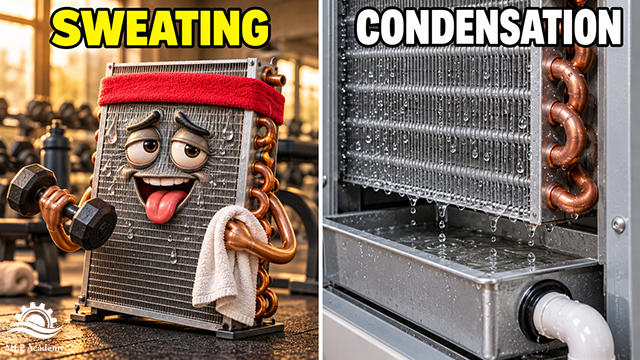
17. Why Is an HVAC Coil Sweating?
A coil sweats when its surface is below the surrounding air’s dew point, causing condensation.
A coil is sweating when water vapor from the surrounding air condenses on its cold surface.
Condensation forms when that surface is below the air’s dew point. On cooling coils, a drain pan and condensate piping collect and remove the water. Sweating does not, by itself, indicate a refrigerant leak.
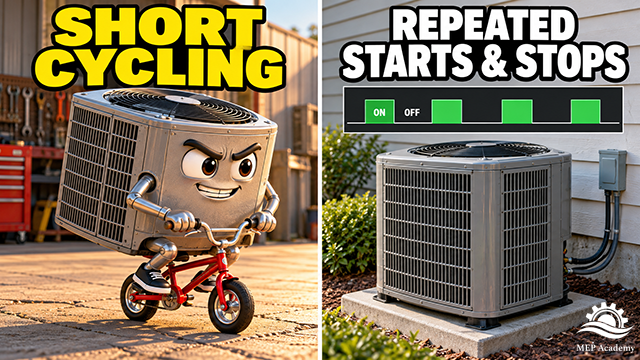
18. What Is Short Cycling?
Short cycling means repeated equipment starts and stops with excessively short operating periods.
Short cycling means HVAC equipment repeatedly starts and stops with excessively short operating periods.
It can reduce efficiency, impair humidity control, and increase wear. Causes may include oversized equipment, control faults, or safety devices interrupting operation.
19. What Does “Let the Smoke Out” Mean?
“Let the smoke out” is technician humor for an electrical component that has failed and released smoke.
“Let the smoke out” is technician humor for an electrical component that has failed and released smoke.
A motor, transformer, relay, or control board may be involved. Replacing the damaged component does not necessarily resolve the underlying cause of the failure.
20. What Is Free Cooling?
An airside economizer uses suitable outdoor air to reduce the need for compressor cooling.
Free cooling uses favorable outdoor conditions to reduce the need for compressor cooling.
An airside economizer brings in suitable outdoor air to help cool the building. Other systems use waterside economizers. Fans, pumps, and controls still consume energy, so “free” does not mean zero operating cost.
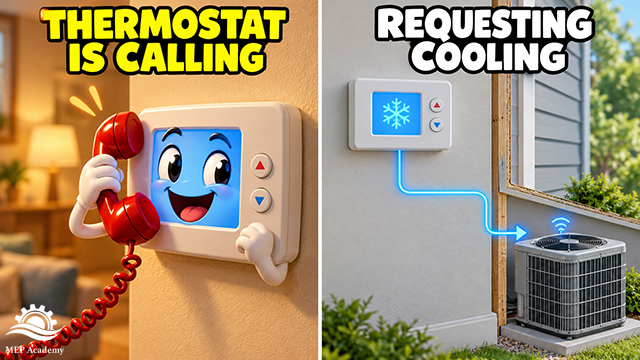
21. What Does “The Thermostat Is Calling” Mean?
A thermostat calling for cooling is requesting cooling operation from the HVAC system.
A thermostat calling for cooling is requesting cooling operation. Calling for heat means it is requesting heating.
The request may travel through conventional control wiring or a communicating control system. A call does not guarantee that the equipment is operating; other controls or safeties can prevent startup.
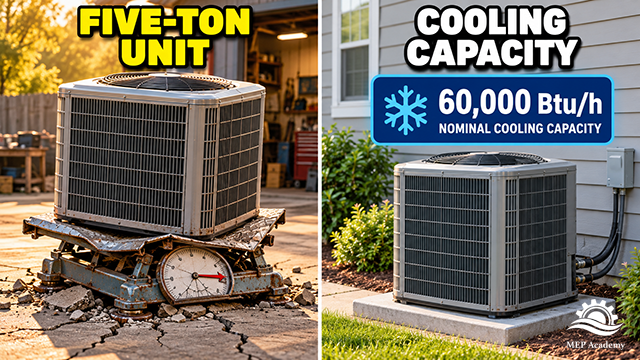
22. What Does a Five-Ton AC Unit Mean?
Five refrigeration tons equal 60,000 Btu per hour of nominal cooling capacity—not equipment weight.
A five-ton AC unit has a nominal cooling capacity of 60,000 Btu per hour. The term describes cooling capacity, not equipment weight.
One refrigeration ton equals 12,000 Btu per hour. Actual equipment capacity varies with operating conditions and the installed system.
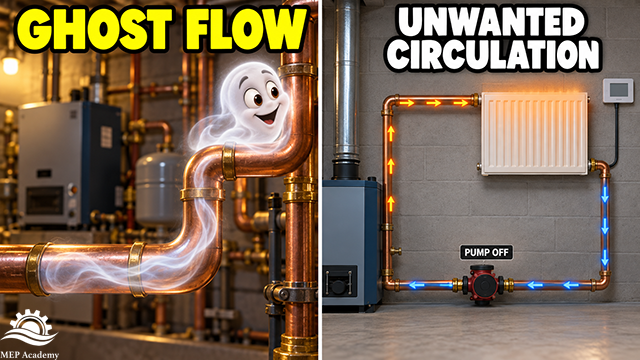
23. What Is Ghost Flow?
Ghost flow is unwanted water circulation through a heating circuit that should be inactive.
Ghost flow is unwanted water circulation through a heating circuit that should be inactive.
It can result from buoyancy-driven circulation or pressure differences created by other operating pumps. A radiator warming when its zone is not calling for heat can be a clue.
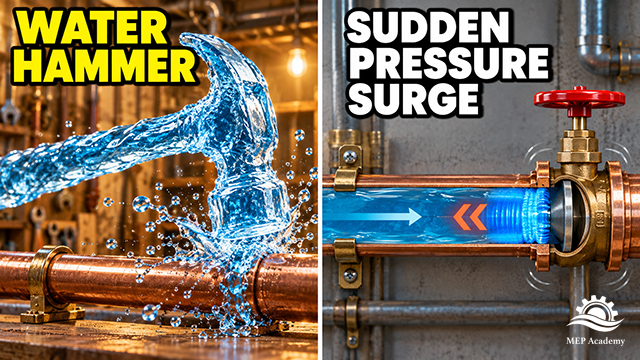
24. What Is Water Hammer?
Water hammer is a pressure surge caused by a rapid change in water velocity.
Water hammer is a pressure surge caused by a rapid change in water velocity, such as a valve closing quickly.
The pressure wave can create banging, pipe movement, and damage. Banging in steam systems can involve moving condensate and requires a different investigation.
Learn More HVAC Terms and Skills
Understanding HVAC terminology makes it easier to follow service discussions, read equipment information, and communicate on the job. These definitions provide a starting point; diagnosing a system requires measurements and an understanding of how its components work together.
Watch for our next HVAC slang video, where we explain bleeding radiators, breaking vacuums, unloading compressors, and high head pressure.
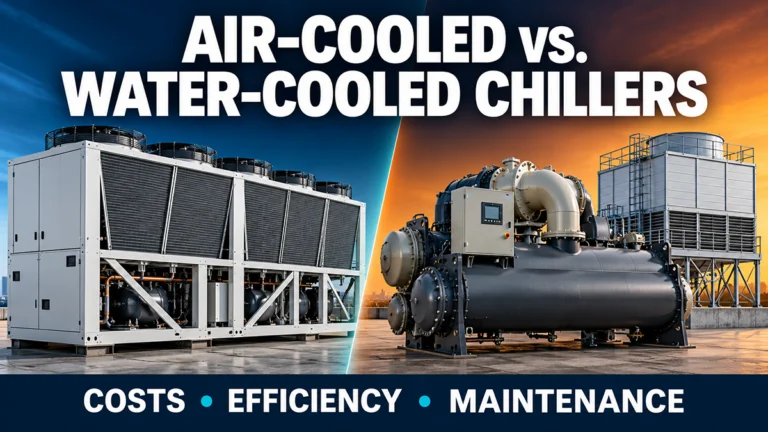
Choosing between an air-cooled and a water-cooled chiller involves more than comparing equipment prices. Both systems can deliver chilled water to a building, but their heat-rejection equipment, installation requirements, operating expenses, and maintenance responsibilities differ substantially.
An air-cooled plant generally offers a simpler installation with fewer components. A water-cooled plant can offer lower chiller energy use, but it adds cooling towers, condenser water pumps, piping, and water management responsibilities.
The best choice depends on the complete plant and the building it serves. Cooling demand, operating hours, climate, utility rates, water availability, and maintenance capabilities all influence the decision.
Watch the video:
What Does a Chilled Water Plant Do?
A chilled water plant removes heat from a building and transfers it outdoors. Water carries that heat between the building’s cooling coils and the chiller.
Chilled water flows through coils inside air handling units or fan coil units. As air passes across the coils, heat transfers from the air into the water. The cooled air is then distributed to occupied spaces.
When the coil surface is below the air’s dew point, moisture also condenses on the coil and drains away. This allows the system to provide dehumidification as well as sensible cooling.
Air-cooled plants reject heat directly to outdoor air, while conventional water-cooled plants use a condenser water circuit and cooling tower.
The water leaves the coil warmer than it entered and returns to the chiller. Inside the chiller’s evaporator, refrigerant absorbs heat from the water through the heat exchanger surfaces. The water and refrigerant remain separate.
The compressor raises the refrigerant’s pressure and temperature so it can release heat through the condenser. An expansion device then lowers the refrigerant pressure, allowing the cycle to repeat.
The heat path is:
Building air → chilled water → refrigerant → condenser → outdoors
The difference between air-cooled and water-cooled chillers occurs at the condenser. Both produce chilled water; they use different methods to reject heat.
How an Air-Cooled Chilled Water Plant Works
An air-cooled chiller packages the refrigeration equipment and outdoor heat-rejection components into one unit. It is commonly installed on a roof or at ground level.
A chilled water pump circulates water between the air-cooled chiller and horizontal fan coils. The chiller’s condenser coils and fans reject heat directly to outdoor air.
Fans move outdoor air across finned condenser coils. Refrigerant inside these coils releases heat to the passing air.
The package typically contains the compressors, evaporator, condenser coils, fans, and equipment controls. Chilled water piping connects the evaporator to the building’s cooling coils.
The complete water circuit also needs pumps, an expansion tank, air removal equipment, strainers, valves, and instrumentation. Some chiller packages include pumps and accessories; others require them separately.
The Main Installation Advantage
An air-cooled plant does not need a conventional evaporative cooling tower, condenser water pumps, or the piping connecting a water-cooled chiller to its tower. Eliminating that infrastructure can reduce installation and maintenance costs. Department of Energy
It also avoids tower evaporation and blowdown water consumption. However, its closed chilled water circuit still requires appropriate fluid maintenance.
Airflow Is Essential
An air-cooled chiller needs sufficient clearance for condenser air intake and discharge. Nearby walls, architectural screens, and adjacent equipment can interfere with airflow.
Hot-air recirculation occurs when warm discharge air returns to the condenser intake. The chiller then receives air warmer than the surrounding outdoor conditions, potentially increasing compressor power and reducing available cooling capacity.
Equipment placement should follow the selected manufacturer’s clearance requirements. Architectural screening must be coordinated with airflow rather than treated solely as a visual feature.
Select for Actual Outdoor Conditions
Nominal tonnage does not establish how much cooling a chiller will provide at every outdoor temperature. Selection should use the project’s required cooling load, design ambient temperature, chilled water temperatures, flow, and fluid composition.
Buildings requiring winter cooling also need equipment suitable for low outdoor temperature operation. This is particularly relevant to server rooms, process applications, and buildings with year-round interior cooling loads.
Exposed water circuits require freeze protection where applicable. Depending on the design, this may involve glycol, heaters, heat tracing, or other manufacturer-approved measures. Insulation slows heat loss but does not, by itself, prevent stagnant water from eventually freezing.
How a Water-Cooled Chilled Water Plant Works
A conventional water-cooled plant separates the chiller from the outdoor heat-rejection equipment.
The chiller is commonly located inside a mechanical room. A condenser water circuit connects it to an outdoor cooling tower.
Chilled water circulates between the chiller and horizontal fan coils, while a separate condenser water circuit transfers heat from the chiller to the cooling tower.
The plant has two separate water circuits:
Circuit
Function
Chilled water
Carries heat from building cooling coils to the chiller evaporator
Condenser water
Carries heat from the chiller condenser to the cooling tower
These circuits do not mix. Refrigerant inside the chiller transfers heat between them.
Condenser water arriving from the tower absorbs heat as it passes through the chiller condenser. A pump circulates the warmer water back to the tower.
Inside a typical open cooling tower, water is distributed over fill, which increases contact between water and moving air. A small portion evaporates, removing heat from the remaining water. The cooled water collects in the basin and returns to the chiller.
The Cooling Tower Does Not Produce Chilled Water
The cooling tower cools condenser water. The chiller’s refrigeration system produces the colder water supplied to the building.
For example, condenser water might enter the chiller at 85°F and leave at 95°F. The tower would then remove heat to bring that water back toward 85°F.
These are illustrative temperatures. Actual operating conditions depend on equipment selection, load, flow, weather, and controls.
Tower Heat Rejection Exceeds the Building Cooling Load
The tower receives the heat removed from the building plus the heat associated with compressor energy input.
Consequently, a tower should be selected for its actual heat-rejection duty, water flow, temperature range, and entering air conditions. Chiller tons and nominal cooling tower tons should not be treated as interchangeable ratings.
Why Climate Changes Chiller Performance
Air-cooled condensers and cooling towers respond to different weather conditions.
Dry-Bulb Temperature and Air-Cooled Chillers
Dry-bulb temperature is the outdoor air temperature measured by an ordinary thermometer.
As outdoor temperature rises, refrigerant generally must condense at a higher temperature to release heat into the air. This increases the compressor’s workload and can reduce available cooling capacity.
A selection that meets the load at mild conditions may therefore be inadequate during the hottest expected weather.
Wet-Bulb Temperature and Cooling Towers
Wet-bulb temperature reflects the combined effects of air temperature and moisture. It indicates the potential for evaporative cooling.
In hot, dry weather, wet-bulb temperature can be considerably lower than dry-bulb temperature. A cooling tower can then supply condenser water well below the outdoor dry-bulb temperature.
In hot, humid weather, the difference is smaller. The higher wet-bulb temperature generally produces warmer condenser water under otherwise comparable conditions.
Cooling Tower Approach
Cooling tower approach is the difference between leaving tower water temperature and entering air wet-bulb temperature:
Approach = Leaving tower water temperature − Entering air wet-bulb temperature
Consider two illustrative examples:
Condition
Outdoor dry-bulb
Entering air wet-bulb
Leaving tower water
Approach
Hot and dry
100°F
70°F
77°F
7°F
Hot and humid
100°F
82°F
89°F
7°F
Both examples assume the same approach to isolate the effect of wet-bulb temperature. They are not equipment selection data.
Approach also depends on tower capability, airflow, water flow, heat load, and equipment condition.
Approach Versus Range
Tower range describes the water temperature reduction through the tower:
Range = Entering hot water temperature − Leaving cold water temperature
Approach compares leaving water with wet-bulb temperature. Range compares entering and leaving water.
For example, a tower receiving 95°F water and supplying 85°F water has a 10°F range. If entering air wet-bulb is 78°F, its approach is 7°F.
What Is Refrigerant Lift?
Lift commonly describes the difference between refrigerant evaporating and condensing temperatures, with a corresponding pressure difference that the compressor must overcome.
With the same chilled water requirement, lower condensing temperature generally reduces lift and compressor work.
However, lowering condenser water temperature may require more cooling tower fan energy. The lowest condenser water temperature is therefore not automatically the lowest-energy operating point for the complete plant.
Installation Cost: Compare Complete Systems
The chiller purchase price is only part of installed cost.
For the same building cooling requirement, an air-cooled plant generally requires less heat-rejection infrastructure. A water-cooled plant adds equipment and connections that must be included in the estimate.
Scope item
Air-cooled plant
Conventional water-cooled plant
Chiller
Required
Required
Chilled water pumps and distribution
Required
Required
Valves, insulation, and controls
Required
Required
Heat rejection
Packaged condenser coils and fans
Cooling tower
Condenser water pumps and piping
Not required
Required
Tower makeup water and blowdown
Not required
Required
Tower treatment provisions
Not required
Required
Equipment location
Usually outdoors
Chiller commonly indoors; tower outdoors
Electrical and controls
Chiller and pumping equipment
Chiller, pumping equipment, tower, and associated systems
Site conditions can change the comparison. Structural support, rigging, electrical capacity, equipment access, and sound requirements can affect either option.
Existing Infrastructure Can Change the Economics
Replacement projects should account for what can be reused.
Serviceable cooling towers, pumps, and condenser water piping may make another water-cooled chiller more economical than converting to air-cooled equipment.
Reuse should follow an assessment of condition, capacity, compatibility, and expected remaining life. Existing infrastructure has value only if it can reliably support the proposed plant.
Equipment quotations also need careful review. Pumps, disconnects, controls interfaces, startup services, and accessories may be included in one quotation and excluded from another.
Operating Cost: Measure Whole-Plant Performance
A lower installed cost does not necessarily produce a lower lifetime cost.
Annual operating expenses include electricity, water, treatment, maintenance, and service. Operating hours determine how much opportunity exists for savings.
Understanding kW per Ton
Kilowatts per ton expresses electrical input relative to cooling output:
kW/ton = Electrical input in kilowatts ÷ Cooling output in tons
At equivalent conditions and the same measurement boundary, a lower value indicates better electrical efficiency.
A chiller-only rating should not be compared directly with a whole-plant figure. Establish which equipment is included before comparing results.
Include Pumps and Fans
An air-cooled plant’s electrical use includes the chiller package and chilled water pumps. Packaged ratings typically include condenser fan power, but the rating basis should be confirmed.
A water-cooled plant adds condenser water pumps and cooling tower fans to the chiller and chilled water pumping energy.
A highly efficient chiller can be paired with inefficient pumping or poorly coordinated controls. Evaluating the complete plant reveals those effects.
Full-Load Efficiency and IPLV
Full-load performance matters when the plant operates near peak demand. Part-load performance matters because cooling demand changes throughout the day and year.
Integrated part-load value, or IPLV, combines equipment performance at standardized load points. It is useful for comparison, but its assumptions do not reproduce every building’s load profile or climate. DOE’s chiller purchasing guidance considers both full-load and part-load efficiency. Department of Energy
Annual energy estimates should reflect actual loads, weather, equipment staging, and control strategies. Utility rates and demand charges then determine the resulting electricity cost.
Maintenance and Water Use
Both plant types need routine maintenance.
Air-cooled heat-rejection maintenance focuses on condenser coils, fans, and motors. Dirt restricts airflow and heat transfer, while outdoor exposure can contribute to corrosion.
Water-cooled plants add cooling tower, condenser water pump, and condenser tube maintenance. Tube deposits reduce heat transfer and can increase compressor energy use.
Water Management Responsibilities
Tower makeup replaces water lost through evaporation, blowdown, and drift. Blowdown removes concentrated water to control mineral buildup. Treatment and monitoring address scale, corrosion, and biological growth.
These requirements create recurring costs for water, chemicals, cleaning, and service. DOE identifies cooling tower management as an opportunity to reduce water and energy consumption. Department of Energy
Cooling towers also need an appropriate water management program to control Legionella growth and spread. CDC identifies effective water management as the primary control strategy. CDC
The owner’s ability to maintain these systems belongs in the selection decision. Potential efficiency savings depend on sustained operating performance.
Pumping Arrangements and Plant Controls
Pumping distributes chilled water while maintaining acceptable flow through the chillers.
As demand falls, two-way coil valves reduce flow. Variable-speed pumps can slow down while maintaining sufficient pressure for coils that still need cooling.
Primary-only systems vary flow through the chillers and cooling coils using one pumping circuit. Primary-secondary systems use separate chiller and distribution pumping circuits connected by a common pipe.
Primary-Secondary Pumping
A conventional primary-secondary arrangement uses primary pumps to maintain approximately constant flow through operating chillers. Separate secondary pumps vary building distribution flow.
A common pipe hydraulically connects the circuits and accommodates differences between their flow rates.
Variable Primary Flow
Variable primary flow varies water flow through both the chillers and the building distribution system. It can reduce pumping equipment, but requires coordinated flow measurement, bypass operation, and chiller staging.
Controls must respect minimum evaporator flow and allowable flow changes. At low building demand, a controlled bypass can maintain required flow through operating chillers. Manufacturer guidance should govern these limits. trane.com
Optimize the Plant, Not Individual Components
Good controls coordinate pump speeds, chiller staging, and tower operation. Temperature reset strategies may offer savings, but must respect equipment limits and the building’s cooling and dehumidification needs.
Changing one setpoint can shift energy use elsewhere in the plant. Performance should be evaluated at the system level.
Low Delta-T: Why More Flow May Be Required
Chilled water delta-T is return temperature minus supply temperature.
For water, a useful approximate relationship in customary U.S. units is:
Cooling capacity in tons ≈ GPM × Delta-T ÷ 24
This approximation assumes water properties typical of HVAC applications. Glycol mixtures require adjusted calculations.
For a 100-ton load:
Supply
Return
Delta-T
Approximate required flow
44°F
56°F
12°F
200 GPM
44°F
50°F
6°F
400 GPM
At the same load, halving delta-T requires approximately twice the flow. This does not mean pump power automatically doubles; pumping energy depends on flow, head, efficiency, and system behavior.
Low delta-T can contribute to higher pumping demand, distribution limitations, and additional chillers operating to provide flow.
Possible causes include excessive coil flow, bypassing valves, dirty coils, inadequate airflow, and control problems. Low delta-T does not automatically indicate lost chiller capacity.
Verify measurements before diagnosing the system. Also consider operating load: a lower delta-T at light load is not necessarily evidence of a fault.
Freeze Protection and Glycol
Glycol can protect exposed circuits against freezing, but it changes fluid properties.
Compared with water, glycol mixtures generally have lower specific heat and higher viscosity. Depending on concentration and temperature, this can affect capacity, required flow, pressure drop, and pumping energy.
Chillers, coils, and pumps should be selected for the intended fluid mixture. Avoid choosing glycol concentration solely by rule of thumb; coordinate it with the required protection temperature and equipment guidance.
A plant with multiple chillers may still depend on a shared pump, electrical supply, controller, or tower header. Those shared components can affect available cooling during a failure.
Define how much cooling must remain available when equipment is out of service. Evaluate redundancy at the plant level, including pumps, power, controls, isolation, and maintenance access.
Lifecycle Cost and Payback
A lifecycle comparison weighs installed cost against operating expenses, repairs, replacements, and expected service life.
For example, if one plant costs $100,000 more to install and saves $10,000 annually in total operating expenses:
Simple payback = $100,000 ÷ $10,000/year = 10 years
These figures are illustrative. Savings should account for electricity, water, treatment, and maintenance.
Simple payback omits financing, discount rates, changing utility costs, major replacements, and residual value. A lifecycle analysis provides a fuller comparison.
Which Chilled Water Plant Fits Your Project?
An air-cooled plant may be attractive where water availability is limited, operating hours are moderate, or simpler maintenance is a priority.
A water-cooled plant may justify its additional infrastructure where loads and operating hours create sufficient energy savings and the owner can support ongoing maintenance.
Before selecting either option, establish:
Peak cooling load and annual load profile.
Local outdoor design conditions.
Required chilled water temperatures and fluid mixture.
Complete installed scope and available infrastructure.
Electricity, water, and applicable sewer costs.
Maintenance resources and service arrangements.
Reliability and future expansion requirements.
There is no universal building-size threshold that settles the decision. Compare complete plants under equivalent conditions.
Choosing the Plant Beyond the Chiller
Air-cooled plants offer fewer heat-rejection components and a relatively straightforward installation. Water-cooled plants can deliver lower chiller energy use, with additional infrastructure, water consumption, and service responsibilities.
For both arrangements, equipment selection, controls, distribution performance, and maintenance determine the results.
Which factor matters most on your projects: installation cost, energy savings, water use, or maintenance? Share your experience in the comments.
To build your understanding of HVAC drawings and construction costs, explore MEP Academy’s courses on HVAC blueprint reading, piping estimating, and sheet metal estimating.
Converting an existing high-rise office building into residential condominiums creates an unusual HVAC design challenge.
An office building may have originally been designed around relatively large HVAC zones, centralized air distribution, and equipment serving an entire floor or substantial portions of a floor. Residential condominiums require something very different. Each residence needs individual temperature control, different operating schedules, appropriate ventilation, and an HVAC system that can be maintained without unnecessarily affecting neighboring residences.
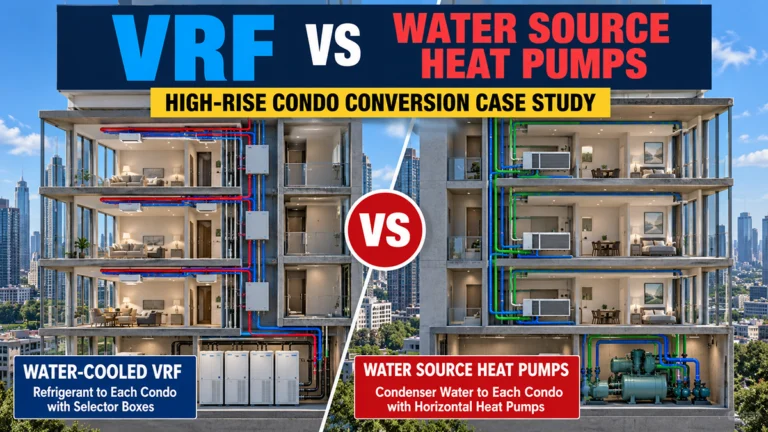
In this case study, we will examine an eight-story office building being converted into residential condominiums. The existing building uses a condenser-water system with a large floor-mounted water-source heat pump serving each floor.
Rather than abandoning that infrastructure, we will compare two approaches that can potentially reuse the existing condenser-water system:
Both approaches can provide individual residential zoning. Both can use a central condenser-water loop. And both can potentially take advantage of substantial portions of the building’s existing mechanical infrastructure.
But beyond those similarities, they become very different HVAC systems.
The differences involve much more than equipment efficiency. Refrigerant distribution, condenser-water piping, ceiling space, ventilation, controls, serviceability, refrigerant concentration, central plant operation, energy consumption, and construction cost all become part of the decision.
Most importantly, when we developed a construction budget for a similar project, the difference in installed cost was significant.
And much of that difference was found not simply in the equipment, but in the distribution systems required to connect that equipment to every residence.
The Existing High-Rise HVAC System
For our case study, imagine an eight-story commercial office building being converted into residential condominiums.
The existing HVAC system consists of a large floor-mounted water-source heat pump on each floor. For purposes of our example, assume each floor originally had approximately 50 tons of cooling capacity.
The individual floor units are connected to a common condenser-water system. The building also contains the infrastructure normally associated with such a system, potentially including:
Condenser-water supply and return risers
Condenser-water pumps
Fluid coolers or cooling towers
A boiler or other means of adding heat to the loop when required
Central plant controls
Existing outside-air distribution
This infrastructure has substantial value.
If it is in suitable condition and has adequate capacity, reusing it may avoid replacing major portions of the central mechanical plant.
However, the original floor-by-floor zoning strategy no longer works once the office space is divided into individual residences.
Each condominium needs independent temperature control.
That is the fundamental problem our two proposed HVAC systems need to solve.
The existing office building uses large floor-mounted water-source heat pumps connected to a common condenser-water system. The office-to-condominium conversion requires replacing the original floor-level zoning with individual HVAC control for each residence.
Start With the Loads, Not the Equipment
Before deciding between VRF and water-source heat pumps, an engineer needs to determine what the converted building actually requires.
Changing a building from commercial offices to residential condominiums changes many of the variables that influence heating and cooling loads.
These can include:
Occupancy density and schedules
Lighting loads
Plug and appliance loads
Outdoor-air requirements
Exterior exposure
Interior zoning
Solar loads
Operating schedules
Kitchen and residential equipment loads
Exhaust requirements
Diversity between individual spaces
Each condominium therefore needs its own heating and cooling load calculation.
The engineer must also evaluate the coincident peak load for each floor and ultimately the entire building.
This leads to an important point:
Existing HVAC capacity is not the same thing as the new building load.
If the original floor-mounted heat pump was 50 tons, that does not mean the converted residential floor necessarily requires 50 tons.
The existing equipment provides useful information about the original HVAC design, but it does not establish the load for a completely different occupancy and space configuration.
New loads should be calculated based on the proposed residential use.
Once those loads have been established, we can begin evaluating the two HVAC strategies.
Option 1: Water-Cooled VRF
The first alternative is a water-cooled VRF heat-recovery system.
Most people are familiar with air-cooled VRF systems where outdoor condensing units are located on a roof or outside the building.
Water-cooled VRF works differently.
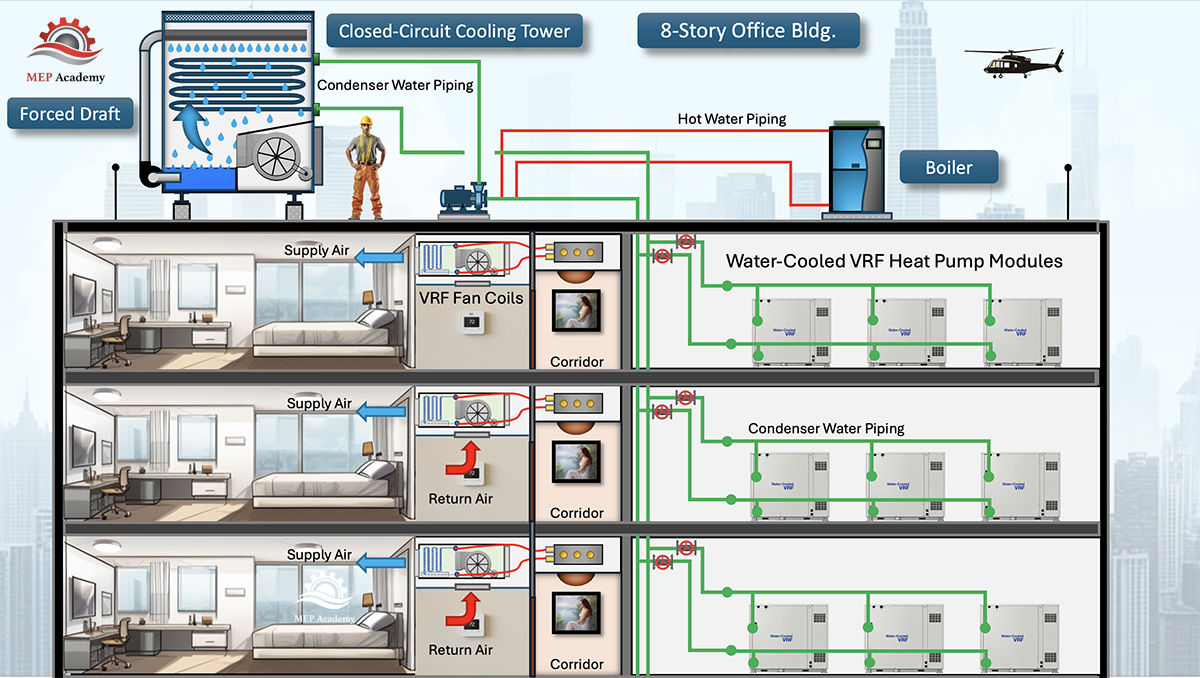
Instead of rejecting and absorbing heat directly through outdoor air, the VRF modules exchange heat with the building’s condenser-water loop.
That means the modules can often be installed indoors in mechanical rooms.
For our example, the system might consist of several modular water-cooled VRF units serving each floor. If approximately 7-ton modules were used, multiple modules could be combined to provide the required floor capacity.
The exact module arrangement would ultimately depend on the calculated loads and the selected manufacturer’s allowable equipment combinations.
This configuration creates an important opportunity in an existing building:
The existing condenser-water risers may potentially be reused.
The condenser-water system supplies the VRF modules. From there, however, the distribution system changes completely.
Instead of distributing condenser water to each residence, the VRF system distributes refrigerant.
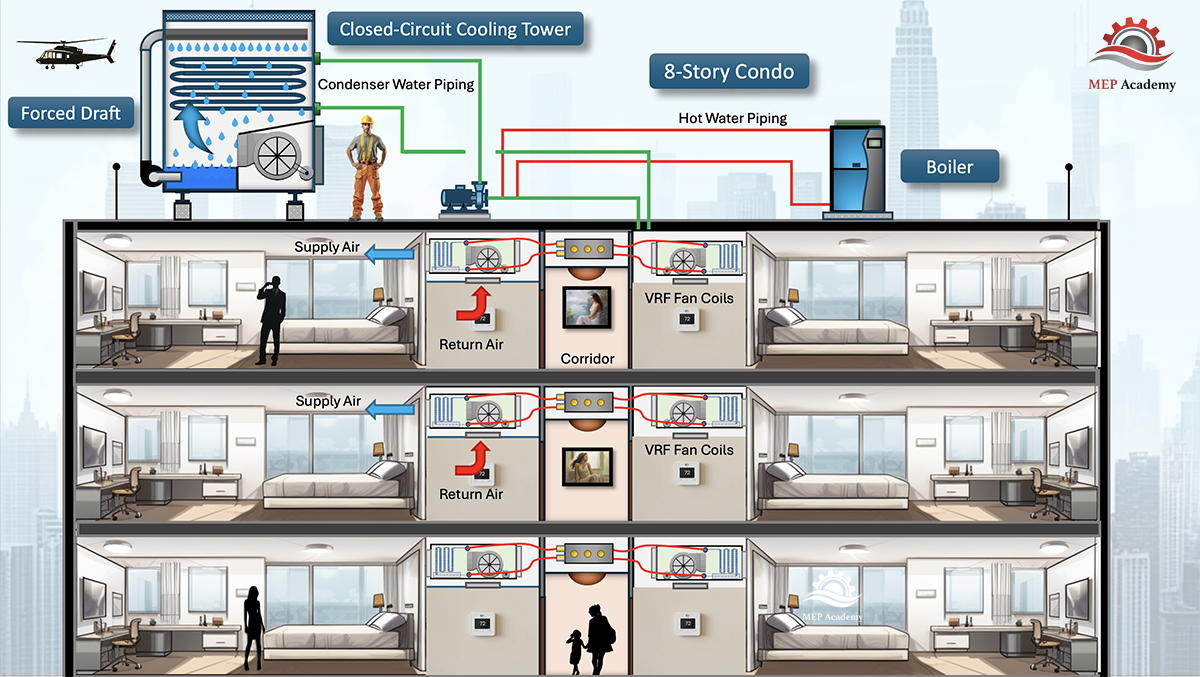
Section view of the water-cooled VRF concept, with modular VRF equipment located in the mechanical room and refrigerant distributed to individual fan-coil units serving the condominiums.
Distributing Refrigerant Throughout the Floor
From the water-cooled VRF modules, refrigerant piping travels throughout the floor.
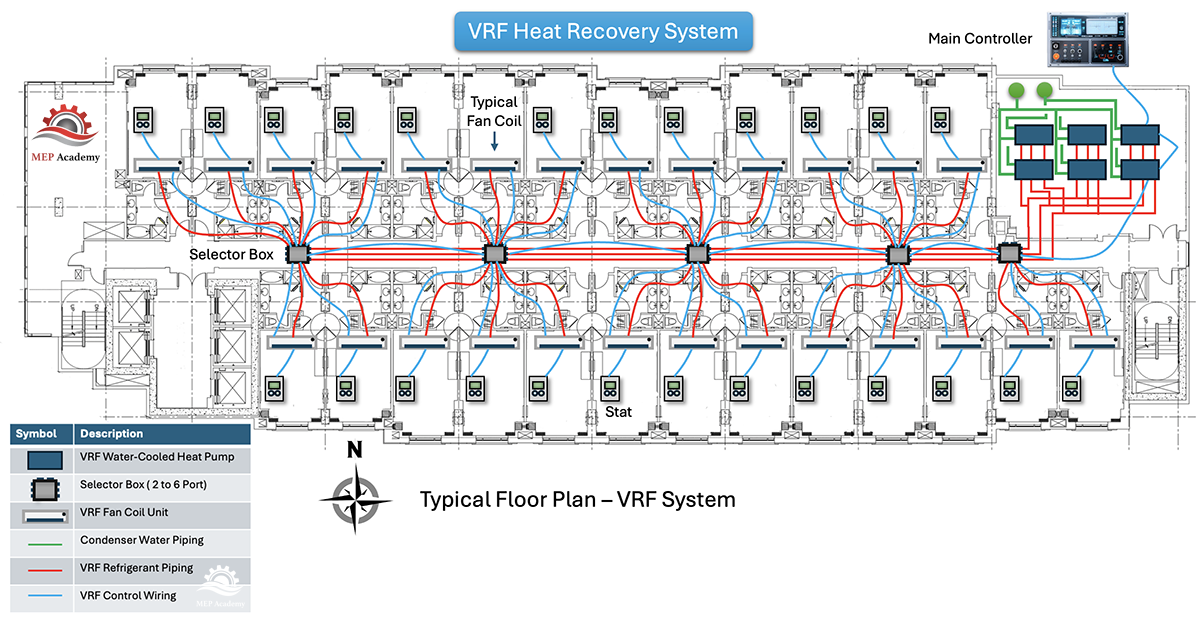
For a heat-recovery VRF system, the refrigerant piping connects to branch or selector boxes strategically located within the building.
For our conceptual design, we considered six-port selector boxes, with each selector box potentially serving several condominium zones.
From those boxes, individual refrigerant branches continue to the indoor fan-coil units serving the residences.
This provides extremely flexible zoning.
Typical floor layout for the water-cooled VRF option. Refrigerant is distributed from the VRF modules through heat-recovery selector boxes to individual fan-coil units serving each condominium.
One condominium can require cooling while another requires heating.
With an appropriately designed heat-recovery VRF system, energy can potentially be transferred between zones rather than simply being rejected through the condenser-water system.
This simultaneous heating and cooling capability is one of VRF’s major attractions.
In a heat-recovery VRF system, refrigerant is distributed through corridor-mounted selector boxes to individual fan-coil units serving each condominium.
The VRF Refrigerant Piping Network
The advantages of VRF come with a more sophisticated refrigerant distribution system.
Refrigerant piping must travel from the VRF modules to selector boxes and from those selector boxes to the individual indoor units.
The designer must consider factors such as:
Refrigerant pipe sizing
Manufacturer-specific branch fittings
Equivalent piping length
Maximum allowable piping lengths
Vertical separation
Refrigerant charge
Oil return
Allowable indoor-unit combinations
Insulation
Pipe supports
Access to selector boxes
Pressure testing
Evacuation and commissioning
These requirements become particularly important in an existing high-rise.
Routing is not an abstract engineering exercise. There must physically be enough room above the ceilings to install everything.
The refrigerant piping has to coexist with plumbing, electrical conduit, cable trays, fire sprinkler piping, ventilation ductwork, structural members, and other existing utilities.
Rated wall penetrations also need to be coordinated and appropriately protected.
Selector boxes need locations that provide both piping access and sufficient service clearance.
A technically sound VRF design can become difficult or expensive if the building does not provide practical pathways for the refrigerant distribution system.
Refrigerant Quantity and Occupied Spaces
There is another important issue with VRF systems: refrigerant quantity.
A large VRF system can contain a substantial refrigerant charge, and portions of that interconnected refrigerant system serve occupied spaces.
The designer therefore needs to evaluate the applicable mechanical and refrigeration codes, the refrigerant being used, the volume of the occupied spaces, the system configuration, and the amount of refrigerant that could potentially be released into a particular space under the applicable design scenario.
This analysis can influence decisions involving:
System zoning
Refrigerant circuit size
Selector-box arrangements
Total refrigerant charge
Leak detection
Ventilation
Other mitigation measures where required
This issue can become particularly important in smaller residential spaces.
A small bedroom, for example, has considerably less room volume than a large open office area.
For that reason, refrigerant concentration analysis should be incorporated into the system design process rather than performed only after the refrigerant piping layout has been completed.
The results can potentially affect the architecture of the VRF system itself.
VRF Controls
VRF is also a highly integrated controls platform.
Indoor units, selector boxes, outdoor or water-cooled modules, electronic expansion valves, sensors, and controllers communicate as part of the system.
Individual residences can have local temperature controllers while a supervisory controller provides broader system monitoring.
Where appropriate, gateways may also allow integration with a building automation system.
This provides sophisticated control, but it also means troubleshooting can require technicians familiar with:
Refrigeration
Electronic expansion valves
Communication networks
Inverter-driven compressors
Manufacturer-specific controllers
Diagnostic software
This should be considered when evaluating the long-term maintenance strategy for the property.
Option 2: Individual Water-Source Heat Pumps
The second alternative takes a fundamentally different approach.
Instead of distributing refrigerant throughout the floor, we distribute condenser water.
The existing large floor-mounted heat pump is removed, and the condenser-water supply and return piping is extended throughout the floor.
Each condominium receives its own horizontal water-source heat pump.
These units can often be installed above a ceiling or in another accessible service location.
Each residence now has its own:
Compressor
Refrigerant circuit
Fan
Controls
Condenser-water connection
Condensate connection
The refrigerant remains primarily within the individual packaged heat pump.
The distribution system outside the equipment is primarily water.
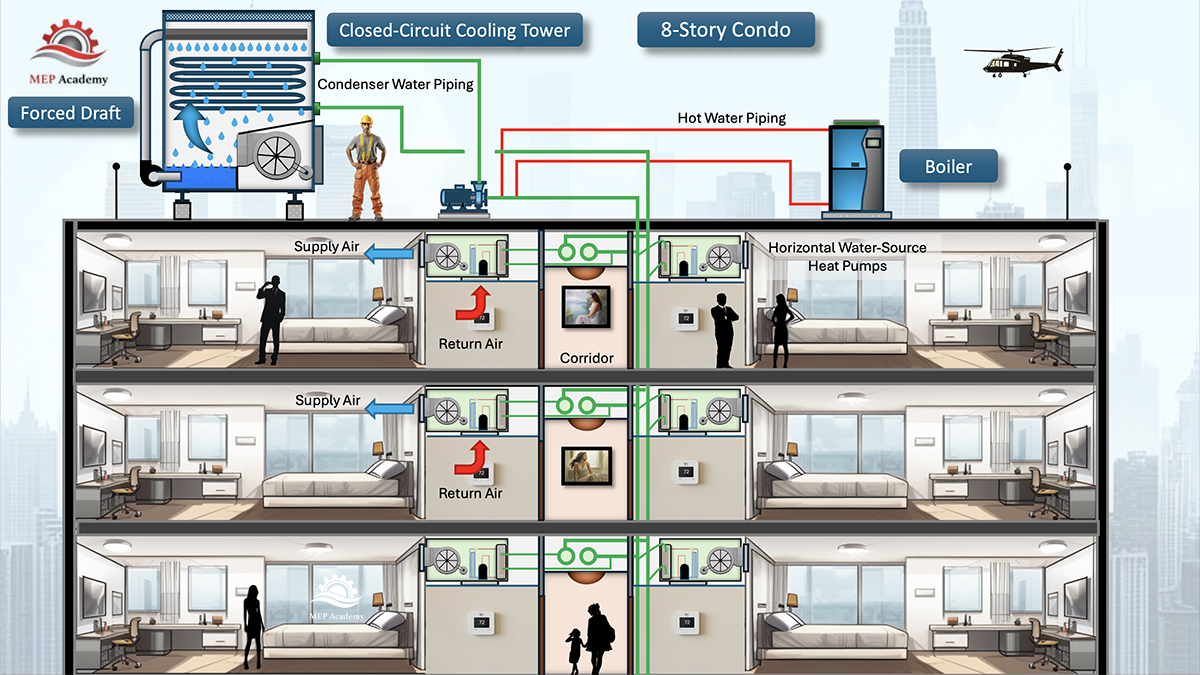
Section view of the individual water-source heat-pump concept, with each condominium served by its own heat pump connected to the building's common condenser-water loop.
Condenser-Water Distribution
The existing condenser-water risers can potentially remain in service.
New horizontal supply and return mains would then extend from those risers across each floor.
Branches connect the mains to the individual heat pumps.
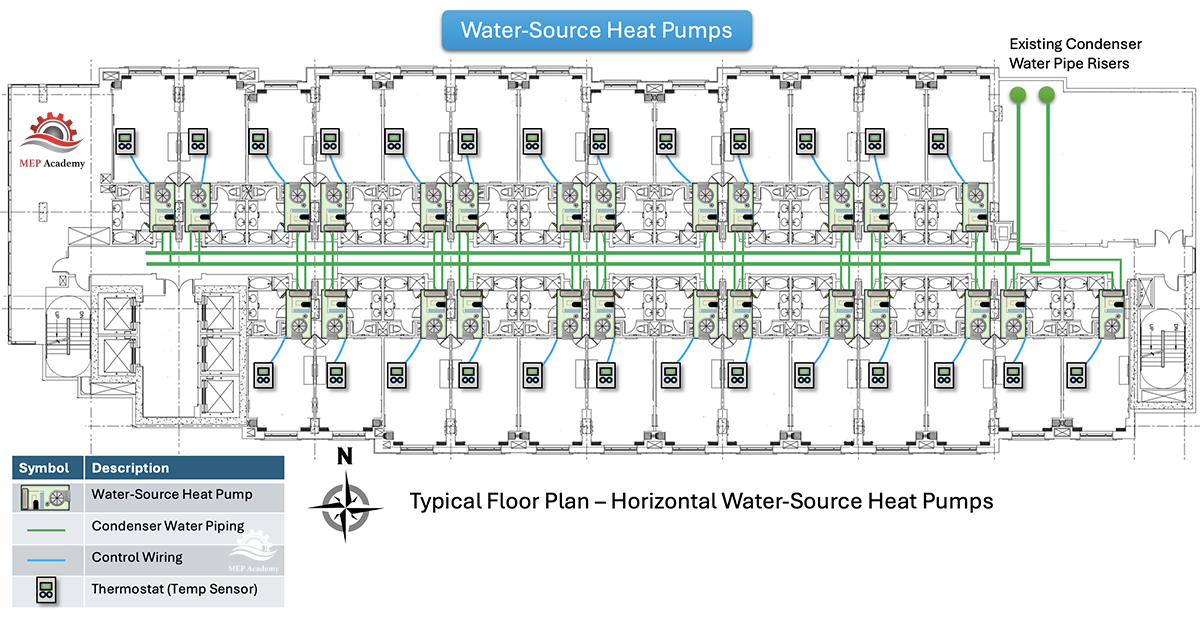
Typical floor layout for the water-source heat-pump option. Condenser-water supply and return piping is distributed throughout the floor to individual horizontal heat pumps serving each condominium.
A typical installation may include components such as:
Isolation valves
Flow-control or balancing devices
Strainers where required
Flexible connections
Control valves
Service access
Appropriate pipe supports
The designer must verify that the existing pumps and distribution system can accommodate the proposed flow rates and pressure requirements.
For preliminary planning, conventional water-loop heat-pump systems are often encountered around 2.5 to 3.0 GPM per ton, although actual design flow should always be based on the selected equipment and manufacturer’s performance data.
Using 3 GPM per ton as a simple conceptual example, a 50-ton connected load would represent approximately 150 GPMat full design flow.
However, the entire building does not necessarily need to operate continuously at full connected flow.
That becomes important when we discuss pumping energy.
Both Systems Still Need the Central Condenser-Water Plant
An important point in this comparison is sometimes overlooked.
Water-cooled VRF does not eliminate the condenser-water system.
Both of our alternatives rely on the building’s central condenser-water infrastructure.
Depending on the existing system and design, that may include:
Fluid coolers or cooling towers
Condenser-water pumps
Supply and return risers
Boiler or other heat-addition equipment
Water treatment
Central plant controls
The water-cooled VRF modules exchange heat with this loop.
The individual water-source heat pumps also exchange heat with the same loop.
Therefore, when comparing the two systems economically, we should not assign the fluid cooler and central pumps only to the water-source heat-pump option.
They are common infrastructure required by both alternatives in this case study.
Failure and Redundancy
System architecture also affects what happens when something fails.
With individual water-source heat pumps, a heat-pump failure generally affects one condominium.
The affected unit can be isolated, serviced, or replaced while neighboring residences continue operating, assuming the common condenser-water system remains available.
VRF is more interconnected.
Depending on the system architecture, a problem involving a common refrigerant circuit, selector box, communication system, or VRF module can potentially affect multiple indoor units.
Modular VRF equipment can provide some redundancy, but designers should still consider the failure domain of the system.
In a condominium building, this matters because a maintenance issue affecting several residences can be considerably more disruptive than replacing one packaged heat pump.
Serviceability
Individual water-source heat pumps are conceptually straightforward.
A typical unit has:
Water in
Water out
Electrical power
Condensate
Supply and return air
Local controls
Many commercial HVAC service companies are familiar with this equipment.
VRF requires a different skill set.
Technicians may need to understand inverter compressors, electronic expansion valves, refrigerant distribution, communication networks, selector boxes, sensors, and manufacturer-specific diagnostic procedures.
Neither approach is inherently unserviceable.
But the building owner should consider the availability and cost of qualified service personnel before selecting the system.
Ceiling Space: Different Problems, Not No Problems
It is tempting to assume that one option automatically solves the ceiling-space problem.
In reality, each system introduces different coordination requirements.
VRF generally uses smaller refrigerant piping compared with large condenser-water mains, which can be advantageous in congested ceiling spaces.
But VRF also introduces:
Multiple refrigerant lines
Insulation
Selector boxes
Service clearances
Numerous branch connections
The WSHP alternative requires larger condenser-water supply and return piping.
It also requires physical space for each individual heat pump and associated valves and accessories.
So the comparison is not simply:
Small piping versus large piping.
The real question is whether the building has appropriate space for the entire distribution and equipment strategy.
Condensate Drainage
Condensate drainage is one area where the two alternatives are relatively similar.
Both VRF indoor units and horizontal water-source heat pumps produce condensate during cooling.
Because the building is being converted into condominiums, plumbing fixtures will already be distributed throughout the floor.
Where permitted by the plumbing design and applicable code, condensate can potentially be routed to nearby approved plumbing connections, such as an appropriate connection associated with a sink.
This can be considerably simpler than routing every condensate line back to a central drain riser.
There is one additional consideration with VRF.
Depending on the manufacturer and selector-box design, certain heat-recovery components may also require condensate drainage.
That requirement should be verified for the specific equipment being selected.
Overall, however, condensate drainage probably would not be the deciding factor between these two systems.
Ventilation Air and the Existing Outside-Air Riser
Neither VRF nor individual water-source heat pumps eliminates the requirement for code-compliant outdoor ventilation.
In our existing building, however, there is another potentially valuable asset: an existing outside-air riser that previously supplied ventilation air to the original floor-mounted heat pumps.
Before installing an entirely new ventilation distribution system, the engineer should investigate whether this riser can be reused.
That evaluation should include:
Physical condition
Riser dimensions
Available airflow
Available static pressure
Existing leakage
New residential ventilation requirements
Proposed floor distribution
Fire and smoke requirements
If suitable, the existing riser could potentially become part of the new ventilation strategy.
Should We Consider a DOAS?
A Dedicated Outdoor Air System, or DOAS, should also be evaluated, particularly with the VRF alternative.
A DOAS can provide conditioned outdoor ventilation air to each condominium while the individual VRF or water-source heat-pump units handle the space heating and cooling loads.
Many VRF indoor units operate with relatively high sensible heat ratios. Depending on the selected equipment and operating conditions, their latent moisture-removal capability may be limited relative to the sensible cooling load.
That becomes important in a coastal environment such as San Diego, where outdoor ventilation air can contribute meaningful latent load.
A DOAS can condition and dehumidify the ventilation air before delivering it to the residences.
This allows the individual VRF fan coils to focus primarily on the space sensible loads.
The existing outside-air riser might even be reusable as part of the DOAS distribution system if its capacity, condition, and configuration are appropriate.
The same DOAS concept can also be evaluated with water-source heat pumps. It is not exclusive to VRF.
Fire and Life-Safety Coordination
An office-to-residential conversion changes much more than HVAC zoning.
New condominium walls, corridors, shafts, and rated separations can affect mechanical distribution throughout the building.
HVAC coordination may therefore involve:
Firestopping of piping penetrations
Rated shaft penetrations
Fire dampers where required
Smoke dampers where required
Access requirements
Corridor construction
Smoke-control systems where applicable
Coordination with the building’s overall fire-life-safety design
These requirements can influence both HVAC options and should be incorporated early in the design.
Installation and Construction Phasing
Existing-building projects also require careful sequencing.
Coordinating condensate, power, controls, and ventilation.
Pressure testing and evacuating the refrigerant piping.
Charging and commissioning the system.
The WSHP option would follow a different sequence:
Verify the existing condenser-water system.
Extend new supply and return mains throughout each floor.
Install branches to each residence.
Set the individual heat pumps.
Connect water, ductwork, condensate, electrical power, and controls.
Flush the piping system.
Balance and verify flow.
Commission the equipment.
The best solution may therefore depend partly on how the renovation is phased and how easily each distribution system can be installed within the existing structure.
What About Energy Consumption?
A simple statement that either VRF or WSHP is always more energy efficient would overlook how these systems actually operate.
Water-cooled VRF has several potential advantages.
Inverter-driven compressors can modulate capacity to match changing loads. Heat-recovery configurations can also transfer energy between zones when some residences require cooling while others require heating.
But the WSHP system has significant part-load opportunities of its own.
One important strategy is to install two-way control valves at the individual heat pumps.
When a heat pump does not require condenser-water flow, its valve can close.
As more units cycle off or require less operation, total condenser-water flow decreases.
If the central condenser-water pumps are equipped with variable-frequency drives, the pumps can respond to the reduced system demand by slowing down.
That can substantially reduce pumping energy during part-load operation.
The common water loop can also facilitate heat exchange within the building. Heat rejected into the loop by residences in cooling can help satisfy heat required by residences operating in heating before the central plant has to add or reject additional energy.
Therefore, both systems can have strong part-load strategies.
Determining which system uses less energy requires analysis of the complete building, including:
Equipment efficiencies
Load profiles
Condenser-water temperatures
Pumping strategy
Heat-rejection equipment
Heating requirements
Controls
Climate
Simultaneous heating and cooling
Building diversity
A building energy model would provide a much better answer than relying solely on generalized equipment-efficiency claims.
What Happened When We Priced the Two Systems?
This was one of the most interesting parts of our comparison.
On paper, water-cooled VRF was an attractive solution.
It offered individual zoning, modular equipment, sophisticated controls, heat recovery, and relatively compact refrigerant piping.
But when we developed an actual construction budget for a similar conversion, the VRF option was substantially more expensive than the individual water-source heat-pump approach.
Why?
A major reason was the distribution system.
The Cost of VRF Refrigerant Distribution
A high-rise VRF system requires a substantial network of refrigerant piping.
That network can include:
Large refrigerant mains
Horizontal refrigerant distribution
Vertical risers where applicable
Multiple pipe sizes
Manufacturer-specific branch fittings
Selector boxes
Refrigerant branches to every indoor unit
Pipe supports
Required insulation
Controls and communication wiring
Specialized installation procedures
Refrigerant pressure testing
Evacuation
Charging
Manufacturer-specific commissioning
None of those items is particularly surprising individually.
The issue is scale.
Repeat them across every condominium and every floor of a high-rise building, and the cost accumulates quickly.
Copper refrigerant piping is also a relatively expensive distribution medium, and the labor associated with installing, brazing, supporting, insulating, testing, evacuating, and commissioning a large refrigerant network can be substantial.
Why the WSHP Distribution System Was Less Expensive
The individual water-source heat-pump alternative still requires significant piping.
Each residence needs condenser-water supply and return connections along with valves, flow-control components, supports, and other hydronic accessories.
But this is fundamentally conventional hydronic distribution.
At typical condenser-water loop operating temperatures, this piping also may not require the same thermal insulation treatment as applicable VRF refrigerant lines, subject to the governing energy code, operating temperatures, condensation considerations, and project-specific requirements.
The WSHP design also eliminates the floor-wide refrigerant distribution network, VRF selector boxes, and much of the specialized refrigerant hardware connecting multiple residences.
The individual heat pumps still have refrigerant circuits, but those circuits are largely contained inside the packaged equipment.
That distinction had a meaningful impact on our construction budget.
First Cost Versus Life-Cycle Cost
Our construction budget showed a significant first-cost advantage for the individual water-source heat-pump system.
But first cost is not the entire economic analysis.
A complete life-cycle evaluation should also consider:
Annual energy consumption
Pumping energy
Central plant energy
Maintenance
Water treatment
Refrigerant service
Controls maintenance
Equipment replacement
Equipment life expectancy
Availability of replacement parts
Service labor
Future refrigerant requirements
Both systems offer opportunities for efficient part-load operation.
Therefore, determining the true life-cycle cost requires evaluating expenses over the expected life of the building rather than simply comparing construction bids.
For this project, however, first cost clearly favored the individual WSHP approach.
So Which System Would We Choose?
Both systems can work for this type of conversion.
Water-cooled VRF provides excellent zoning, modulation, and heat-recovery capabilities.
But based on our actual construction budget, the individual water-source heat-pump system had a significant first-cost advantage.
It also keeps the refrigerant primarily contained within each individual unit and provides relatively straightforward service and replacement at the condominium level.
VRF remains an attractive technology, but on this particular project, its advantages came with a substantially higher installed cost.
Ultimately, the appropriate choice depends on the building, available ceiling space, existing infrastructure, maintenance strategy, code requirements, energy goals, and project budget.
For this case study, the individual water-source heat-pump system made the stronger economic case.
The Bigger Lesson: Evaluate the Distribution System
Perhaps the most important lesson from this case study is that HVAC system selection should not be reduced to comparing equipment efficiencies or manufacturers’ brochures.
In a high-rise retrofit, the equipment may represent only part of the challenge.
The building must accommodate everything that connects that equipment together.
For water-cooled VRF, that means examining the complete refrigerant distribution network.
For individual water-source heat pumps, it means examining the condenser-water distribution system.
The designer needs to ask:
Can we physically route it?
How do we maintain it?
Can we isolate failures?
Will we be able to comply with the applicable refrigerant and life-safety requirements?
Can the existing central plant support it?
How will it operate at part load?
And what will the complete installed system actually cost?
Those questions often tell us more about the suitability of an HVAC system than the equipment efficiency rating alone.
When converting an existing office building into residential condominiums, the best HVAC solution is not necessarily the system with the newest technology.
It is the system that can be integrated into the existing building economically, operated efficiently, serviced effectively, and relied upon to provide comfortable conditions for the people who will live there for years to come.
Artificial intelligence is changing the way data centers are designed.
Traditional data centers already require substantial electrical and mechanical infrastructure, but AI introduces a new challenge: enormous amounts of computing power concentrated into a relatively small space.
Modern AI systems can connect thousands—or even tens of thousands—of Graphics Processing Units, or GPUs, into large computing clusters. These GPUs consume tremendous amounts of electricity, and almost all of that electrical energy eventually becomes heat that must be continuously removed.
That creates two fundamental engineering challenges:
How do you deliver enough electrical power to high-density GPU racks?
How do you remove the enormous amount of heat they generate?
Those two questions are driving major changes in data-center electrical distribution, cooling systems, controls, and even how data centers are constructed.
Why AI Data Centers Are Different
Traditional data centers rely heavily on CPUs—or Central Processing Units—to process information and run applications.
AI systems increasingly rely on GPUs—or Graphics Processing Units.
Unlike CPUs, GPUs are designed to perform huge numbers of calculations simultaneously. This parallel-processing capability makes them particularly effective for artificial intelligence, machine learning, large language models, and other computationally intensive workloads.
Instead of operating independently, GPUs can be connected through extremely high-speed networks to create enormous computing clusters.
AI GPU racks can concentrate substantially more computing power and electrical load into the same physical footprint as traditional server racks.
Modern rack-scale systems demonstrate just how concentrated this computing power has become. Some current systems combine dozens of GPUs into a single liquid-cooled rack, allowing the rack to operate almost like one enormous computing system.
But increased computing density creates increased power density and heat density.
The Power and Heat Density Problem
A traditional server rack might consume approximately 5 to 15 kilowatts, although rack loads vary considerably depending on the application.
High-density AI racks operate at a very different scale.
Modern GPU racks can require 40, 80, 100 kilowatts or more, and newer rack-scale AI systems can exceed 100 kW.
Consider a 100-kW GPU rack.
Almost all the electrical power consumed by the IT equipment ultimately becomes heat.
That means:
100 kW ≈ 341,000 BTU/hr
Converting that into familiar HVAC terminology:
341,000 BTU/hr ÷ 12,000 ≈ 28.4 tons of heat
That’s approximately 28 tons of heat from a single rack.
The challenge with AI data centers isn’t only the amount of heat generated—it’s the concentration of that heat within a relatively small footprint.
Put ten 100-kW racks together and you have approximately:
1 megawatt of IT load
3.41 million BTU/hr of heat
284 tons of heat
And all of it can be concentrated into a relatively small portion of the data hall.
The challenge isn’t simply the amount of heat.
It’s the concentration of that heat.
Getting Power to the GPUs
Before the heat can be removed, the electrical power first has to reach the computing equipment.
The basic electrical path through an AI data center is similar to other mission-critical data centers:
Utility → Transformers → Switchgear → UPS → Power Distribution → GPU Racks
Nearly all of the electrical energy consumed by IT equipment ultimately becomes heat that the cooling system must remove.
Backup generators, UPS systems, redundant electrical paths, and other systems help maintain operation when utility power or individual components fail.
What changes with AI is the scale and concentration of the electrical load.
A relatively short row of high-density GPU racks can represent megawatts of electrical demand. That affects transformers, switchgear, UPS capacity, busway, conductors, rack distribution, and ultimately the utility infrastructure serving the facility.
And every kilowatt delivered to the computing equipment creates approximately another kilowatt of heat that ultimately has to be removed.
AI data-center infrastructure must accomplish two things continuously: deliver enormous amounts of electrical power and remove the resulting heat.
Why Air Cooling Becomes More Difficult
Traditional data centers have relied primarily on air cooling.
Cool air enters the front of a server rack, passes through the equipment, absorbs heat, and leaves the rear of the rack as hot air.
Hot-aisle and cold-aisle arrangements help prevent these two air streams from mixing and improve cooling efficiency.
This remains an effective solution for many data centers.
The problem occurs as rack density increases.
Removing more heat with air requires moving increasingly large quantities of air through the equipment. That means greater airflow, larger cooling systems, more fan energy, and sufficient space to distribute all that air.
At very high rack densities, removing enough heat directly from the highest-powered processors with air becomes increasingly difficult.
The solution is to move the cooling medium closer to the heat source.
That’s where liquid cooling becomes particularly important.
Direct-to-Chip Liquid Cooling
One of the most important cooling technologies for high-density AI equipment is direct-to-chip liquid cooling.
Instead of relying entirely on air to remove heat, a cold plate is installed directly against high-heat components such as GPUs and CPUs.
Coolant flows through small passages inside the cold plate and absorbs heat directly from the processor.
The basic heat path becomes:
GPU/CPU → Cold Plate → Coolant → Rack Manifold
Supply and return manifolds distribute coolant to multiple servers within the rack.
Liquid is particularly effective because it can transport large quantities of heat without requiring the enormous airflow that would otherwise be necessary.
But liquid cooling doesn’t eliminate the heat.
It simply gives us a much more effective way to capture it and move it somewhere else.
What Is a Cooling Distribution Unit?
The next major component is the Cooling Distribution Unit, or CDU.
Think of the CDU as the bridge between the liquid cooling the computer equipment and the mechanical cooling system serving the building.
Warm coolant returning from the GPU racks enters the CDU and transfers its heat through a heat exchanger.
On the opposite side of that heat exchanger is the facility water system.
The two fluid circuits remain separated while heat passes between them.
A CDU can also contain components such as:
Pumps
Heat exchangers
Filters
Temperature sensors
Pressure sensors
Flow monitoring
Controls
Leak-detection systems
The cooling path can now be expanded:
GPU → Cold Plate → Rack Manifold → CDU → Facility Water System
But the heat still has to leave the building.
Getting the Heat Out of the Data Center
Once the heat reaches the facility water system, several types of mechanical equipment can ultimately reject it outdoors.
Depending on the facility, climate, water temperatures, and system design, this can include:
Chillers
Cooling towers
Dry coolers
Evaporative or adiabatic equipment
Economizer systems
Combinations of these technologies
One important advantage of some liquid-cooled systems is the potential to operate at warmer water temperatures than traditional chilled-water cooling.
Under suitable outdoor conditions, warmer water temperatures may allow heat to be rejected through dry coolers or other economizer strategies with reduced reliance on mechanical refrigeration.
The complete heat journey might therefore look something like this:
GPU → Cold Plate → Manifold → CDU → Facility Water → Heat Rejection Equipment → Outdoors
The exact equipment changes from one facility to another, but the objective remains the same:
Capture the heat, transport it efficiently, and reject it outside.
AI Data Centers Can Use Both Air and Liquid Cooling
Liquid cooling doesn’t necessarily eliminate air cooling.
Cold plates can capture heat directly from the highest-powered components, including GPUs and CPUs.
Other equipment within the servers and racks may still reject heat into the surrounding air, including:
Power supplies
Memory
Storage
Networking equipment
Other electronic components
This creates a hybrid cooling system.
Liquid handles the highest heat-density components while air cooling handles the remaining rack and room heat.
The exact split varies by equipment and system architecture.
The important concept is that liquid cooling captures a significant portion of the heat before that heat ever enters the data hall.
Other Liquid-Cooling Technologies
Direct-to-chip cooling isn’t the only liquid-cooling technology available.
Rear-Door Heat Exchangers
A liquid-cooled heat exchanger is installed directly behind the server rack.
Hot air leaving the servers passes through the heat exchanger, allowing much of the heat to be captured before it enters the data hall.
Immersion Cooling
Immersion cooling takes a completely different approach.
Computing equipment is submerged in a specially engineered dielectric fluid that doesn’t conduct electricity.
Heat transfers directly from the electronic components into the fluid and is then transported to the cooling system.
Each cooling method has advantages and limitations depending on equipment density, application, facility design, maintainability, and cost.
Efficiency Matters at AI Scale
When a data center consumes tens or hundreds of megawatts, relatively small efficiency improvements can represent substantial amounts of energy.
One of the most common data-center efficiency metrics is Power Usage Effectiveness, or PUE.
PUE compares the total energy consumed by the facility with the energy actually consumed by the IT equipment:
PUE = Total Facility Energy ÷ IT Equipment Energy
A theoretical PUE of 1.0 would mean that all facility energy is being used directly by the IT equipment.
Real facilities also require energy for cooling, pumps, fans, electrical losses, lighting, controls, and other supporting infrastructure.
Energy isn’t the only consideration.
Cooling-system selection can also affect water consumption, particularly when cooling towers or other evaporative cooling technologies are used.
AI data-center design therefore involves balancing several objectives:
Computing performance
Electrical efficiency
Cooling efficiency
Water consumption
Reliability
Capital cost
Operating cost
Reliability and Controls
A high-density AI data center can concentrate an extraordinary amount of computing capacity into a relatively small area.
That makes reliability critical.
A power interruption can stop thousands of GPUs, while loss of cooling can cause equipment temperatures to increase very quickly.
Critical infrastructure may therefore incorporate redundant:
Sensors and control systems continuously monitor parameters such as:
Power | Temperature | Coolant Flow | Pressure | Equipment Status | Leak Detection
Data Center Infrastructure Management systems, building automation systems, and equipment-level controls allow operators to identify abnormal conditions and respond before they affect computing operations.
Modular AI Data Centers
There is another major challenge facing AI data centers:
Speed of deployment.
Demand for AI computing capacity can grow much faster than conventional data centers can be designed and constructed.
One solution is modular data-center construction.
Instead of assembling every system independently at the construction site, major portions of the infrastructure can be manufactured, assembled, integrated, and tested in a factory.
The completed modules are transported to the project site and interconnected.
Additional modules can potentially be added as computing demand increases.
This approach can reduce field installation requirements, improve factory quality control, and accelerate deployment.
We’ll explore this subject separately in our upcoming article and video on Modular Data Centers and the concept sometimes referred to as a “Data Center in a Box.”
The Big Picture
AI may run on software, but the infrastructure supporting it is very physical.
Thousands of GPUs require enormous amounts of electrical power.
That power becomes heat.
And that heat has to be continuously captured, transported, and rejected.
The entire engineering problem can therefore be reduced to one simple concept:
POWER IN → GPU COMPUTING → HEAT OUT
As GPU densities continue to increase, data centers are evolving with them.
Higher-capacity electrical systems, high-density power distribution, direct-to-chip liquid cooling, CDUs, facility water systems, advanced heat rejection, sophisticated controls, and modular construction are all becoming increasingly important parts of the AI data-center infrastructure.
The technology inside the racks will continue to evolve.
But the fundamental engineering challenge remains the same:
Deliver the power. Keep the equipment operating. And get the heat out.
For more detailed explanations of data-center electrical systems, UPS systems, redundancy, chilled-water systems, CRAC and CRAH units, liquid cooling, immersion cooling, and other critical infrastructure, visit the MEP Academy Data Center video series.