
Home Blog Page 5

Heat Pump vs Air Conditioner: Key Differences, Efficiency, and When to Use Each (HVAC Guide)

Introduction: Heat Pump vs Air Conditioner — What’s the Real Difference?

At first glance, a heat pump and an air conditioner appear nearly identical. Both systems use refrigerant, include an outdoor condenser unit, and are designed to remove heat from a building. Because of these similarities, many assume they function the same way.

However, the fundamental difference is simple:

👉 A heat pump provides both heating and cooling
👉 An air conditioner provides cooling only

While that distinction is important, it is not the full story. In real-world HVAC design, the decision between a heat pump and an air conditioner is driven by application, not just equipment capability. Factors such as climate, energy costs, and—most critically—zone-specific load conditions determine the correct choice.

How Heat Pumps and Air Conditioners Work

Both systems operate using the same refrigeration cycle. This cycle consists of four primary components: the compressor, condenser, expansion device, and evaporator. In cooling mode, the process is identical for both systems.

Heat is absorbed from the indoor air at the evaporator coil, transported through the refrigerant, and rejected outside at the condenser. Because of this, the cooling performance of a heat pump and an air conditioner is essentially the samewhen operating in cooling mode.

The key distinction appears when heating is required.

The Role of the Reversing Valve

A heat pump includes a component called a reversing valve, which allows the system to change the direction of refrigerant flow. When this occurs, the system effectively switches roles:

  • The outdoor coil becomes the evaporator
  • The indoor coil becomes the condenser

This allows the system to extract heat from outdoor air—even in cooler conditions—and transfer it indoors. Instead of generating heat, the system is moving existing heat, which is why heat pumps can achieve high efficiency under the right conditions.

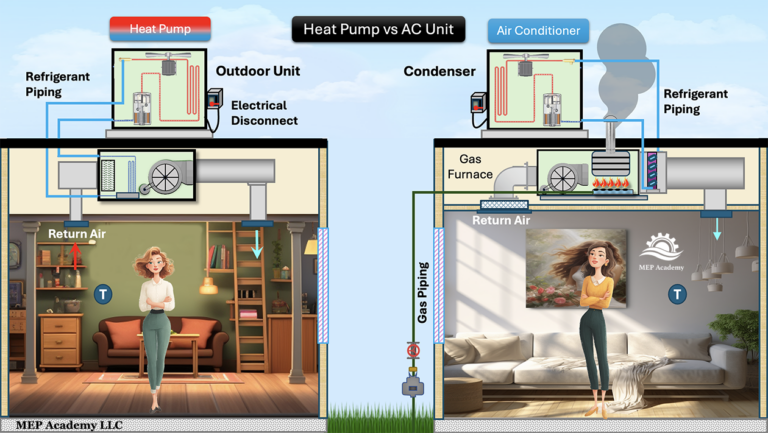
heat pump versus air conditioner, see how they difference, which one is better for mild or cold climates.

Heat Pump vs Air Conditioner: Key Differences

Heating Capability

An air conditioner cannot provide heating on its own and must be paired with a separate system such as a gas furnace or electric heater. A heat pump, by contrast, is a dual-purpose system, capable of both heating and cooling within a single piece of equipment.

This can simplify system design in certain applications, particularly where all-electric systems are preferred.

Energy Efficiency (With Proper Context)

Heat pumps are often described as being “2 to 4 times more efficient” in heating mode. This statement is technically accurate, but it requires context to be properly understood.

In mild outdoor conditions—typically between 40°F and 60°F—a heat pump can achieve a Coefficient of Performance (COP) between 2.5 and 4.0. This means the system delivers 2.5 to 4 units of heat for every unit of electrical energy consumed.

However, this efficiency is not constant.

As outdoor temperatures drop, the amount of available heat in the air decreases, and the system must work harder to extract it. As a result, the COP declines. At lower temperatures, the performance of the heat pump may approach that of electric resistance heating.

In colder climates, a high-efficiency gas furnace—operating at 90% to 98% efficiency—can become the more reliable and cost-effective heating solution. This is why many systems in colder regions use dual-fuel configurations, combining a heat pump with a furnace.

Climate Performance

Climate plays a major role in system selection. Heat pumps perform exceptionally well in mild and warm climates, where outdoor temperatures remain within an efficient operating range for most of the year.

In colder climates, however, their performance becomes more limited. Supplemental heating is often required, either through electric resistance elements or a gas furnace. This reduces the overall efficiency advantage of the heat pump in those conditions.

Installation and Operating Costs

From a first-cost perspective, heat pumps are typically more expensive due to additional components such as the reversing valve and more complex controls. However, they can offset this higher initial investment with lower operating costs in suitable climates.

Conversely, a traditional air conditioning system paired with a gas furnace often has a lower upfront cost and may provide more predictable heating performance in colder regions.

The Most Important Concept: Interior vs Exterior Zones

One of the most overlooked aspects of HVAC system selection is the difference between interior and exterior zoneswithin a building.

Many assume that an entire building requires both heating and cooling. In reality, different areas of the building behave very differently based on their location and exposure.

👉 This is why HVAC systems should be selected based on zone loads—not the building as a whole.

Interior Zones: Cooling-Dominant by Nature

Interior zones are areas that are not directly exposed to outdoor conditions. These include central office spaces, interior retail areas, and core sections of large buildings.

These zones are heavily influenced by internal heat gains, including:

  • Occupants
  • Lighting systems
  • Equipment and plug loads

Because of these continuous heat sources, interior zones often require cooling throughout the entire year, even during winter months.

This leads to an important design insight:

👉 Interior zones frequently do not require heating at all

System Selection for Interior Zones

Because heating is typically unnecessary, installing a heat pump in these areas provides little benefit. Instead, cooling-only systems such as direct expansion (DX) air conditioning or chilled water systems are more appropriate.

Using a heat pump in an interior zone can increase system cost and complexity without improving performance. For this reason, experienced designers avoid over-applying heat pumps where they are not needed.

Exterior Zones: Variable Loads and Seasonal Demand

Exterior zones, also known as perimeter zones, are directly influenced by outdoor conditions. These include spaces adjacent to windows, exterior walls, and roof exposures.

Unlike interior zones, these areas experience:

  • Heat loss during cold weather
  • Solar heat gain during warm weather
  • Significant load variation throughout the day

Because of these changing conditions, exterior zones require both heating and cooling to maintain comfort.

System Selection for Exterior Zones

This is where heat pumps provide clear value. Their ability to switch between heating and cooling makes them well-suited for perimeter zones that experience seasonal load reversal.

In these applications, heat pumps can:

  • Reduce the need for separate heating systems
  • Improve energy efficiency in mild climates
  • Simplify system design in all-electric buildings

Real-World HVAC Design Strategy

In practice, most commercial HVAC systems are designed using a hybrid approach that reflects the differing needs of interior and exterior zones.

Interior zones are typically served by cooling-only systems, while exterior zones are served by systems capable of both heating and cooling.

This approach optimizes both performance and cost by aligning equipment selection with actual load requirements rather than applying a single solution across the entire building.

When to Use a Heat Pump vs Air Conditioner

A heat pump is generally the better choice when both heating and cooling are required within the same zone, particularly in mild climates where efficiency remains high.

An air conditioner, on the other hand, is often the better choice for interior zones or applications where cooling dominates and heating is either unnecessary or provided by another system.

A heat pump differs from an air conditioner primarily in its ability to provide heating, but that does not automatically make it the better choice in every situation.

Key Takeaways

Interior zones in commercial buildings often require cooling year-round, making heating capability unnecessary in those areas.

Finally, system efficiency is not fixed. Heat pump performance depends heavily on outdoor temperature, which is why climate and application must always be considered during system selection.

Conclusion

The decision between a heat pump and an air conditioner is not simply a matter of equipment preference. It is a design decision that should be based on climate conditions, energy considerations, and most importantly, zone-specific load requirements.

By understanding how different areas of a building behave, HVAC professionals can make more informed decisions that improve system performance, reduce costs, and deliver better long-term results.

How Data Center Electrical Systems Work

Every time you stream a video, store data in the cloud, or run an AI application, you are relying on a system that must operate continuously without interruption.

At the center of that reliability is the data center electrical system.

To understand how all data center systems work together, start with our guide: How Data Centers Actually Work

Unlike traditional buildings, where a brief power outage is inconvenient, data centers are designed so that power can never be lost—even for a fraction of a second. A momentary interruption can shut down thousands of servers, disrupt services worldwide, and result in significant financial losses.

https://youtu.be/x7dxWbNoq8s

So how do data center electrical systems actually work?

To understand the system clearly, break it down into three key concepts:

  • Power Distribution
  • Backup Power Systems (UPS and Generators)
  • Redundancy and Reliability Design

1. Power Distribution: From Utility to Server Rack

Data centers receive electricity from the utility grid at medium or high voltage, typically ranging from 13.2 kV to 34.5 kV depending on the facility.

This high-voltage power must be safely reduced and distributed throughout the building before it can be used by sensitive IT equipment.

Step-by-Step Power Flow

The electrical path inside a data center typically follows this sequence:

Data center electrical power distribution showing switchgear, UPS systems, transformers, and server racks
  • Utility Service Entrance
  • Switchgear
  • Transformers
  • Uninterruptible Power Supply (UPS)
  • Power Distribution Units (PDUs)
  • Server Racks

Switchgear: The Control Point

Switchgear is the primary control and protection system for incoming power.

It performs several critical functions:

  • Controls incoming power from the utility
  • Protects equipment using breakers and relays
  • Allows isolation for maintenance
  • Enables load switching between power sources

In large facilities, switchgear may be divided into multiple sections to support redundancy and load balancing.

Transformers: Voltage Conversion

Transformers reduce voltage from utility levels to usable building levels, such as:

  • 480V (common distribution voltage)
  • 208V or 120V (used at the equipment level)

Proper voltage transformation is essential for both:

  • Equipment compatibility
  • Electrical efficiency

Power Distribution Units (PDUs)

PDUs are responsible for delivering conditioned power to server racks.

They typically:

  • Step voltage down further (if required)
  • Distribute power to multiple circuits
  • Monitor electrical loads
  • Provide branch circuit protection

From PDUs, power flows to rack-level distribution units, which feed individual servers.

2. UPS Systems in Data Center Electrical Systems

One of the most critical components in a data center electrical system is the Uninterruptible Power Supply (UPS).

Why UPS Systems Are Required

Utility power is not perfectly reliable. Even brief disturbances—such as voltage sags or momentary outages—can disrupt server operations.

UPS systems solve this problem by:

  • Providing instant backup power
  • Conditioning incoming electricity
  • Protecting against voltage fluctuations

How UPS Systems Work

In most modern data centers, UPS systems use a design called double conversion.

This process involves:

  1. Converting incoming AC power to DC
  2. Storing energy in batteries
  3. Converting DC power back to clean AC power

This ensures that servers always receive stable, conditioned power, regardless of utility fluctuations.

UPS Battery Systems

UPS systems rely on battery banks, commonly:

  • VRLA (Valve-Regulated Lead Acid) batteries
  • Lithium-ion batteries (in newer facilities)

These batteries provide short-term power, typically lasting several minutes.

Their primary purpose is not long-term operation, but to bridge the gap until backup generators start.

3. Backup Generators in Data Center Electrical Systems

While UPS systems handle immediate interruptions, data centers also require a solution for extended outages.

This is where backup generators come into play.

Generator Operation

Most data centers use diesel generators, capable of producing several megawatts of power.

When utility power fails:

  1. UPS systems instantly supply power
  2. Generators automatically start
  3. Generators reach full output (typically within 10–60 seconds)
  4. Electrical load transfers to generators

Once generators are running, they can support the facility for:

  • Hours (with on-site fuel)
  • Days (with refueling)

Automatic Transfer Switches (ATS)

An Automatic Transfer Switch (ATS) controls the transition between power sources.

It detects power loss and automatically:

  • Disconnects from utility
  • Transfer Electrical Load to Generators
  • Ensures seamless transition

This transition is seamless when coordinated with the UPS system.

4. Redundancy: Eliminating Single Points of Failure

The most important design principle in data center electrical systems is redundancy.

Rather than relying on a single system, data centers include duplicate components and power paths.

Common Redundancy Configurations

  • N → One system, no backup
  • N+1 → One extra component for backup
  • 2N → Fully duplicated systems
Data center redundancy diagram showing N, N+1, and 2N power configurations with multiple UPS systems and power paths
Comparison of data center redundancy levels showing N, N+1, and 2N configurations

For example:

  • Dual utility feeds
  • Multiple UPS systems
  • Redundant generators
  • Separate electrical distribution paths

Why Redundancy Matters

Redundancy ensures that:

  • Equipment failures do not cause outages
  • Maintenance can occur without shutdown
  • Critical systems remain operational at all times

This is especially important in Tier III and Tier IV data centers, where uptime requirements are extremely high.

5. Power Quality and Monitoring

Beyond simply delivering power, data centers must maintain high power quality.

This includes:

  • Stable voltage levels
  • Frequency control
  • Harmonic mitigation
  • Load balancing

Advanced monitoring systems track:

  • Real-time electrical loads
  • Equipment performance
  • Power usage effectiveness (PUE)

This allows operators to optimize efficiency and detect issues before they become failures.

6. Why Data Center Electrical Systems Are Unique

Compared to traditional commercial buildings, data center electrical systems are:

  • More complex
  • More redundant
  • More heavily monitored
  • Designed for continuous operation

In a typical office building, systems can tolerate downtime.

In a data center, downtime is not an option.

Conclusion

Data center electrical systems are engineered to deliver one critical outcome:

Continuous, reliable power.

This is achieved through:

  • Layered power distribution
  • Instant backup via UPS systems
  • Long-duration support from generators
  • Redundant system design

Together, these elements create one of the most reliable electrical infrastructures ever built.

And without it, the digital services we rely on every day would not be possible.

Next in the Series

In the next article, we take a deeper dive into one of the most critical components of this system:

👉 How Data Center UPS Systems Work

We’ll break down UPS types, battery systems, and how they keep data centers running without interruption.

Frequently Asked Questions

What are data center electrical systems?

Data center electrical systems are the infrastructure that delivers, conditions, and protects power for servers and IT equipment. They include switchgear, transformers, UPS systems, PDUs, and backup generators.

Why do data centers use UPS systems?

UPS systems provide instant backup power and protect servers from power interruptions, voltage fluctuations, and electrical disturbances.

How long can a data center run on backup power?

UPS systems typically provide power for several minutes, while generators can run for hours or days depending on fuel availability.

What is redundancy in data center electrical systems?

Redundancy means having backup components or systems so that if one fails, another can take over without interrupting operations.

What is the difference between UPS and generators?

UPS systems provide immediate, short-term power, while generators provide long-term backup power after startup

Data Center Engineering Series

This article is the hub of our Data Center Educational Series, where we break down each major system in detail.

Currently Published

  • How Data Centers Actually Work
    An overview of how modern data centers operate, explaining the critical electrical, mechanical, and IT infrastructure required to keep servers running 24/7.
  • Data Center Power Flow: From Utility Grid to Server Rack
    Learn how electrical power travels from the utility grid through switchgear, UPS systems, generators, and distribution equipment before reaching server racks.
  • Data Center Cooling Methods Explained
    Learn how CRAC units, chilled water systems, and airflow management remove heat from server environments.
  • Data Center Redundancy Explained (N, N+1, and 2N Systems)
    Understand how redundancy strategies like N, N+1, and 2N designs protect data centers from outages and ensure continuous operation.
  • How Data Center Electrical Systems Work
    Understand how data center electrical systems deliver continuous power using switchgear, UPS systems, generators, and redundancy design.
  • How Data Center UPS Systems Work
    Understand how UPS systems provide instant backup power and protect data centers from outages and power disruptions..
  • How Data CenterHot Aisle vs Cold Aisle Containment
    Hot aisle vs cold aisle containment explained. Learn how airflow control improves data center cooling efficiency and reduces energy costs.
  • Data Center Chilled Water Systems Explained
    Learn how chilled water systems cool data centers, including chillers, CRAH units, pumps, and how the entire system removes heat efficiently.
  • Data Center Refrigerant Economizer
    Discover how refrigerant economizer systems improve cooling efficiency by using outdoor conditions to reduce compressor operation and lower energy consumption.
  • Data Center HVAC Systems
  • CRAC vs CRAH Units Explained
    Learn the difference between Computer Room Air Conditioners and Computer Room Air Handlers, including how DX refrigerant cooling compares with chilled water cooling in data center environments.
  • Air-Cooled vs Water-Cooled Data Centers
    Learn the difference between Computer Room Air Conditioners and Computer Room Air Handlers, including how DX refrigerant cooling compares with chilled water cooling in data center environments.
  • Immersion Cooling Explained
    Discover how immersion cooling is transforming AI data centers by submerging servers in a non-conductive dielectric fluid for highly efficient heat removal. Learn how single-phase and two-phase immersion cooling work, why AI is driving their adoption, and how these systems compare to traditional air cooling.
  • AI Data Centers Explained
    Learn how high-density GPU data centers deliver massive amounts of electrical power and remove the resulting heat using liquid cooling, CDUs, and advanced cooling infrastructure.

This article is part of our Data Center Engineering Series where we explain how data centers are powered, cooled, and designed.

How Data Centers Work: Power, Cooling, and Infrastructure Explained

Modern digital life depends on data centers. Every website visit, online purchase, video stream, cloud application, or artificial intelligence request relies on powerful computer servers operating inside these highly specialized facilities.

But servers alone are not enough.

A data center must provide continuous electrical power, precise cooling, secure infrastructure, and reliable network connectivity. If any of these systems fail, the servers inside can shut down within seconds.

This is why modern data centers are engineered with extremely robust mechanical, electrical, and infrastructure systems designed to maintain continuous operation 24 hours a day, 365 days a year.

A data center is a specialized facility that houses computer servers, networking equipment, storage systems, and the electrical and cooling infrastructure required to keep them operating continuously.

In This Complete Guide to Data Centers

In this guide, we explain the major systems that allow data centers to operate continuously:

• Electrical power infrastructure
• Cooling systems and heat removal
• Redundancy and reliability design
• Server racks and IT equipment
• Supporting building infrastructure

You can also explore our detailed articles on each topic:

• Data Center Power Flow: From Utility Grid to Server Rack
• Data Center Cooling Methods Explained
• Data Center Redundancy Explained (N, N+1 and 2N Systems)
• How Data Center Electrical Systems Work
• How Data Center UPS Systems Work
• Hot Aisle vs Cold Aisle Containment
• Data Center Refrigerant Economizer
• Data Center HVAC Systems

These articles provide deeper explanations of each system used in modern data centers.

This article also serves as the central hub for our Data Center Learning Series, linking to detailed articles that explore each subsystem in greater depth.

The Core Systems Inside Every Data Center

Every data center relies on three major infrastructure systems working together:

  1. Electrical Power Systems
  2. Cooling Systems
  3. IT Infrastructure (Servers, Networking, Storage)

Each system must operate continuously and reliably to support the computing equipment inside the building.

Data Center Power System comprised of UPS, Backup Generators, PDU's and Rack Power Distribution
Data Center Power System

Electrical Systems: Supplying Reliable Power

Electricity is the most critical resource in a data center. Without power, servers stop instantly.

Because outages are unacceptable for many digital services, data centers are designed with multiple layers of electrical reliability.

The Power Flow in a Data Center

Power typically moves through the facility in the following sequence:

  1. Utility Grid Connection
    Electrical power enters the facility from the local power utility.
  2. Medium Voltage Switchgear
    Switchgear equipment manages incoming power and distributes it to transformers.
  3. Transformers
    Voltage levels are stepped down to usable levels for building systems.
  4. Uninterruptible Power Supply (UPS)
    UPS systems provide instant backup power using battery systems if the utility power fails.
  5. Backup Generators
    Diesel or natural gas generators start automatically during outages to provide long-duration backup power.
  6. Power Distribution Units (PDUs)
    PDUs distribute electricity to rows of server racks.
  7. Rack Power Distribution (RPPs or Busways)
    Electricity finally reaches individual servers through rack-level power systems.

Because downtime is extremely costly, most data centers use redundant electrical paths.

Learn More

For a detailed walkthrough of this process:

→ Read: Data Center Power Flow: From Utility Grid to Server Rack

Cooling Systems: Removing Massive Amounts of Heat

Servers consume large amounts of electricity, and nearly all of that energy becomes heat.

If that heat is not removed quickly, servers will overheat and shut down.

Modern data centers use a variety of cooling technologies to control temperature and airflow.

Common Data Center Cooling Methods

Typical Data Center Cooling Methods, Hot Aisle/Cold Aisle Containment, Liquid Cooling, In-Row Cooling, CRAH and CRAC units.
Typical Data Center Cooling Methods

Computer Room Air Conditioners (CRAC Units)

CRAC units function similarly to traditional air conditioners, using refrigerant systems to cool air before circulating it through the server room.

Chilled Water Cooling

Large facilities often use chilled water plants that circulate cold water through cooling coils inside air handling units.

In-Row Cooling

In-row cooling units sit between server racks, blowing cold air directly into the cold aisle to remove heat more efficiently.

Liquid Cooling

New AI and high-density computing environments sometimes use direct liquid cooling or immersion cooling to remove heat directly from servers.

Hot Aisle / Cold Aisle Containment

Server racks are arranged in alternating aisles:

  • Cold aisle: Cold air supplied to server intakes
  • Hot aisle: Heated exhaust air removed by cooling systems

This configuration greatly improves cooling efficiency.

Learn More

For a full explanation of cooling strategies:

→ Read: Data Center Cooling Methods Explained

Redundancy: Designing Systems That Never Fail

Because downtime can cost millions of dollars per hour, data centers are designed with redundant systems.

Redundancy means extra equipment is installed so that the system continues operating even if a component fails.

Common Redundancy Configurations

N (No Redundancy)

Only the required equipment is installed.

If a component fails, the system may shut down.

N+1 Redundancy

One additional backup component is installed.

Example:

  • 3 cooling units required
  • 4 installed

If one fails, the remaining units can still handle the load.

Data Center Redundancy of Equipment. Minimum Requirement versus N+1 Option

2N Redundancy

Two completely independent systems exist.

Example:

  • Two separate UPS systems
  • Two independent electrical distribution paths

This provides extremely high reliability.

Tier Classifications

Many facilities follow the Uptime Institute Tier system, which classifies data centers based on redundancy and reliability levels.

Learn More

For a deeper explanation of redundancy strategies:

→ Read: Data Center Redundancy Explained: N, N+1, and 2N Systems

The IT Infrastructure: Servers, Storage, and Networking

Inside the server hall, thousands of computer systems perform the actual computing work.

Key Components Inside Server Racks

Servers

Servers perform the computing tasks required for:

  • Cloud applications
  • Websites
  • Artificial intelligence processing
  • Databases
  • Enterprise software

Storage Systems

Storage arrays hold the massive amounts of data used by applications and users.

Network Switches

Network switches connect servers to each other and to the internet through high-speed fiber networks.

Rack Infrastructure

Servers are installed in standardized 19-inch racks which organize equipment vertically.

These racks also support:

  • Cable management
  • Power distribution
  • Airflow control

Additional Critical Data Center Systems

Large facilities include many other systems that support operations.

Fire Protection Systems

Common systems include:

  • Pre-action sprinkler systems
  • Clean agent fire suppression systems

These systems protect equipment without damaging electronics.

Security Systems

Data centers use extensive security measures such as:

  • Biometric access control
  • Security checkpoints
  • Surveillance systems

Monitoring and Building Management

Facility operators continuously monitor:

  • Power usage
  • Cooling performance
  • Environmental conditions
  • Equipment alarms

This monitoring helps operators respond quickly to any issues.

Why Data Centers Are So Important

Data centers are the backbone of the modern digital economy.

They support:

  • Cloud computing platforms
  • Artificial intelligence systems
  • Online banking
  • Streaming services
  • Enterprise software
  • Global communication networks

Without reliable data centers, the digital services we depend on daily would not exist.

As computing demands grow — especially with artificial intelligence — data centers are becoming larger, more complex, and more energy-intensive.

Data Center Learning Series

This article is the hub of our Data Center Educational Series, where we break down each major system in detail.

Currently Published

  • How Data Centers Actually Work
    An overview of how modern data centers operate, explaining the critical electrical, mechanical, and IT infrastructure required to keep servers running 24/7.
  • Data Center Power Flow: From Utility Grid to Server Rack
    Learn how electrical power travels from the utility grid through switchgear, UPS systems, generators, and distribution equipment before reaching server racks.
  • Data Center Cooling Methods Explained
    Learn how CRAC units, chilled water systems, and airflow management remove heat from server environments.
  • Data Center Redundancy Explained (N, N+1, and 2N Systems)
    Understand how redundancy strategies like N, N+1, and 2N designs protect data centers from outages and ensure continuous operation.
  • How Data Center Electrical Systems Work
    Understand how data center electrical systems deliver continuous power using switchgear, UPS systems, generators, and redundancy design.
  • How Data Center UPS Systems Work
    Understand how UPS systems provide instant backup power and protect data centers from outages and power disruptions..
  • How Data CenterHot Aisle vs Cold Aisle Containment
    Hot aisle vs cold aisle containment explained. Learn how airflow control improves data center cooling efficiency and reduces energy costs.
  • Data Center Chilled Water Systems Explained
    Learn how chilled water systems cool data centers, including chillers, CRAH units, pumps, and how the entire system removes heat efficiently.
  • Data Center Refrigerant Economizer
    Discover how refrigerant economizer systems improve cooling efficiency by using outdoor conditions to reduce compressor operation and lower energy consumption.
  • Data Center HVAC Systems
  • CRAC vs CRAH Units Explained
    Learn the difference between Computer Room Air Conditioners and Computer Room Air Handlers, including how DX refrigerant cooling compares with chilled water cooling in data center environments.
  • Air-Cooled vs Water-Cooled Data Centers
    Learn the difference between Computer Room Air Conditioners and Computer Room Air Handlers, including how DX refrigerant cooling compares with chilled water cooling in data center environments.
  • Immersion Cooling Explained
    Discover how immersion cooling is transforming AI data centers by submerging servers in a non-conductive dielectric fluid for highly efficient heat removal. Learn how single-phase and two-phase immersion cooling work, why AI is driving their adoption, and how these systems compare to traditional air cooling.
  • AI Data Centers Explained
    Learn how high-density GPU data centers deliver massive amounts of electrical power and remove the resulting heat using liquid cooling, CDUs, and advanced cooling infrastructure.

Upcoming Articles


• Inside a Data Center Server Rack
• Hyperscale Data Centers Explained
• Data Center Liquid Cooling Technologies

Final Thoughts

Data centers combine advanced electrical engineering, mechanical cooling systems, and IT infrastructure to support the digital world.

Understanding how these systems interact helps engineers, contractors, technicians, and technology professionals better understand the facilities that power modern computing.

If you’re interested in learning more about how these facilities operate, explore the articles in our Data Center Learning Series, where we dive deeper into each system and the engineering behind it.

Data Center Redundancy Explained: N, N+1, and 2N Systems

Modern data centers are designed around one fundamental requirement: they must remain operational at all times.

Servers inside data centers support cloud applications, financial systems, artificial intelligence platforms, and critical digital infrastructure used by businesses around the world. Even a short interruption in power or cooling can cause servers to shut down, which may result in significant financial losses or service disruptions.

Because of this, data centers are engineered with redundancy, which means installing additional infrastructure so that systems can continue operating even when equipment fails or requires maintenance.

In data center design, redundancy is commonly described using the terms N, N+1, and 2N. These terms are used to define the level of backup capacity installed within the facility’s electrical and cooling systems.

Understanding these redundancy strategies is essential for engineers, contractors, and facility operators working with modern data center infrastructure.

Data centers rely on several interconnected systems.
To understand how these systems work together, see our guide How Data Centers Work.

What Data Center Redundancy Means

Data center redundancy refers to the practice of installing extra infrastructure capacity to ensure continuous operation during equipment failures, maintenance events, or unexpected disruptions. See How Data Centers Actually Work if you missed the first video in this series on Data Centers.

Redundancy is applied to multiple critical systems within a data center, including:

  • Electrical power distribution
  • Utility power connections
  • Uninterruptible Power Supply (UPS) systems
  • Backup generators
  • Cooling systems
  • Chilled water plants
  • Pumps and cooling towers
  • Air distribution units inside the data hall

By designing these systems with redundancy, data centers can achieve extremely high levels of uptime, often measured in 99.999% availability, commonly referred to as “five nines” reliability.

Understanding the Meaning of “N

The term N represents the minimum number of components required for the system to operate normally.

In other words, N is the amount of infrastructure needed to support the full operational load of the data center.

For example, imagine a data center requires three chillers to remove all the heat produced by the servers.

In this scenario:

N = 3 chillers

If all three chillers are operating, the cooling demand is satisfied. However, if one of those chillers fails, the facility no longer has enough cooling capacity to support the full load.

Chiller plant with no redundancy

The same concept applies to electrical systems.

If a data center requires four UPS modules to support the electrical load of the servers, those four modules represent N capacity.

Operating at an N configuration means the system has no redundancy. If any component fails, the facility may experience reduced capacity or even downtime.

For this reason, most modern data centers do not operate at pure N capacity.

N+1 Redundancy

The most common redundancy level used in data centers is N+1.

In an N+1 configuration, the facility installs one additional component beyond what is required to support the load.

This extra component acts as a backup if one unit fails or requires taking offline for maintenance.

Cooling System Example

Assume a data center requires three chillers to meet its cooling demand.

An N+1 configuration would install:

3 chillers required (N)
+1 additional backup chiller
---------------------------
4 total chillers installed

Under normal operation, three chillers carry the load while the fourth unit remains available as a backup.

Water-cooled chillers used in redundant data center cooling systems
N+1 Chiller Redundancy using 3 Chillers plus 1 Additional Chiller as backup

If one chiller fails, the backup chiller automatically starts and maintains full cooling capacity. See Data Center Cooling Systems Explained our 3rd video in our series on Data Centers.

Electrical System Example

Electrical infrastructure often follows the same design principle.

For example, a UPS system may require four modules to support the full IT load.

In an N+1 configuration, the facility installs:

4 UPS modules required
+1 redundant module
--------------------
5 total UPS modules

If one module fails or requires removal for maintenance, the remaining units continue to support the servers without interruption.

Because N+1 provides a good balance between reliability and cost, it is widely used in many enterprise and colocation data centers. See Data Center Power Flow: from Utility Grid to Server Rack our 2nd video in our series on Data Centers.

2N Redundancy

A more advanced redundancy architecture is known as 2N redundancy.

In a 2N design, the entire system is fully duplicated.

Instead of adding one backup component, the facility installs two completely independent systems, each capable of supporting the full load by itself.

Cooling System Example

Suppose a facility requires three chillers to cool the data center.

Redundant Chiller Plant with 2N Redundancy

A 2N design would install two separate chiller plants:

Plant A (N)
3 chillersPlant B (N)
3 chillers

In this configuration, either plant can support the entire cooling demand.

If Plant A fails or requires maintenance, Plant B can continue operating without affecting the servers.

Electrical System Example

Electrical infrastructure may also follow a 2N architecture.

A typical 2N electrical system might include:

  • Two independent utility power feeds
  • Two separate switchgear lineups
  • Two UPS systems
  • Two independent power distribution paths
  • Dual power supplies on each server

Servers connect to both electrical paths so that if one path fails, the other path continues delivering power.

This design dramatically increases reliability and fault tolerance.

High voltage electrical transmission lines supplying redundant power to a data center

Redundancy in Data Center Cooling Systems

Cooling systems are one of the most critical components of data center infrastructure.

Servers generate large amounts of heat, and maintaining the correct operating temperature is essential to prevent hardware failures.

A typical data center cooling system may include redundancy at multiple levels, including:

  • Chillers
  • Cooling towers
  • Chilled water pumps
  • Condenser water pumps
  • Computer Room Air Handlers (CRAH units)
  • In-row cooling systems

For example, a chilled water plant may include:

4 chillers (N+1 configuration)
4 chilled water pumps
4 condenser water pumps

Inside the data hall, multiple cooling units distribute cold air to the server racks.

If one cooling unit fails, the remaining units increase airflow and maintain temperature control.

This layered redundancy helps ensure that a single equipment failure does not cause servers to overheat.

Redundancy in Data Center Electrical Systems

Electrical infrastructure is another critical area where redundancy is essential.

Data centers typically receive power from the electrical grid, but they also include several layers of backup systems to maintain continuous operation.

These systems may include:

Utility Power Feeds

Many data centers receive electricity from two separate utility feeders, often from different substations. This allows the facility to continue receiving power if one feeder fails.

Backup Generators

Facilities commonly install diesel generators to provide long-duration backup power in the event of a utility outage.

Uninterruptible Power Supply (UPS)

UPS systems provide short-term battery backup power to maintain electrical supply while generators start and stabilize.

Power Distribution

Switchgear, power distribution units (PDUs), and busway systems distribute electrical power to the server racks.

Redundant electrical systems ensure that power remains available even if a component fails or requires maintenance.

Redundancy and Data Center Tier Classifications

Redundancy levels are closely related to data center tier ratings, which classify facilities based on reliability and fault tolerance.

The most widely recognized classification system was developed by the Uptime Institute.

Typical tier classifications include:

Tier I

  • Basic infrastructure
  • Little or no redundancy

Classification Tier II

  • Includes some redundant components
  • Often uses N+1 redundancy

Tier III

  • Concurrently maintainable infrastructure
  • Maintenance can occur without shutting down systems

Tier IV

  • Fully fault-tolerant systems
  • Often uses 2N or similar architectures

Higher-tier facilities require more infrastructure investment but provide greater reliability.

Why Redundancy Is Critical for Data Centers

Redundancy is essential because failures are inevitable.

Equipment may fail due to:

  • mechanical wear
  • electrical faults
  • cooling issues
  • maintenance requirements
  • external power outages

Data centers install redundant systems to ensure that when one component fails, another system immediately takes over.

This design philosophy allows modern data centers to deliver the extremely high uptime levels required by today’s digital economy.

Final Thoughts

Data center redundancy is one of the most important concepts in modern digital infrastructure design.

When you see terms such as N, N+1, and 2N they describe how much backup capacity is installed to protect critical systems.

Both electrical infrastructure and cooling systems rely on redundancy strategies to maintain reliable operation and prevent downtime.

As demand for cloud computing, artificial intelligence, and large-scale data processing continues to grow, redundancy will remain a central design principle in the construction and operation of data centers around the world.

Common Redundancy Configurations in Data Centers

Example list:

N configuration
N+1 configuration
2N configuration
2N+1 configuration
Distributed redundant systems

Data Center Engineering Series

This article is the hub of our Data Center Educational Series, where we break down each major system in detail.

Currently Published

  • How Data Centers Actually Work
    An overview of how modern data centers operate, explaining the critical electrical, mechanical, and IT infrastructure required to keep servers running 24/7.
  • Data Center Power Flow: From Utility Grid to Server Rack
    Learn how electrical power travels from the utility grid through switchgear, UPS systems, generators, and distribution equipment before reaching server racks.
  • Data Center Cooling Methods Explained
    Learn how CRAC units, chilled water systems, and airflow management remove heat from server environments.
  • Data Center Redundancy Explained (N, N+1, and 2N Systems)
    Understand how redundancy strategies like N, N+1, and 2N designs protect data centers from outages and ensure continuous operation.
  • How Data Center Electrical Systems Work
    Understand how data center electrical systems deliver continuous power using switchgear, UPS systems, generators, and redundancy design.
  • How Data Center UPS Systems Work
    Understand how UPS systems provide instant backup power and protect data centers from outages and power disruptions..
  • Hot Aisle vs Cold Aisle Containment
    Hot aisle vs cold aisle containment explained. Learn how airflow control improves data center cooling efficiency and reduces energy costs.
  • Data Center Chilled Water Systems Explained
    Learn how chilled water systems cool data centers, including chillers, CRAH units, pumps, and how the entire system removes heat efficiently.
  • Data Center Refrigerant Economizer
    Discover how refrigerant economizer systems improve cooling efficiency by using outdoor conditions to reduce compressor operation and lower energy consumption.
  • Data Center HVAC Systems
  • CRAC vs CRAH Units Explained
    Learn the difference between Computer Room Air Conditioners and Computer Room Air Handlers, including how DX refrigerant cooling compares with chilled water cooling in data center environments.
  • Air-Cooled vs Water-Cooled Data Centers
    Learn the difference between Computer Room Air Conditioners and Computer Room Air Handlers, including how DX refrigerant cooling compares with chilled water cooling in data center environments.
  • Immersion Cooling Explained
    Discover how immersion cooling is transforming AI data centers by submerging servers in a non-conductive dielectric fluid for highly efficient heat removal. Learn how single-phase and two-phase immersion cooling work, why AI is driving their adoption, and how these systems compare to traditional air cooling.
  • AI Data Centers Explained
    Learn how high-density GPU data centers deliver massive amounts of electrical power and remove the resulting heat using liquid cooling, CDUs, and advanced cooling infrastructure.

This article is part of our Data Center Engineering Series where we explain how data centers are powered, cooled, and designed.